How to Automate Regression Testing Without Devs?
Written byDominik SzahidewiczReviewed byPaweł Bylina


Updated: October 22, 2026View as Markdown
A PM ships a one-line copy change to the pricing page. It also quietly breaks the annual-plan checkout button. Nobody notices for six days — until a customer emails asking why they can't pay you.
That's the regression problem when you have no QA team: the bug isn't in what you changed, it's in what you didn't think to re-check. And the person who needs to catch it usually can't write a line of Selenium.
You don't need to. You need a way to protect your critical flows on every release — without turning it into an engineering project that competes with the roadmap and loses. Here's the risk-based approach that makes that work.
💡 Check also:
Before the strategy, get honest about the approach. If you’re figuring out how to automate regression tests, the practical answer is to start with a testing strategy built around your highest-risk user flows, turn those flows into automated tests with a recordable browser tool, group them into small regression suites, and run them on a schedule or in CI so software quality holds up as the development process speeds up.
There are only three ways to run regression, and most advice skips straight past the trade-off that actually matters: who has to maintain it. For mid-sized SaaS and web teams shipping frequently without a large QA department—and for PMs or other non-technical teammates who need to automate UI testing without writing code—that ownership question matters more than theory.
| Approach | Who owns it | Setup | Best for | Skip if |
|---|---|---|---|---|
| Manual regression testing | Anyone | None | Early stage, monthly releases, under ~10 core flows | You ship weekly or faster — it becomes the bottleneck |
| Coded automation (Selenium, Cypress, Playwright) | Developers | High — framework, CI, drivers, environment | Dev-led teams wanting full control; Selenium is often the standard choice for UI testing in coded regression testing | You have no engineering time to build and maintain it |
| No-code test automation (record-and-replay) | PM, QA, or dev | Minutes | Web-only SaaS teams with no dedicated QA | You need Firefox/Safari, mobile, or heavy data-driven scripting |
If you’re reading this, you’re almost certainly in row three: shipping too often for manual regression testing to keep up, without the developer capacity to own a coded framework, where the cost of automated regression testing is often hard for small teams to justify when they have to build and maintain it themselves. The rest of this article focuses on that case: choosing regression testing tools, setting scope by risk, organizing suites, deciding when to stop adding coverage, and maintaining browser-based checks that catch bugs earlier and help you ship faster with confidence.
Regression testing is not about testing everything. In the software development lifecycle, regression testing plays a key role in protecting existing functionality as the product evolves, and effective regression testing is about managing risk.
Testing every flow on every release would be ideal — and for most SaaS teams it's simply too expensive. Time is limited, attention is limited, and developer availability is the tightest constraint of all. So you focus your effort where a failure actually costs you. Because modern systems are interconnected, even small code changes can affect the rest of the product in unexpected ways, so the regression testing process should be risk-based. Regression testing ensures the testing process stays practical across the software development life cycle. Here's how mature teams do that without a large QA department.
You don't have to run every test on every release. This is a form of selective regression testing rather than running the entire regression test suite every time. Tier them:
That keeps broad coverage without slowing delivery. With a tool that supports suites and scheduling, you can split the broader test suite into a core suite that runs every release and an extended suite that runs less often, which makes regression test selection more practical than blindly running everything.
Regression effort should follow development effort. If a new feature touches billing, authentication, dashboard components, or permissions, partial regression testing is where regression belongs.
This is exactly where non-developer-led testing has an edge: you don't need deep technical knowledge, you need awareness of what changed. Tie your regression scope to PR summaries, release notes, and feature tickets, and selecting the right regression test cases and automated test cases cuts test execution time and makes the process more stable — you're testing the 20% of the app that actually moved.
The most common mistake: "We'll stop testing when we feel safe." That's not a strategy. Track instead:
Test until the rate of finding new bugs drops below a threshold you set in advance. If regression keeps surfacing issues late in the cycle, you're not done. If defect frequency flattens, more testing has diminishing returns, and in continuous testing automated checks can give immediate feedback on test results so teams can react faster when issues appear. This turns "when do we stop" from a gut call into measurable risk control.
👉 Check our guide on QA Metrics That Actually Matter
Your support inbox is a goldmine. For every production bug reported, log the severity, the area affected, and the release it slipped through. From that, you get your bug escape rate.
Say five serious bugs escape per release today, and after tightening regression only two do. Now you can put a number on it — cost saved, churn risk reduced, a concrete case for stakeholder buy-in. Executives don't fund "it feels safer." They fund "we cut production escapes by 60%."
Even when regression is non-developer-owned, engineering metrics help you aim. If you have code coverage reports, use them: concentrate browser regression where coverage is low, legacy code lives, or active refactoring is happening. If you don't have coverage, advocate for it. Unit tests and browser regression are complementary regression testing techniques used to maintain tested software as changes continue.
Manual testing earns its place early. You start with smoke tests, grow into acceptance and functional flows, add negative cases, and track it all in a per-release test plan.
Then release frequency catches up with you. Manual regression testing doesn't scale: if you ship weekly — or daily — long test completion times slow the development process in fast release cycles, and the manual cycle becomes the thing everyone is waiting on. As software systems grow more complex, small changes can trigger unexpected side effects, while human error makes manual execution less reliable for protecting basic functionality. Under deadline pressure, it's the first step that gets cut. That's the moment automation stops being optional.
The obvious next step — Selenium, Cypress, Playwright — runs into a wall for a team without engineers. These frameworks are powerful, but they require coding, CI/CD integration, test execution and scheduling through tools like Jenkins, production-like environments maintained with containerization or infrastructure-as-code, and ongoing maintenance as part of a broader regression testing automation effort.
For a PM or founder, that's not "set up some tests." It's building and maintaining automated test suites for continuous testing, not just launching a few scripts, and roadmap work always wins that fight. When regression automation depends on developer availability, it stalls. That's the gap no-code fills.
Automating regression without developers does not mean replacing engineering QA, testing every edge case, or building a framework. It means creating stable, repeatable browser checks for your critical flows. Four things:
Documenting test cases and expected outcomes helps define scope and choose which flows to automate first as part of a regression testing strategy.
That's the whole job. Everything in the step-by-step below builds those four things.
Automate the flows that hurt most when they break: login, signup, payment, your core action, logout. Identify and prioritize the highest-impact workflows first, and build your initial suite around them; these first tests become the initial regression test cases in your regression test suite. Then grow gradually toward acceptance-level flows. Re-run successful test cases regularly, and audit the suite over time to remove obsolete coverage.
Once the happy paths are stable, add the ways things go wrong: invalid login, failed payment, restricted permissions. Make these reusable test cases, and use a modular and reusable design to keep larger functional tests maintainable, with modular scripts updated in one place. Note each test script's expected behavior and any test data it needs, and use a data-driven approach that separates logic from test data so the same automated test cases can run with multiple data sets. Don't aim for perfection — aim for risk coverage.
Group tests into suites by risk: reserve complete regression testing for cases that truly need full-app coverage, and use corrective regression testing for quick checks after smaller changes. Update your automated test suites as the product changes so they stay relevant; test case maintenance is ongoing, because loosely written checks miss bugs while overly rigid ones break often, so organize them with stable locators such as unique IDs or semantic attributes. This is what balances speed against coverage in practice.
Monitor regression test results from each run alongside bugs found during regression, escaped bugs, and time-to-fix. Review the trend, not any single run — it's what tells you whether your suite is catching enough, and where to add the next test. Let the data decide when your regression effort is sufficient.
👉 Check our our guide on the best regression testing tools
The risk-based strategy above only holds if automation is easy enough that a non-engineer can actually own it. That's where BugBug fits.
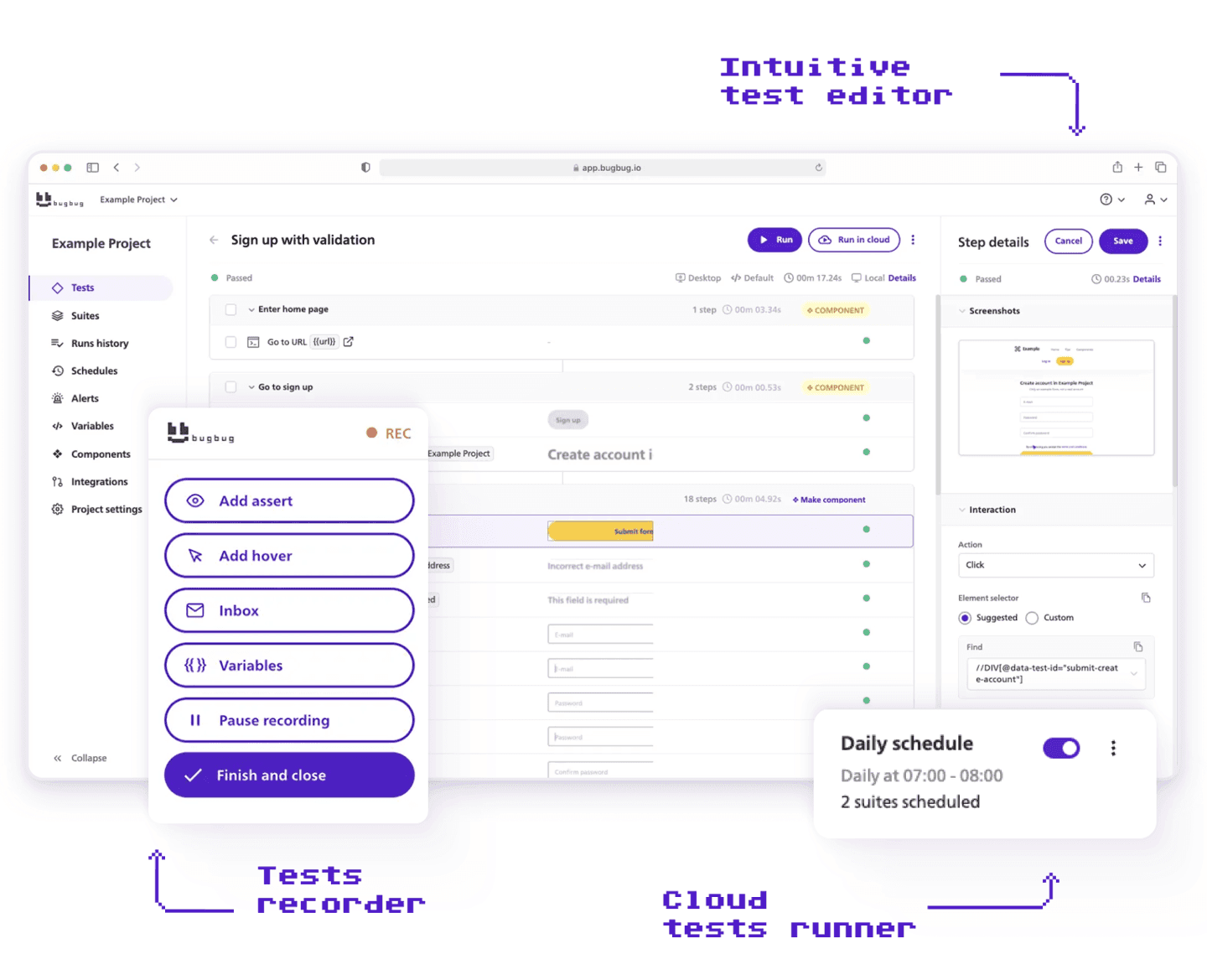
BugBug lets you record a browser flow by clicking through it, create tests via MCP, add visual validations, group tests into regression suites, and schedule them to run in the cloud for automated test execution of browser flows — with no CI/CD wiring, local drivers, or automation engineers required. Because it's no-code with optional JavaScript actions, it scales when you need more without overwhelming you at the start. It's a fit for web-only SaaS teams, and anyone shipping weekly.
The honest limitation: BugBug is Chromium-only, so it's not built for cross browser testing — no Firefox, Safari, or mobile. If you need Firefox or Safari coverage, that's exactly why a coded framework above will serve you better.
Staying grounded: browser-level regression protects existing functionality, but it is one layer, not the whole stack; developers still need to cover deeper layers with functional tests, integration checks, and other quality work across the software development lifecycle. You still want developers (or QAs) for API contract validation, performance and load testing, security testing, complex data-layer checks, and integration tests. Regression automation without developers protects your critical user-facing flows — it doesn't replace engineering quality practice.
Regression testing isn't about testing everything. It's about reducing escape rate, protecting revenue flows, and making release risk measurable enough to manage as you grow. In practice, regression testing ensures bug fixes and new features don't break basic functionality in existing features.
So start small. Pick your handful of highest-risk flows, automate those first, tie the suite to what each release actually changes as part of a clear regression testing strategy, and let your escape-rate data guide how far to push. Scale from there.
Ready to start regression testing?
Test easier than ever with BugBug test recorder. Faster than coding. Free forever.
Get started

Your next release. Properly tested.
Join 1,200+ QA teams that automated their regression coverage with BugBug.


Dominik Szahidewicz is a Software Quality Evangelist specialising in quality assurance, test automation, and modern software testing practices. He creates practical, research-driven content that helps QA professionals, developers, and product teams improve test coverage, automate repetitive testing, and release more reliable web applications.
Drawing on his experience in technical writing, data analysis, and application consulting, Dominik translates complex testing concepts into clear, actionable guidance. His areas of interest include end-to-end testing, no-code test automation, regression testing, and the use of AI in software quality assurance.

Paweł Bylina is a software engineer, test automation product leader, and founder and CEO of BugBug, a no-code end-to-end testing platform used by teams in more than 50 countries. He has over 15 years of experience building software and leading engineering teams as a developer, engineering manager, CTO, and SaaS founder.
Paweł created BugBug after repeatedly seeing teams struggle with test automation that was costly to implement and difficult to maintain. He now works closely with QA engineers, developers, and engineering leaders to improve how software teams create and maintain reliable automated test coverage.
His expertise includes end-to-end testing, regression testing, browser automation, no-code test automation, QA strategy, and software quality. He shares practical insights drawn from building BugBug and working with software teams worldwide.
Join thousands of QA experts. Subscribe to our newsletter.
Get more testing tips and product related content. Zero spam.
This article delves into the journey of becoming an Automated Test Engineer, offering insights into the essential skills, knowledge, and steps required to embark on this career path and increase your current salary.
Build a CI/CD testing pipeline in 30 minutes with BugBug. Learn how to run reliable E2E smoke tests on every PR, block bad merges, and scale safely.
Build an effective QA strategy aligned with your business goals. Explore best practices in quality assurance and test automation.
Discover how to calculate ROI for test automation with easy formulas and practical examples. Learn to evaluate costs and track results effectively.
Discover the essential QA tester skills for 2026! Learn the technical and soft skills required to excel as a QA Tester.
Learn how to create a test plan for the testing process of your web application. Discover how to write a test plan with examples in the article.
This article delves into the significance of crafting comprehensive test cases for login pages, highlighting various scenarios.
Learn how to extend low-code testing with JavaScript to add advanced logic, API validation, and dynamic assertions without testing framework.
Discover the causes and impact of flaky tests, and learn effective strategies to identify and fix them for reliable software performance.