Best Free and Open-Source Test Automation Tools
Written byDominik SzahidewiczReviewed byPaweł Bylina


Updated: October 23, 2026View as Markdown
🤖 Summarize this article with AI:
💬 ChatGPT 🔍 Perplexity 💥 Claude 🐦 Grok 🔮 Google AI Mode
Best overall for developer teams is Playwright (cross-browser, mcp, auto-waiting, Microsoft-backed); Cypress wins for JS/React local debugging, and Selenium only makes sense for existing multi-language suites.
If no developer will own the suite, BugBug is the best free option for Chromium-only web teams, while Katalon covers web, API, and mobile from one platform. The real deciding factor isn't the tool - it's who maintains the tests six months from now.
You set up Selenium six months ago. The tests passed. Everyone felt good.
Then the app changed. Selectors broke. Half the suite went red. The developer who built it left. Now nobody touches the test suite because nobody wants to own it — and the "automation" you celebrated is quietly rotting in a repo somewhere.
This is the most common way free and open-source test automation fails: not at setup, but six months later. The tool was free. The maintenance wasn't.
In 2019, engineer Jonathan Block put a number to it: a company of 200 engineers, each losing one hour a week to flaky test failures, burns roughly $500,000 a year — not on license fees, which are zero, but on the maintenance overhead the suite creates.
That cycle — flaky failures, distrust in the pipeline, tests that get ignored instead of fixed — is how automation suites die quietly. The framework doesn't cause it. Unclear ownership does.
That doesn't mean you should avoid open-source frameworks. Some of them — Playwright, Cypress, pytest — are genuinely excellent and power the test stacks of teams running hundreds of deploys a day. But choosing the right one means understanding what you're actually signing up for: not just a tool, but a long-term infrastructure decision.
For a broader comparison that also includes commercial and codeless options, see our guide to web testing tools.
This isn't a scraped list. Every tool here was assessed against the criteria that actually predict whether a test suite survives its first six months:
| Tool | Free model | Coding required | Who maintains it | Best for |
|---|---|---|---|---|
| Playwright | Open source | Yes | Developer who owns it | Developer-led cross-browser E2E |
| Cypress | Open source | Yes (JS only) | JS developer | React/Vue/Angular teams |
| Selenium | Open source | Yes | Senior QA or developer | Legacy/multi-language codebases |
| Puppeteer | Open source | Yes (JS) | JS/Node developer | Chrome automation + scraping |
| WebdriverIO | Open source | Yes (JS) | Node developer | WebDriver-protocol Node teams |
| TestCafe | Open source | Yes (JS/TS) | Developer | Driver-free cross-browser testing |
| Robot Framework | Open source | Partial (keywords) | Mixed technical/non-technical | Keyword-driven acceptance tests |
Automate your tests for free
Test easier than ever with BugBug test recorder - free local testing forever!
Get started
The license is free. The total cost of ownership is not, even if open source gives you public auditing and often faster vulnerability patching. This is the single most important thing to understand before you commit to anything in this guide — which is why it's here, near the top, instead of buried at the bottom.
"Free" in test automation breaks into three categories, and the difference decides everything:
Before committing to an open source framework, budget honestly for four hidden costs. These are the line items that don't show up on the license - and they're where "free" quietly turns expensive:
| Hidden cost | What it actually means |
|---|---|
| Technical headcount | Every open source framework needs someone who codes. You either hire a QA engineer or reallocate developers or other technical personnel for setup and maintenance, pulling them off shipping features to write and maintain tests. This is usually the single largest cost, and it's a recurring one. |
| Infrastructure to run tests | A handful of tests run fine on one local machine. A growing suite needs parallel execution - which means provisioning and maintaining machines yourself, or paying for a grid (BrowserStack, Sauce Labs). Cheap to start, scales with suite size. |
| Test maintenance | Every UI change that breaks a selector needs a fix: dig through code, find the affected lines, update the right locator (CSS class, XPath, element ID). On a fast-moving product this is constant, mindless overhead. Auto-waiting frameworks (Playwright, Cypress) reduce flakiness; Selenium needs explicit wait strategies. |
| Missing functionality | Frameworks automate browsers - they don't ship test management, reporting, or visual regression. None of the open source tools here catch a button rendered offscreen or behind a popup; they test what the DOM "sees," not what the user sees. Many teams solve this with a hybrid stack: open source for execution, commercial tools for visual regression testing or richer reporting. Adding that back means plugins (some free, the better ones paid) or a separate tool. |
Two costs that don't fit the table but matter just as much: onboarding (most frameworks need scripting knowledge, so non-technical teammates can't contribute without training, and documentation and interfaces are often weaker, which slows onboarding further) and support (community forums and GitHub Issues are your only SLA - for a critical failure, there's no vendor to call).
| Cost factor | Open source frameworks | Free-plan SaaS | Paid commercial tools |
|---|---|---|---|
| License | Free | Free (within limits) | Paid |
| Infrastructure | You own it | Included | Included |
| Maintenance | You fix broken tests | Re-record or AI healing | Vendor or AI |
| Scripting required | Yes (most tools) | No | Partial |
| Enterprise support | Community only | Vendor support | Full vendor SLA |
| Best for | Dev teams with infra skills | Non-dev teams, fast setup | Compliance, large scale |
The right choice isn't about budget. It's about one question: who on your team will own and maintain these tests six months from now? If it's a developer who writes code daily, an open source framework - especially Playwright - is hard to beat. If it's a QA engineer who's technical but not a developer, or "honestly, whoever has time," the maintenance overhead of a framework will kill the suite faster than any feature gap.

Best for: Developer teams who need cross-browser E2E coverage and have someone willing to own the framework.
Avoid if: Non-developer QA, or teams where test ownership is unclear. Playwright is only as good as the developer maintaining it.
Playwright is the most actively developed open source browser automation framework available today. Released by Microsoft in late 2019 and now sitting above 80k GitHub stars, it covers Chromium, Firefox, and WebKit (Safari) from a single test definition - the only major open source framework that covers all three engines. It's available in JavaScript, TypeScript, Python, Java, and C#.
The reason it wins for developer teams: built-in auto-waiting eliminates the most common source of flaky tests - tests wait for elements to be actionable, not just present, so you don't litter your suite with sleep() calls. The Trace Viewer turns CI debugging from hours into minutes. Parallel execution is on by default.
Key strengths:
Limitations: Requires JavaScript, Python, Java, or C# knowledge — not accessible to non-developers. You own the infrastructure: runners, CI configuration, and parallel setup are your responsibility.
Free model: Fully open source (Apache 2.0). No run limits, no user caps, no expiry. Infrastructure costs are entirely yours.

Best for: JavaScript and TypeScript teams building React, Vue, or Angular apps who want the best local debugging experience open source offers.
Avoid if: Teams writing Python, Java, or C#. Or anyone who needs Safari/WebKit coverage — Cypress doesn't support it.
Cypress runs directly inside the browser, which gives developers a real-time visual test runner with step-by-step replay. For JavaScript-heavy single-page apps, that's the fastest feedback loop available in open source. It's the most popular choice for React, Vue, and Angular testing.
What it adds over Playwright for its audience is time travel debugging: every test step is captured in clickable history backed by dom snapshots, which helps debug failed tests locally. cy.intercept() for stubbing API responses lets you test front-end scenarios without backend dependency. Automatic waiting and retry logic reduce flakiness on dynamic SPAs without manual waits.
Key strengths:
Limitations: JavaScript and TypeScript only. No WebKit/Safari support — coverage is limited to Chrome, Firefox, and Edge. Parallel execution requires a paid Cypress Cloud plan.
Free model: Open source core is fully free (MIT) — no run or user limits when you run locally or in your own CI. Cypress Cloud (parallelism, analytics, test recording) has a free tier capped at 3 users and 500 test recordings per month; paid plans above that.

Best for: Teams inheriting an existing Selenium codebase, or multi-language environments (Java, C#, Ruby) with existing Grid infrastructure.
Avoid if: New projects starting from scratch. Playwright covers the same browsers with less setup and better debugging.
Selenium WebDriver is the core open-source browser automation project behind Selenium — free under Apache 2.0 and available since 2004. Its "free" story is identical to Playwright's: no license cost, full infrastructure and maintenance ownership. The difference is age, which cuts both ways. More Stack Overflow answers and more engineers who already know it — but also no built-in auto-waiting, the single biggest driver of the flakiness that makes free frameworks expensive to run.
For teams already on Selenium, migration to Playwright rarely justifies the cost unless maintenance has become genuinely unsustainable. For everyone else, Selenium earns its place by being the most language-flexible framework available (Java, Python, C#, Ruby, JavaScript, Kotlin) and the default integration target for every major cloud device grid. Selenium IDE exists for simple record-and-playback flows, but most serious selenium tests are written in code on top of WebDriver.
Key strengths:
Limitations: No built-in auto-waiting — explicit wait strategies are on you, and they're the usual source of flakiness. Maintaining custom frameworks on top of Selenium adds ongoing cost: drivers, infrastructure, reporting plugins, and standards all need owners. Selenium tests usually require more setup and maintenance than newer frameworks because waits, reporting, and framework structure are assembled from separate pieces.
Free model: Fully open source. No run limits, no user caps. Grid setup and driver management are entirely yours.
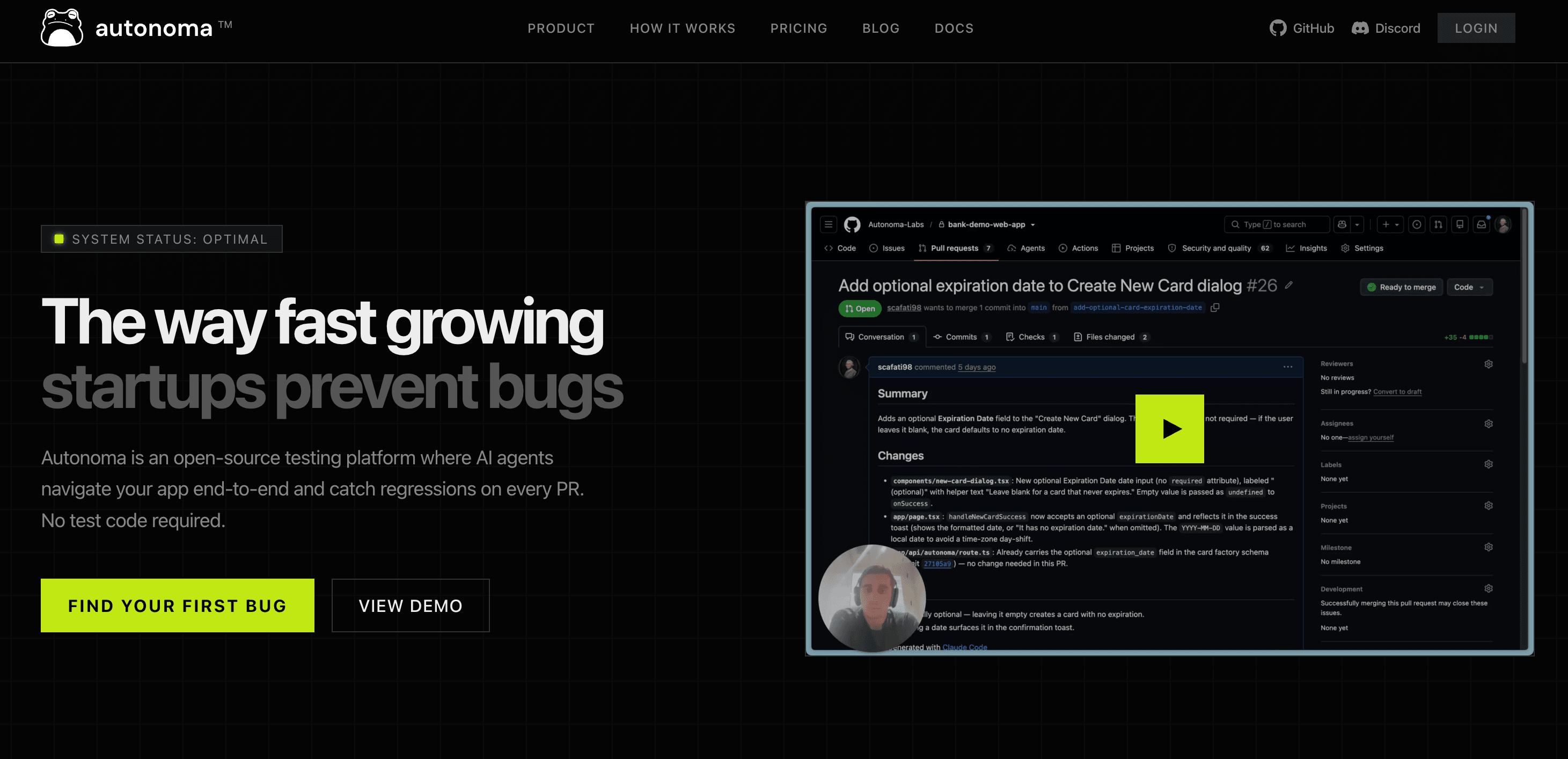
Best for: Teams already running Kubernetes and per-PR preview environments who want agentic E2E inside their own VPC.
Avoid if: You need OSI-approved licensing, or nobody owns infrastructure. Self-hosting means running previews, browsers and inference yourself.
Autonoma is an agentic platform where AI agents read your codebase, generate natural-language tests, and run them against a fresh preview deployment of every PR. The whole stack is in the public repo — planner CLI, Playwright web engine, Appium mobile engine, preview builder, and the reviewer that separates real bugs from flaky infrastructure. Self-hosting carries no feature restrictions, and inference routing is yours, so prompts and test data never leave your network.
The license is where it differs from everything else here. Autonoma is Business Source License 1.1, not Apache 2.0 or MIT — read it, modify it, self-host it, run it in production, but don't sell it as a competing service. It converts to Apache 2.0 on 23 March 2028. That's the same time-boxed model Sentry and MariaDB use, but a legal team requiring an OSI-approved license will still say no.
Key strengths:
Limitations: "Free" replaces a license fee with an infrastructure bill — a Kubernetes namespace per pull request, browser runners, and LLM inference on every run and regeneration. You also need an Environment Factory endpoint in your backend before the first test runs. The project is young: 116 stars, no tagged releases, and none of Selenium's twenty-year Stack Overflow trail.
Free model: Self-hosted, no feature limits, no run or user caps. Inference is your cost. Managed cloud priced separately.

Best for: Node.js teams who need fast headless Chrome automation — testing alongside scraping, PDF generation, or screenshots.
Avoid if: Cross-browser testing, or any team not working in JavaScript/Node. Chrome and Chromium only.
Puppeteer is Google's Node.js library for controlling Chrome and Chromium. It's lower-level than Playwright — which was built by ex-Puppeteer developers — and more tightly coupled to Chrome. For pure testing, most teams now choose Playwright. Puppeteer stays the right call for workflows that mix browser automation with scraping, PDF generation, or screenshot capture.
Key strengths:
Limitations: Chrome and Chromium only — no Firefox or Safari without separate configuration. JavaScript/Node.js only.
Free model: Fully open source. Infrastructure is yours.

Best for: Node.js teams who prefer the WebDriver protocol and want a mature, extensible framework with strong TypeScript and BDD support.
Avoid if: Java or Python teams, or anyone who wants minimal configuration out of the box.
WebdriverIO is a Node.js automation framework built on the WebDriver protocol. It handles both browser and mobile testing (via Appium), including mobile automation for teams that want web and mobile flows under one framework, has a large plugin ecosystem, and integrates cleanly with Cucumber for BDD. Teams already using Selenium's WebDriver protocol will find the migration path straightforward.
Key strengths:
Limitations: JavaScript/Node.js only. More configuration and boilerplate than Playwright for basic use cases.
Free model: Fully open source. Infrastructure is yours.

Best for: JavaScript teams who want cross-browser testing without installing or version-matching browser drivers.
Avoid if: Python, Java, or C# teams — and anyone choosing a primary E2E framework from scratch today. TestCafe's ~~10k GitHub stars against Playwright's 80k+ tells the adoption story plainly.
TestCafe injects a JavaScript proxy into the browser instead of driving it through WebDriver, so there's no ChromeDriver, no geckodriver, no version pinning, and no "driver doesn't match your Chrome version" build failures. For teams where driver maintenance has been a recurring pain, that's a genuine relief. Cross-browser parallel execution runs from a single command: testcafe chrome,firefox tests/.
Key strengths:
Limitations: JavaScript and TypeScript only. The proxy architecture that solves driver management creates friction on complex interactions — certain drag-and-drop, canvas elements, and some iframe scenarios. The community is much smaller than Playwright's or Cypress's, so unusual problems take longer to resolve.
Free model: Fully open source (MIT). Infrastructure is yours.

Best for: Teams who want keyword-driven or BDD-style tests that non-programmers can read and contribute to, alongside technical QA.
Avoid if: Teams that want the terse, fast-to-write syntax of Playwright or Cypress for standard web flows.
Robot Framework uses a keyword-driven syntax that reads almost like plain English, rather than writing code directly, though direct code is still more flexible for complex scenarios. Test cases are written in a tabular format where keywords map to Python functions — so the same suite can be understood by non-technical stakeholders and extended by developers. It's widely used for acceptance testing and BDD, with a large library ecosystem (SeleniumLibrary, the Playwright-based Browser library, RequestsLibrary, and more).
Key strengths:
Limitations: More verbose than Playwright or Cypress for standard web scenarios. Python knowledge is required to build custom keywords and extend the framework, so even with readable syntax, deeper customization still depends on Python and real coding skills.
Free model: Fully open source. Infrastructure is yours.
Everything above is genuinely free and genuinely powerful. It's also genuinely someone's job.
The two tools below aren't open source. They're commercial products with real free plans, and they're here because they solve the problem the frameworks above create: what happens when nobody on your team can own a codebase of tests. If you have a developer who wants that job, skip this section — Playwright is the better tool. If you don't, keep reading, because a framework nobody maintains isn't free. It's just deferred.
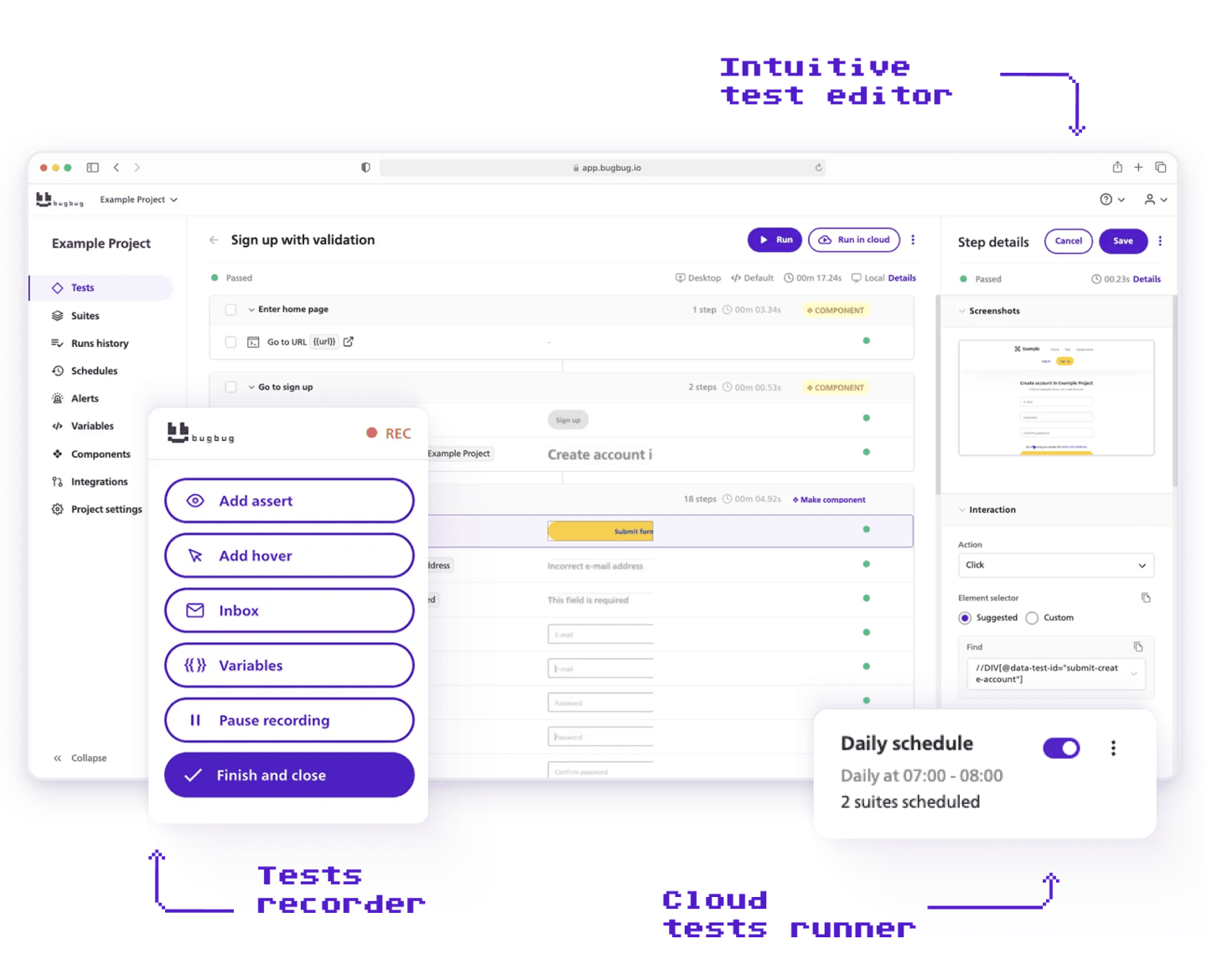
Best for: SaaS teams, small QA teams, and cross-functional teams who need production-grade regression coverage without owning a testing framework — especially when the person running tests isn't a developer.
Avoid if: Teams that need cross-browser coverage beyond Chromium, desktop app testing, or deep framework-level customization.
BugBug sits in a different category from everything above. Playwright, Cypress, and Selenium all need someone who writes code, owns infrastructure, and can debug a framework when it breaks. BugBug removes that dependency: install the Chrome extension, click through your app, and it turns those actions into a test — no framework, no grid, no CI configuration to start.
That's not hypothetical. Brand24, a SaaS media monitoring platform with clients in 110+ countries, evaluated Selenium, dropped it over the developer setup cost, and had their Product Manager implement BugBug solo. The suite has since run over 100,000 automated test executions and caught five critical production issues — including a login failure after a broken deploy.
Free model: 2-week Pro trial on signup. Free plan contains unlimited local testing. All paid plans contain unlimited cloud runs.
👉 If a recorder-based workflow is the direction you're leaning, we compared the full category in our guide to codeless automation testing tools.

Best for: Mixed teams covering visual testing, web applications, API testing, and mobile testing from a single platform — particularly where non-technical members contribute tests alongside developers.
Avoid if: Web-only teams who want fast setup and a low learning curve. BugBug gets a web team running in under 10 minutes; Katalon requires a meaningful setup investment that only pays off when you genuinely need the breadth.
Katalon wraps Selenium and Appium inside a more accessible IDE with a codeless recording layer on top. Both modes coexist: a QA engineer records basic flows through the UI while a developer adds scripted Groovy steps for complex scenarios, in the same project. For organizations where web, API, and mobile currently live in three separate tools with three CI integrations and three reporting views, that consolidation is a real operational benefit.
Free model: Free tier (Katalon Studio) with no time limit on core features, but local execution only — cloud-based parallel testing across machines, CI/CD integrations, test scheduling, advanced result insights, AI maintenance, and self-healing selectors all require paid plans.
👉 Read more on Katalon's key features in our guide on codeless testing tools.
Every open-source framework on this list was built by engineers, for engineers. That's their strength and their limit. Someone has to write the code, own the grid, and debug the suite when it breaks at 2am.
For a 50-person SaaS team with no dedicated automation engineer, that's a hire they can't justify yet — and it's usually why their "automation" is a Selenium repo nobody touches anymore.
I know that gap because I lived inside it. I was working on a fintech product where one small change triggered hours of manual regression across half a dozen user paths. The people doing that clicking weren't engineers — they were the business team, working through the app step by step, release after release.
I'd seen the same thing everywhere I'd worked: Selenium was too technical for the people actually running the tests, and the enterprise tools were too complex and too expensive to justify. So I built the thing I wished existed — my idea of what testing should feel like: simple, fast, and usable by anyone, not just the person who could maintain a framework.
I'll be straight with you about the trade-off, because you're going to hit it either way. If you've got engineers who want to own their test code in git, ship hundreds of times a day, and treat the suite as real infrastructure — use Playwright or Cypress.
They're excellent, and BugBug isn't trying to replace them. But if testing in your org keeps landing on a QA lead, a PM, or a developer who'd rather be building features, a framework you have to maintain becomes a cost that compounds quietly. A recorder-based tool is a different bargain: you give up some control, and you get back most of the upkeep.
Before committing to an open-source framework, compare it with commercial and low-code test automation tools that may reduce setup and maintenance.
There is no single best open source framework. The right pick depends on your team's language, which browser engines are in your release criteria, and — the question this whole guide keeps returning to — who will still be maintaining the suite six months from now.
| Team type | Primary tool | Complement with | Why this pick |
|---|---|---|---|
| Developer team needing cross-browser E2E, with someone who'll own it | Playwright | A cloud grid (BrowserStack, Sauce Labs) once parallel runs outgrow your CI | Chromium, Firefox, and WebKit from one test definition — the only major open source framework covering all three. Auto-waiting kills the biggest source of flakiness, and Trace Viewer turns a mysterious CI failure into a five-minute fix. You own runners, CI config, and parallel setup. |
| JS/TS team building React, Vue, or Angular apps | Cypress | Cypress Cloud (free tier: 3 users, 500 recordings/month) for parallelism | Time-travel debugging is still the fastest local feedback loop in open source — click any step, see the exact DOM state. cy.intercept() lets you test the frontend without a backend. No WebKit, JavaScript only, and parallel execution is paid. |
| Inheriting an existing suite, or a multi-language shop (Java, C#, Ruby) | Selenium | Selenium Grid, or a hosted grid at scale | Broadest language support anywhere and the default integration target for every cloud device grid. Keep it if you have it — migration rarely pays for itself. Starting from zero, Playwright covers the same browsers with less setup and no explicit wait strategies to hand-roll. |
| Node team mixing automation with scraping, PDFs, or screenshots | Puppeteer | Playwright, if cross-browser later becomes a requirement | Direct Chrome DevTools Protocol access makes it the sharper instrument for headless Chrome work. For pure testing most teams have moved to Playwright — which was built by ex-Puppeteer developers. Chrome and Chromium only. |
| Node team on the WebDriver protocol, running web and mobile together | WebdriverIO | Appium (native mobile), Cucumber (BDD specs) | WebDriver-native, so Selenium Grid and every cloud provider work out of the box, with first-class TypeScript. Web, mobile web, and native apps in one suite. More boilerplate than Playwright for a basic web job. |
| JS team where driver version-matching has been a recurring tax | TestCafe | — | The proxy architecture means no ChromeDriver, no geckodriver, no version pinning, and cross-browser parallel runs from one command. The same architecture creates friction on drag-and-drop, canvas, and some iframes — and at ~10k stars against Playwright's 80k+, unusual problems take longer to solve. |
| Acceptance tests that analysts and manual testers need to read | Robot Framework | SeleniumLibrary or the Playwright-based Browser library | Tabular keyword syntax reads close to plain English, so non-programmers can follow and contribute while developers extend it in Python. Verbose for standard web flows, and custom keywords still require real Python. |
| Kubernetes shop running per-PR preview environments, wanting agentic E2E in your own VPC | Autonoma | Your own inference endpoint; Playwright and Appium underneath | The full stack self-hosts with no feature restrictions, and prompts never leave your network. Two caveats worth reading closely: it's BUSL 1.1, not OSI-approved, until it converts to Apache 2.0 on 23 March 2028 — and at 116 stars with no tagged releases, there's no Stack Overflow trail behind you. |
| Nobody on the team can own a framework, and the product is web-only on Chromium | BugBug | Playwright, for the handful of flows that need framework-level control | Not open source — a commercial free plan, and it's here because it solves the problem the frameworks create. Chrome extension, click through the app, first test in under 10 minutes; Adaptive Locators and Edit & Rewind mean a PM or QA lead maintains it without a developer ticket. Chromium only; cloud runs and scheduling are paid. |
| Mixed team consolidating web, API, and mobile out of three separate tools | Katalon | Postman (API), a device cloud (real devices) | Selenium and Appium behind a more accessible IDE, with recorded and scripted Groovy steps coexisting in one project. Real consolidation if you genuinely need the breadth — a meaningful setup investment if you don't. Self-healing, AI maintenance, and cloud execution are paid. |
One last thing worth naming before you commit: every option on this list is built to write tests and run them, not to manage the wider picture around them. Open-source frameworks automate web testing and UI testing across multiple machines, but they don't ship test management, and none of them handle mobile testing tools natively without extra setup — you're pulling in other frameworks or other tools to close those testing gaps. Most of these tools capture network requests and produce raw test results, but turning those into actionable insights about user behavior in your web apps usually means a separate reporting layer. The trade-offs split cleanly: the open-source frameworks are completely free and support the widest range of programming languages, but every test file lives in code that breaks on code changes and demands upkeep — the maintenance tax we opened with. BugBug and Katalon trade some of that flexibility for lower overhead and automatic generation of stable steps; BugBug's free plan needs no account required beyond signup and won't hold your suite hostage to vendor lock in, and its two week proof — the Pro trial — is enough to tell you whether a recorder-based workflow lifts your team's productivity or just moves the problem. There's no tool here that does all the tools' jobs at once. Pick for the one job that's actually hurting
Happy (automated) testing!

Your next release. Properly tested.
Join 1,200+ QA teams that automated their regression coverage with BugBug.


Dominik Szahidewicz is a Software Quality Evangelist specialising in quality assurance, test automation, and modern software testing practices. He creates practical, research-driven content that helps QA professionals, developers, and product teams improve test coverage, automate repetitive testing, and release more reliable web applications.
Drawing on his experience in technical writing, data analysis, and application consulting, Dominik translates complex testing concepts into clear, actionable guidance. His areas of interest include end-to-end testing, no-code test automation, regression testing, and the use of AI in software quality assurance.

Paweł Bylina is a software engineer, test automation product leader, and founder and CEO of BugBug, a no-code end-to-end testing platform used by teams in more than 50 countries. He has over 15 years of experience building software and leading engineering teams as a developer, engineering manager, CTO, and SaaS founder.
Paweł created BugBug after repeatedly seeing teams struggle with test automation that was costly to implement and difficult to maintain. He now works closely with QA engineers, developers, and engineering leaders to improve how software teams create and maintain reliable automated test coverage.
His expertise includes end-to-end testing, regression testing, browser automation, no-code test automation, QA strategy, and software quality. He shares practical insights drawn from building BugBug and working with software teams worldwide.
Join thousands of QA experts. Subscribe to our newsletter.
Get more testing tips and product related content. Zero spam.
data-testid attributes serve as a simple yet powerful tool for selecting elements within tests. Let's dive in and explore.
Learn how to identify and fix test failures with this complete guide on what to do when your test fails.
Discover the best practices for handling Stale Element Reference Exception in Selenium. Learn how to avoid it in your test automation code.
Discover how to calculate ROI for test automation with easy formulas and practical examples. Learn to evaluate costs and track results effectively.
This article delves into the significance of crafting comprehensive test cases for login pages, highlighting various scenarios.
Compatibility testing is non-functional testing, which means it focuses on such aspects as the reliability and usability of software applications.
Looking for the best Applause alternatives in 2026? Compare features and enhance your software testing process with the best solution.
Discover low-code test automation tools for simplifying processes without extensive coding knowledge. Learn how to test faster today.
Explore the best Katalon alternatives in 2026. Find top automation tools for web and mobile testing to match your QA needs.