What is end-to-end testing? A practical guide with examples
Written byDominik SzahidewiczReviewed byBartek Krzyzanowski


Updated: October 23, 2026View as Markdown
🤖 Summarize this article with AI:
💬 ChatGPT 🔍 Perplexity 💥 Claude 🐦 Grok 🔮 Google AI Mode
Your checkout flow passes every unit test. The discount function returns the right number. The payment API mock responds exactly as documented. You ship on Friday.
By Saturday morning, 20% of your users can't complete a purchase — because the shipping form silently rejects any address with an apartment number containing a #, and the error never bubbles up to the UI. No unit test caught it. No integration test caught it. The only thing that would have caught it is a test that validates the entire process by walking through the entire purchase the way a real user does, surfacing failures before they affect users directly.
That's the gap end-to-end testing fills.
Check also:
End-to-end (E2E) testing validates a complete user workflow across the entire system from first interaction to final result — including multiple systems and integrated components, not just one app layer. Where a unit test checks one function and an integration test checks that two components talk to each other, an E2E test checks that the whole chain works when everything is connected: frontend, backend, database, third-party APIs, and the emails or webhooks that fire along the way.
It sits at the top of the testing pyramid: the tests are the fewest, the slowest, and the most expensive to run — but they're the only ones that exercise the real thing. Unlike other testing methods, E2E checks full user flows end to end, so most tests should still stay at the unit and integration layers because E2E runs are slower to execute. A common shorthand is 70/20/10. The reason isn't dogma — it's that a failing E2E test takes far longer to debug than a failing unit test, so you want them reserved for the flows that genuinely matter.
The bugs E2E catches are the ones nothing else can see. In one widely-shared engineering thread, a backend developer described a test that suddenly started failing on an e-commerce site — the cause turned out to be a third-party "chat with us" popup that had started rendering directly over the Submit button, quietly making checkout impossible. No unit test would ever find that. It only surfaces when something drives a real browser the way a user does.
| Aspect | Unit | Integration | E2E |
|---|---|---|---|
| Scope | One function | A few components | The whole application |
| Speed | Milliseconds | Seconds | Minutes |
| What breaks them | Logic errors | API changes, schema drift | Timing, environment, third parties |
| Debug difficulty | Low | Medium | High |
| Example bug it catches | Discount math is wrong | Frontend misreads the API error format | User can't actually check out under real latency |
The practical takeaway: don't reach for an E2E test to catch something a unit test would catch faster and cheaper. Use E2E for the workflows where failure costs you money or trust — login, signup, checkout, onboarding. In practice, unit testing checks individual components in isolation, while E2E is best reserved for full user flows. For a full breakdown of where the line sits, see E2E testing vs integration testing.
Smoke testing complements these layers by checking a small set of critical paths immediately after a build or deployment.
There's no single best E2E tool — the best choice depends on your team's skill set, stack, and tolerance for ongoing maintenance. Skim the table, then read the entry for the two or three that fit your situation. Every tool here gets an honest "best for" and "avoid if," because the wrong tool for your team is worse than no tool at all.
Different testing frameworks vary mainly in how easily teams can create, run, and maintain tests over time.
| Tool | Coding required | Free tier | Cross-browser | Mobile | CI/CD | Best for |
|---|---|---|---|---|---|---|
| Playwright | Yes (JS/TS, Python, more) | Free, open source | Chromium, Firefox, WebKit | Emulation | Native | Dev teams that will own the code |
| Cypress | Yes (JS) | Free + paid Cloud | Chromium, Firefox, WebKit | No native | Native | JS-heavy single-page apps |
| Selenium | Yes (many langs) | Free, open source | All major | Via Appium | DIY setup | Max language/browser flexibility |
| BugBug | No (records; optional JS) | Free- unlimited local runs | Chromium only | No | API/CLI | Web-only teams with no infra |
| TestCafe | Yes (JS/TS) | Free, open source | All major | Device farms | Yes | Devs who want no WebDriver setup |
| LambdaTest | Depends on framework | Limited free | 3,000+ combos | Real devices | Native | Broad cross-browser/device grids |
| BrowserStack | Depends on framework | Limited trial | Real browsers | 20,000+ real devices | Native | Real-device coverage at scale |
| Reflect | No (records) | Free trial | Chromium-based | Limited | Yes | No-code, cloud-only recording |
Best for: dev-led teams who are comfortable treating tests as code.
Avoid if: nobody on the team wants to write or maintain JavaScript, or your development process doesn't already support code review and test ownership.
Microsoft-backed, genuinely fast, and the auto-waiting actually works — which is why it has overtaken Selenium and Cypress in most recent developer surveys. The trace viewer and codegen (which records your clicks into a test) make debugging and authoring far less painful than the old framework experience.
Tests are code, so teams write tests, keep them in the repo, get them reviewed in pull requests, and run tests in CI in minutes as the app changes. The flip side: you own every selector, and when the UI shifts, you're the one updating them.
👉 Playwright Recorder vs BugBug

Best for: JavaScript developers testing modern single-page apps.
Avoid if: your critical flows leave the main origin (SSO, payment redirects), or your team doesn't code.
The time-travel debugger and in-browser execution make Cypress a pleasure for React, Vue, and Angular work. You can see exactly what the app looked like at each step of a failed test.
It runs inside the browser, which is the source of both its best feature (that debugging experience) and its sharpest limits — OAuth redirects need workarounds, multi-tab scenarios aren't supported, and cross-origin iframes need special handling.

Best for: teams that need a specific language or browser nothing else supports.
Avoid if: you want tests running this week without building infrastructure first.
The original browser-automation standard, and still relevant for one reason: nothing else matches its reach across languages, browsers, and platforms.
That flexibility is real, but you assemble the waiting strategies, the grid, and the drivers yourself. That assembly work is exactly where Selenium's reputation for flakiness and maintenance cost comes from — the tool isn't flaky, under-engineered synchronization is.
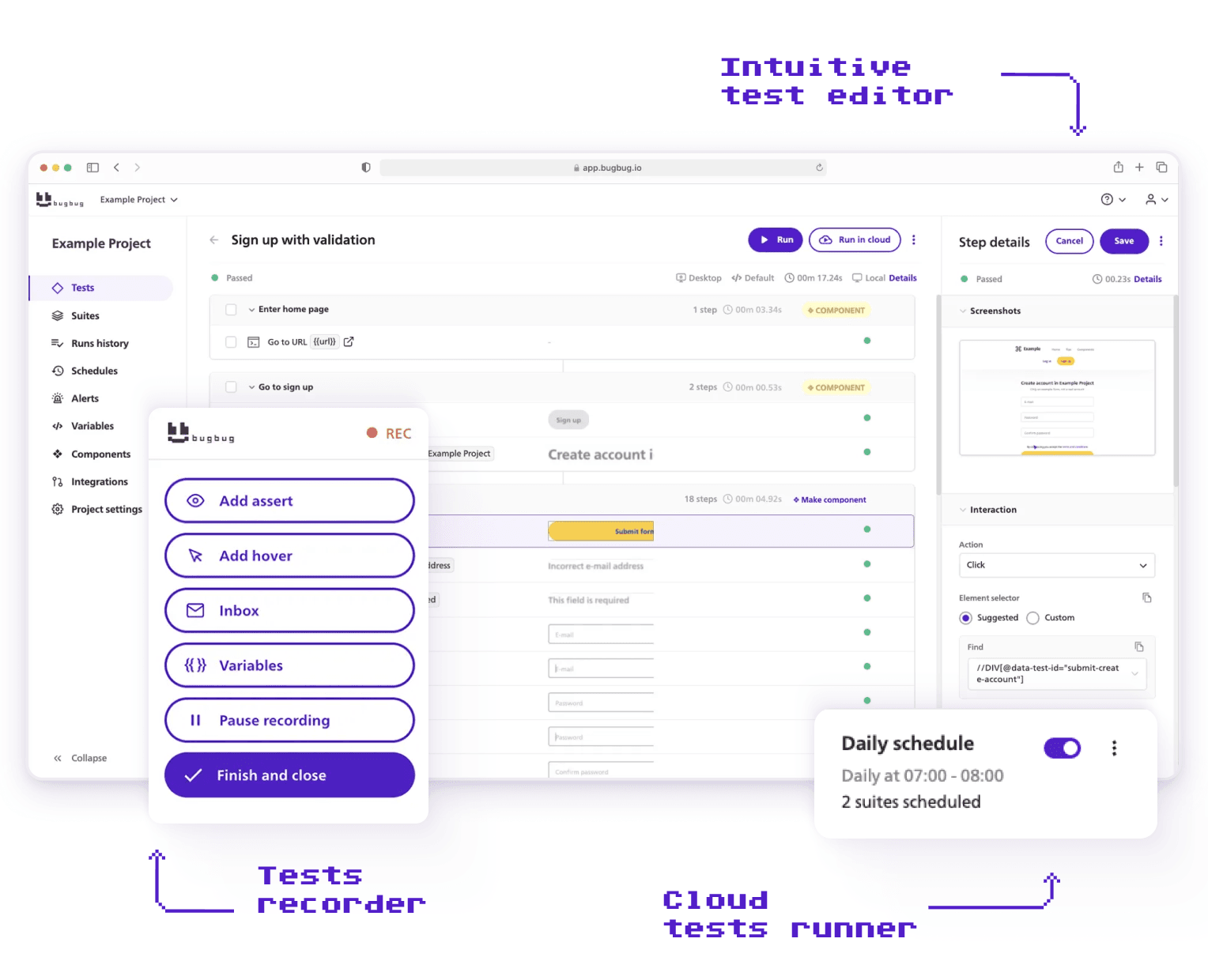
Best for: web-only SaaS teams on Chromium with no dedicated QA infrastructure.
Avoid if: you need Firefox, Safari, mobile, or desktop coverage — BugBug is Chromium-only by design.
BugBug lets you record an end-to-end test by clicking through your app in Chrome — no code, no Selenium grid, no Docker, no VMs. Edit & Rewind lets you insert a step anywhere and rerun from that exact point instead of re-recording the whole flow, which is where most recorder tools waste your afternoon. Built-in email testing covers the signup and password-reset flows that most no-code tools quietly skip.
BugBug runs in a real browser and simulates real typing — not a JavaScript shortcut that fills the field by setting its value. That difference is exactly what catches form-field bugs that simulation-based tools miss.
Don't just take our word for it. Paul Grossman - founder of the CandyMapper.com automation sandbox and author of Enhanced Test Automation with WebdriverIO - runs the CandyMapper Challenge, an annual, standardized speed benchmark across codeless and AI-powered testing tools. Every tool builds and runs the exact same automation task on the exact same site.
BugBug came out on top in the 2026 results: the fastest run time of all 16 tools tested (18 seconds), plus the second-fastest build time (1 min 40 sec). That combination put it furthest into Paul's "Speedsters" quadrant (fast to build, fast to run) - ahead of testRigor, Tricentis Testim, and Blinq.io.
💡 Check Paul's profile for full results of the challenge.

Best for: developers who want code-based tests without WebDriver configuration.
Avoid if: you want no-code authoring, or you need the largest possible ecosystem of plugins and integrations.
A Node.js tool that tests in any modern browser without browser plugins or WebDriver. It sits between Selenium's setup burden and a pure recorder.
It injects its driver into the page rather than driving the browser externally, which removes a whole class of setup problems — at the cost of occasional friction with sites that have strict content-security policies.
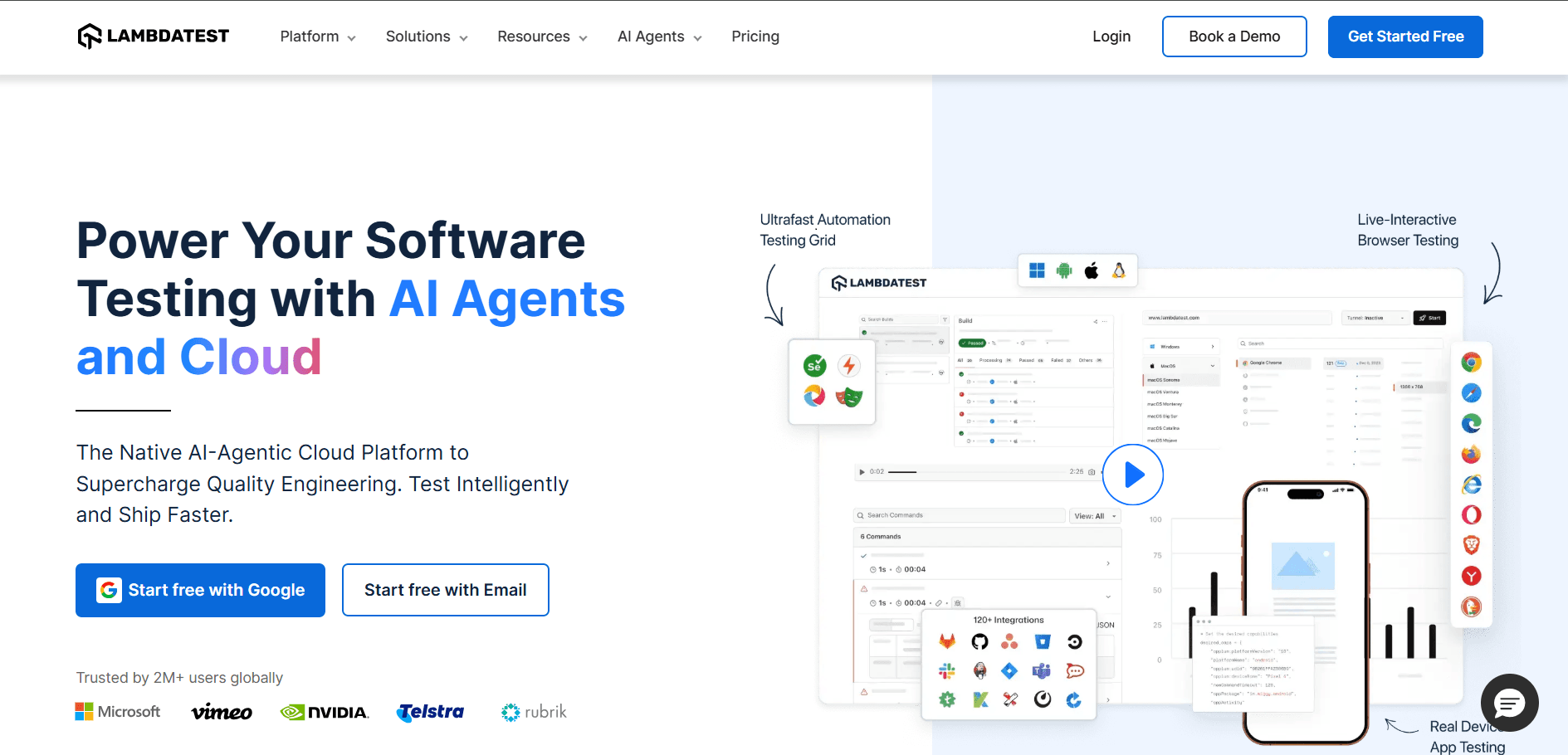
Best for: teams that genuinely need broad cross-browser and device coverage.
Avoid if: you test one or two browsers — you'd be paying for breadth you won't use.
An AI-assisted test-execution cloud that runs your tests across thousands of browser/OS/device combinations in parallel. It doesn't replace your test framework — it runs the tests you've written at scale.
Parallel execution across a huge grid is the whole value. HyperExecute speeds up orchestration meaningfully versus a conventional grid.

Best for: teams validating against real-device and real-browser matrices.
Avoid if: you're a web-only Chromium shop — most of the platform's value is coverage you don't need.
Similar in spirit to LambdaTest: a cloud platform for running manual and automated tests across real browsers and 20,000+ real mobile devices, with support for Selenium, Cypress, Playwright, and Appium.
These are real devices under real conditions, not emulators — which is what you need when a bug only shows up on a specific iOS version.

Best for: no-code teams that want a fully hosted, cloud-only workflow.
Avoid if: you want local execution, a permanent free tier.
A no-code recorder in a similar lane to BugBug, run entirely in the cloud.
Cloud-only recording is convenient, but you give up local runs and the free-forever tier — Reflect is trial-then-paid, where BugBug keeps a permanent free plan with unlimited tests.
Here's a category most "best tools" lists blur together with the tools above — wrongly. The tools so far create and run your tests. But once you have multiple tests, the harder part is reviewing test results and separating real failures from noise during the testing process. That triage is a different job, handled by a different kind of tool.
Best for: teams already running Playwright who are drowning in flaky-test triage.
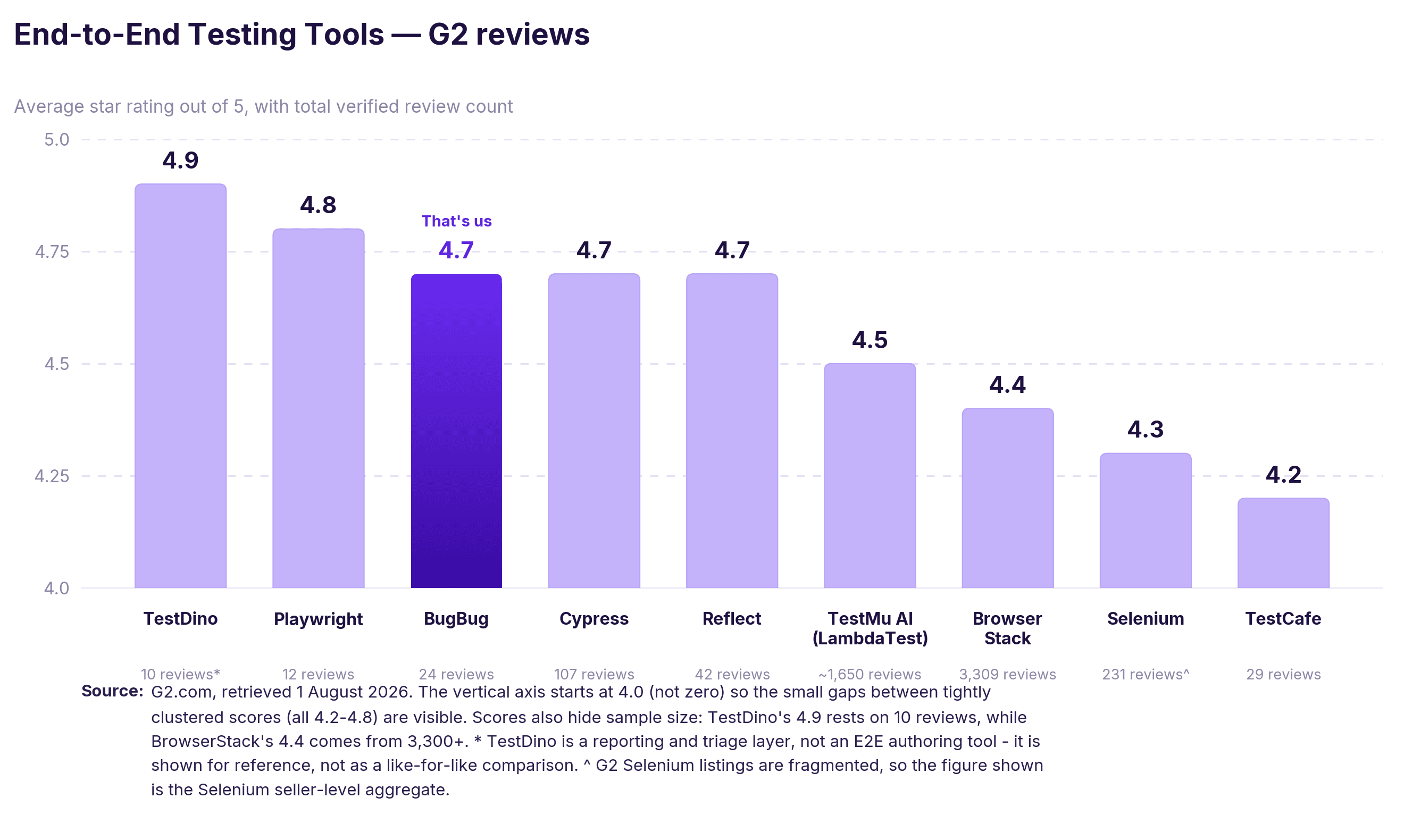
Avoid if: you're still at the "I need to create my first tests" stage — this is the layer above that. (G2: 4.9/5.)
TestDino doesn't run your tests — it makes sense of them. It's an AI-native, Playwright-focused reporting and test-management layer that classifies each failure as a real bug, a flaky test, or a UI change, attaches a confidence score, and suggests a fix — so you're not hand-sorting a wall of red at 2am.
It ingests your Playwright runs and scores failures instead of just listing them, which is where the time savings appear once you're past a dozen tests. Role-aware dashboards mean a developer, a QA lead, and a manager each see the slice they care about.
Tool descriptions only get you so far. Here are examples of test scripts or test cases for the same critical path — log in, land on the dashboard, confirm the welcome heading is there — written three ways.
Playwright (login.spec.ts):
import { test, expect } from '@playwright/test';

test('user can log in', async ({ page }) => {
  await page.goto('https://app.example.com/login');
  await page.getByLabel('Email').fill('user@example.com');
  await page.getByLabel('Password').fill('correct-horse-battery');
  await page.getByRole('button', { name: 'Log in' }).click();
  await expect(page.getByRole('heading', { name: 'Dashboard' })).toBeVisible();
});
Cypress (login.cy.js):
describe('Login', () => {
  it('logs the user in', () => {
    cy.visit('https://app.example.com/login');
    cy.get('[data-testid="email"]').type('user@example.com');
    cy.get('[data-testid="password"]').type('correct-horse-battery');
    cy.contains('button', 'Log in').click();
    cy.contains('h1', 'Dashboard').should('be.visible');
  });
});
BugBug (recorded — no file to write):
The two code versions aren't hard. For a simple login, test creation is easy either way, and any competent developer can write them. That's the point — the snippet length is not the real difference. The real difference shows up when larger test scenarios have to be maintained at scale. With Playwright or Cypress, someone owns those files: updating selectors when the UI shifts, wiring CI, managing the framework as it grows to 200 tests. With BugBug, the trade runs the other way — you record in minutes and maintain no code, but you're bounded by what the recorder and Chromium support.
Choose based on whether your team wants to own a framework or skip owning one — not on which login example looks shortest on a blog.
Most best-practice lists are interchangeable. They're not equally important. Two practices prevent the majority of the time-consuming, error-prone parts of E2E maintenance; the rest are useful but secondary. Here they are in priority order.
1. Use stable selectors. This single choice determines how often your tests break. If you target CSS classes, every styling change risks a red suite. Target data-testid attributes or accessibility roles instead — they survive cosmetic redesigns. (Recorder tools like BugBug handle this for you by capturing stable selectors at record time, which is a large part of why recorded tests break less often on UI tweaks.)
2. Isolate every test. Each test should set up and control its own test data, preserve data integrity, run independently, and clean up after itself. Tests that depend on the output of other tests produce cascading failures and can't run in parallel. This is the difference between a suite you trust and a suite you learn to ignore.
3. Use real waiting strategies, never hard-coded sleeps. sleep(5000) is both slow and unreliable — it waits too long on a fast run and not long enough on a slow one. Wait for a specific condition (an element visible, a network request settled) instead. Modern tools do this automatically; older setups make you do it by hand, which is why they flake.
4. Test critical paths only. A focused suite of 30 reliable tests beats 300 that fail intermittently. Cover login, signup, checkout, onboarding — the flows whose failure costs revenue or trust. Let unit and integration tests handle the rest. The hard part, as experienced engineers will tell you, isn't keeping the suite small in principle — it's keeping it small in practice. Teams have a habit of cramming a fresh E2E test in after every bug fix as regression testing, until most of the suite is edge cases that will never recur; too much browser-level coverage here gets expensive fast. Resist that. An edge case usually belongs in a cheap unit test, not an expensive browser run.
5. Run them in CI/CD. A test that doesn't run automatically on every deploy gets forgotten. Wire your suite into the pipeline so failures surface before release, not after. A stable test environment should mirror the production environment closely enough to make results reliable. BugBug integrates via API and CLI; code frameworks plug in natively.
6. Quarantine flaky tests fast. A test that fails intermittently is worse than no test — it trains your team to ignore red. Quarantine it the moment it flakes, then fix it or delete it. As suites grow, QA teams often help maintain tests and review failures. Once your suite is large enough that triage itself becomes the bottleneck, a reporting layer like TestDino can auto-classify failures as real bugs versus flakiness so you're not sorting them by hand.
Strip away the brand names and there are really two paths in testing frameworks — code-based and no-code — with an honest trade-off between them.
Code-based frameworks (Playwright, Cypress, Selenium, TestCafe) give you total control. You can express any logic, integrate anything, and your tests live in git as code your team owns. The cost is ownership: someone writes the tests, someone maintains the selectors, and someone keeps the framework healthy as the app grows. Teams also look at Gauge when they want a free open-source framework, or Robot Framework when they prefer human-readable keywords. For a team with engineering time to spend on testing — and a developer who wants to — this is the stronger long-term foundation.
No-code recorders (BugBug, Reflect) invert the trade. You record a test by using your app, and you maintain no framework. The cost is boundaries: you're limited to what the recorder supports, and in BugBug's case, to Chromium. For a team without dedicated testing time — the solo QA, the developer-on-call, the product owner who needs release confidence — that boundary is often a fair price for getting reliable coverage live this week instead of next quarter.
This is where BugBug fits, stated plainly: it's the fastest way for a web-only team on Chromium with no test infrastructure to get a regression suite running — record in the browser, run locally or in the cloud, plug into CI, and skip the framework entirely. Katalon Studio is a reasonable middle ground for teams that want easier authoring with straightforward CI/CD integration.
There's no single best E2E tool. The right pick depends on your stack, which browsers are in your release criteria, and the question that decides everything: whether someone on your team wants to own a framework, or nobody does.
| Team type | Primary tool | Complement with | Why this pick |
|---|---|---|---|
| Dev-led team starting fresh, at least one person will own the tests as code | Playwright | TestDino (once triage becomes the bottleneck), a device cloud for real-browser breadth | Chromium, Firefox, and WebKit from one test definition, auto-waiting that actually works, and a trace viewer that turns a 2am CI failure into a five-minute fix. You own every selector when the UI shifts. |
| JavaScript team building a React, Vue, or Angular single-page app | Cypress | Cypress Cloud for parallel runs | The time-travel debugger is still the best local feedback loop going — click any step, see the exact DOM. It runs inside the browser, which is both the best feature and the sharpest limit: OAuth redirects need workarounds, multi-tab isn't supported. |
| Web-only SaaS team on Chromium, nobody wants to own a framework | BugBug | Playwright, for the handful of flows that need framework-level control | Record in the browser, first suite live this week, no grid and no CI config to start. Real typing rather than value injection catches the form bugs simulation-based recorders miss, and Edit & Rewind means fixing a step instead of re-recording the flow. Chromium only, by design. |
| You need a language or browser combination nothing else supports | Selenium | A cloud grid, or your own Selenium Grid | Unmatched reach across languages, browsers, and platforms — and the default integration target for every device cloud. You assemble the waits, the drivers, and the grid yourself, which is where its flakiness reputation actually comes from. |
| Developers who want code-based tests without WebDriver configuration | TestCafe | — | Injects its driver into the page, so no ChromeDriver, no version pinning, no driver-mismatch build failures. Occasional friction with strict content-security policies, and a smaller ecosystem than Playwright or Cypress. |
| Real-device coverage is a hard release requirement | BrowserStack | Playwright, Cypress, or BugBug for authoring | 20,000+ real devices under real conditions, not emulators — what you need when a bug only appears on one iOS version. It runs your tests; it will never write them. |
| Broad cross-browser matrices, run in parallel | TestMu AI (LambdaTest) | Whichever framework you author in | 3,000+ browser/OS/device combinations with HyperExecute speeding up orchestration versus a conventional grid. Overkill if you test one or two browsers. |
| No-code team that wants a fully hosted, cloud-only workflow | Reflect | — | Clean recorder, nothing to install, everything runs in their cloud. You give up local runs and the permanent free tier — it's trial-then-paid where BugBug keeps a free plan with unlimited tests. |
| You already have a suite and the triage is the problem | TestDino | Playwright (it's Playwright-focused) | A different layer entirely: it doesn't run tests, it scores failures — real bug, flaky test, or UI change, with a confidence score and a suggested fix. Only worth it once you're past a dozen tests and sorting red by hand. |
Pick for the job that's actually hurting. If the pain is nobody has written the tests yet, an authoring tool solves it and a device cloud won't. If the pain is the tests exist but nobody trusts them, a reporting layer will do more than switching frameworks. And if the pain is the person who built the suite left — that's the ownership question, and no tool on this list fixes it except by needing less of it.
Everything above comes down to a few habits that separate a suite people trust from one they quietly disable. Here's how the pieces fit together once you start building.
Good software testing isn't about chasing 100% test coverage with detailed test cases for every conceivable path. It's about writing tests that mirror real-world scenarios — the actual user interactions that drive your product. When test automation reproduces those journeys faithfully, it earns its place; when it drifts into testing implementation details, it becomes maintenance debt.
Start where the risk is. List your most important real-world user scenarios — the flows where a break violates user expectations and costs you customers — and automate those first. Match the automation tools to your reality: if your product spans multiple devices and mobile platforms, you'll need mobile testing in the mix, which means a code framework plus a device cloud rather than a Chromium-only recorder. If you're web-only, a recorder gets you to faster test creation without the overhead of automating web browsers by hand or maintaining test code nobody wants to own.
The mechanics matter more than they look. Simulating real user interactions — real typing, real clicks, real web browsers — catches bugs that value-injection shortcuts miss, because they exercise the entire application the way a person actually would, not a stripped-down approximation. Track the output data at each step so a failure tells you what broke, not just that something did. Thoughtful test design here pays off for years; sloppy design rots in weeks.
Happy (automated) testing.

Your next release. Properly tested.
Join 1,200+ QA teams that automated their regression coverage with BugBug.


Dominik Szahidewicz is a Software Quality Evangelist specialising in quality assurance, test automation, and modern software testing practices. He creates practical, research-driven content that helps QA professionals, developers, and product teams improve test coverage, automate repetitive testing, and release more reliable web applications.
Drawing on his experience in technical writing, data analysis, and application consulting, Dominik translates complex testing concepts into clear, actionable guidance. His areas of interest include end-to-end testing, no-code test automation, regression testing, and the use of AI in software quality assurance.

QA & Test Automation Expert
Bartek Krzyżanowski is a QA and test automation expert at BugBug with 15 years of experience in software testing and quality assurance. Throughout his career, he has worked with software teams on improving testing processes, designing effective test strategies, and building maintainable automated test coverage.
His expertise spans manual and automated testing, end-to-end and regression testing, test automation strategy, and the practical challenges teams face when maintaining reliable test suites as products evolve. He focuses particularly on approaches that help QA and engineering teams increase coverage while keeping test automation understandable, maintainable, and useful in everyday development workflows.
At BugBug, Bartek contributes his testing expertise to educational content for QA professionals, developers, and product teams. As an author on the BugBug blog, he writes about software testing methodologies, test automation tools, industry practices, and practical techniques teams can use to improve software quality.
His writing combines extensive industry experience with a pragmatic perspective on modern test automation, helping teams understand not only which tools and techniques are available, but how to apply them effectively in real-world software development.
Join thousands of QA experts. Subscribe to our newsletter.
Get more testing tips and product related content. Zero spam.
Discover essential business tools for startups. Read the article to find the right tools for your success.
Learn how to speed up end-to-end (E2E) testing with smart test design, CI/CD optimizations, and lightweight tools like BugBug.
Learn how to identify and fix test failures with this complete guide on what to do when your test fails.
Discover how to calculate ROI for test automation with easy formulas and practical examples. Learn to evaluate costs and track results effectively.
Discover the causes and impact of flaky tests, and learn effective strategies to identify and fix them for reliable software performance.
How to Scale Test Automation Without Code? A comprehensive guide for Qa teams, saas and startups.
Find the best courses to learn automation testing tools and techniques in 2026. Enhance your software testing skills and become a valuable tester.
This article delves into the significance of crafting comprehensive test cases for login pages, highlighting various scenarios.
Learn how you can use NotebookLM for you software testing needs. We prepared a comprehensive guide with tutorial so you can start right away!