Playwright Visual Regression Testing: What's Great & Cost
Written byDominik Szahidewicz


Updated: July 11, 2026View as Markdown
TL;DR
Playwright's native toHaveScreenshot() is a genuinely strong, free, cross-browser visual regression engine — but the real cost lives in the workflow: platform-locked baselines that force you into Docker, a Git-based review process that breaks down past a solo developer, and a code-only wall that locks out the designers, QA, and PMs who know the UI best. Percy and Applitools fix the review and baseline gaps for real money (but not the code wall), while BugBug trades away cross-browser coverage to give web-only Chromium teams managed baselines, a built-in review flow, and non-coder participation with zero setup.
Here's a scenario every frontend team has lived. You ship a CSS tweak. Every Playwright test passes — the button still exists, the click still fires, toBeVisible() is green. Then someone opens the pricing page on a different screen and the CTA has slid halfway under the footer. Your functional tests never stood a chance. They check whether the button works, not whether anyone can see it where it belongs.
Playwright visual regression testing closes that gap by using the built-in toHaveScreenshot() assertion to capture baseline screenshots and compare later runs for visual diffs across Chromium, Firefox, and WebKit, with thresholds and masking when needed. No plugin, no third-party service, no npm install. It's one of the strongest native features in the framework, especially for frontend teams that already own their test suite and small to midsize SaaS teams trying to keep UI quality high without bolting on yet another tool.
So this article isn't going to pretend Playwright is bad at visual testing. It's good at it. The more useful question is whether its workflow fits your team: the engine is excellent and free, but the environment you have to pin, the review process that doesn't scale past a solo dev, and the hard fact that only people who write TypeScript can touch it are where the real cost lives. You'll see what Playwright gives you out of the box, where its native approach gets expensive or awkward, how tools like Percy and Applitools compare, and where a managed, code-light option like BugBug makes more sense.
Credit where it's due. Playwright's native visual comparison is the real thing, not a token feature.
await expect(page).toHaveScreenshot() does three things in one call: it waits for the page to stabilize by letting network requests settle before capture, along with no CSS animations and no pending JS; captures a PNG of the viewport, a specific element, or the entire page via the fullPage option, since Playwright supports both full-page and element-level screenshots; and compares it against a stored baseline using the pixelmatch library. On the first run there's no baseline, so Playwright writes baseline screenshots next to the test file in the snapshots folder, where they act as baseline images for later screenshot comparison, and tells you to commit it. Every later run diffs against it and fails if the difference exceeds your threshold, so Playwright can use snapshot testing to detect visual diffs and visual differences against those baseline images, generating an expected/actual/diff image trio in test-results/.
You get real control knobs:
maxDiffPixels (absolute pixel count), maxDiffPixelRatio (percentage of the image, 0–1), and threshold (per-pixel color difference in YIQ space). Most teams start around a maxDiffPixelRatio of 0.01 to absorb anti-aliasing without missing real breaks; these threshold settings can live in assertions or global settings to separate real regressions from anti-aliasing differences and limit acceptable pixel difference.mask array of locators and Playwright paints those regions a solid color before comparing — the single most important trick for killing false positives when dynamic content and dynamic elements such as timestamps, avatars, ads, live data, or other dynamic data are not masked and make visual assertions fail unnecessarily.animations: 'disabled' and a custom stylePath stylesheet let you freeze volatile UI before the shot, and you can inject custom CSS to hide unstable regions for more reliable visual tests and fewer flaky visual tests.If you have a developer who'll own it, this is a capable, zero-license-cost visual testing setup. Be honest with yourself about that "if," though — because it's where the cost hides.
Large snapshot folders are often kept in version control with Git LFS.
Every Playwright visual testing tutorial ends at the green checkmark. The production reality starts after it — and it's not the diffing that hurts. pixelmatch does its job. It's the three things wrapped around the diffing that eat your week.
Look closely at the filename Playwright generates: example-test-1-chromium-darwin.png. That darwin is macOS. Baselines are platform-locked, and for good reason — Playwright's own docs warn that rendering varies by OS, version, hardware, headless mode, and (their words) even "battery vs. power adapter."
Here's what that means in practice: a baseline generated on a developer's Mac will always fail against a screenshot taken on your Linux CI runner. Different anti-aliasing, different font hinting, guaranteed mismatch, every time. It's the number-one pitfall teams hit.
The accepted fix is to generate and run baselines inside the official Playwright Docker image, locally and in CI, with GitHub Actions as a common setup for integrating visual tests, so every screenshot comes from an identical environment. That works — and the Dockerized test environment gives you a more consistent environment for test execution when you run visual tests with npx playwright test — but now you're maintaining a Docker image as a dependency of your test suite. That's infrastructure work most teams didn't plan for when they picked "the free built-in feature," especially if visual tests should run automatically on every commit in CI to keep that setup stable.
When a visual test fails, Playwright hands you a diff PNG. That's it. There's no interface to review the change, approve or reject it, leave a comment, or collaborate. Updating a baseline means running --update-snapshots and committing binary image files to Git.
That workflow is fine for one developer and one small suite. It falls apart at team scale. Reviewing visual changes through Git PR comments — where binary image diffs are notoriously hard to actually see — is the pain teams name most. There's even a term for the tipping point: "GitHub diff-blindness," the moment binary baseline updates start dominating your PR review time. That's usually when teams start paying for Percy or Chromatic just to get a review dashboard the framework doesn't provide.
This is the one nobody likes to say out loud. toHaveScreenshot() lives in a TypeScript file. To create a visual test, update a baseline, or review a diff, you have to write and run code.
Think about who that excludes. The designer who created the interface and knows exactly how it should look. The QA analyst who validates it. The product owner who signs off on releases. These are the people with the sharpest eye for visual correctness — and Playwright locks all of them out of the visual testing workflow, because the workflow is code. Every visual change routes back through an engineer, which is the opposite of what you want when the bug is "the spacing looks wrong."
None of this makes Playwright's engine bad. It makes the total cost higher than "it's built in and free" suggests. That's the number to weigh.
When the workflow tax gets heavy, teams reach for a cloud layer bolted onto Playwright. The two names you'll hit:
Percy (BrowserStack) moves baseline storage and approval into a managed dashboard, adds cross-browser cloud rendering, and uses Visual AI to filter noise. Free tier is 5,000 screenshots/month with unlimited users and 30-day history; paid starts around $199/month. Note the metering — one page across two browsers at three widths is six screenshots, so volume climbs fast. Isolated component checks also simplify review, because localized changes are easier to inspect than page-wide updates.
Applitools Eyes brings perceptual Visual AI — it evaluates screenshots the way a human eye would rather than counting raw pixels, which cuts false-positive fatigue harder than any pixelmatch threshold can. It renders cross-browser through its Ultrafast Grid and traces defects to the DOM element. It's priced for the enterprise, though: no meaningful free tier, published starter figures around $899–$969/month, real deployments well beyond.
Both fix the review-dashboard and baseline-management gaps. That's why many teams mix page-level coverage with isolated component screenshot comparison when testing with Playwright. Both cost real money, meter in units that surprise you at invoice time, and move your baselines into a vendor's cloud. And critically — neither fixes the participation wall. Percy-on-Playwright and Applitools-on-Playwright are still code. The designer and the PM still can't touch them.
👉 Check our full guide on the best Visual Regression Testing Tools
👉 Check our take on Cypress Visual Regression
| Playwright (native) | Cypress (+ plugin/service) | BugBug | |
|---|---|---|---|
| Visual diffing | Native — built into the framework | ❌ None native — needs plugin or paid service | Native — built-in step |
| Setup | Built-in, but setup for the Playwright test runner, config + baselines | Install plugin, edit config + support files | Add a visual regression step — no install |
| Comparison tech | Pixel-based (pixelmatch, 3 threshold knobs) |
Pixel-based plugin, or cloud Visual AI | Pixel-based + adjustable sensitivity |
| Cross-browser | ✅ Chromium, Firefox, WebKit | Chromium/Firefox (WebKit experimental) | ❌ Chromium only |
| Baseline management | Manual, committed to repo, platform-locked; baselines live beside each test file in the snapshots folder | Manual, committed to repo | Auto, per environment |
| Environment consistency | Your job (Docker image) | Your job (Docker image) | Auto — separate reference per environment |
| Review workflow | Diff PNGs / Git PRs, with test artifacts on failure | Diff images / CI artifacts (or cloud service) | Built-in Review & fix flow |
| Who can author/review | Developers only (TypeScript) | Developers only (JS/TS) | Coders and non-coders |
| Pricing | Free | Free (plugin) → paid (Percy/Applitools) | Pro Plan (189 USD) |
Playwright wins on native capability and cross-browser — it's the only one of the three with WebKit/Safari coverage built in, which BugBug simply doesn't have, and Cypress only offers experimentally. Visual testing complements unit tests and functional tests by validating appearance, not behavior alone, and that matters even more across multiple browsers. Cypress is the weakest for visual regression specifically — it has nothing native, so you're assembling a plugin or renting a service just to reach the starting line. BugBug wins on zero setup, managed baselines, a real review flow, and non-coders being able to participate — and loses cross-browser outright. No tool sweeps the board, because that's not how they actually stack up.
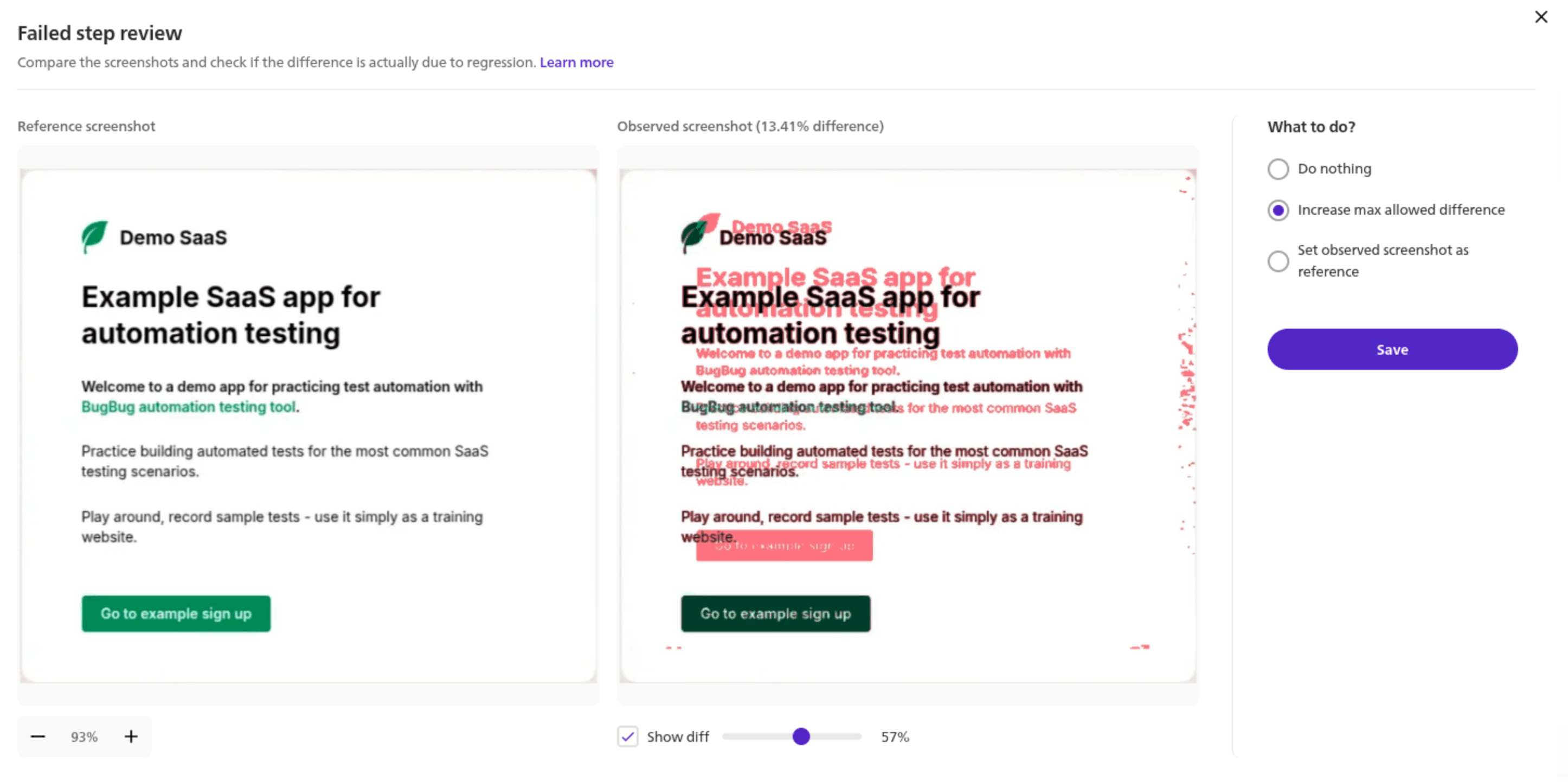
Everything above assumes a developer owns the setup, pins the environment, and gatekeeps the review. BugBug's difference is that visual regression is a native step you add to a test — not code you write and infrastructure you maintain — and the people who care about the UI can participate whether or not they write TypeScript.
Best for: web-only SaaS teams on Chromium who want functional and visual coverage in one low-maintenance tool, and who want non-developers in the loop — without owning a Docker image or a plugin-plus-cloud stack.
Here's how it works. You add a visual regression step during a recorded test. On the first run, BugBug captures the screenshot and saves it as the baseline automatically, acting as the baseline setup for that specific environment — defined by browser, OS, screen size, profile, and run mode (cloud or local). On later runs it compares the fresh shot against the matching reference, measures the difference as a percentage, and passes or fails against a max difference threshold you control, with sensitivity and anti-aliasing handling, which also makes visual test results easier to review because each environment keeps its own reference. When a step fails, the Review & fix flow shows the reference, the observed screenshot, and a diff overlay side by side, and lets you keep the reference (real bug), raise the tolerance (acceptable variation), or set the new screenshot as the baseline (intentional redesign) — with keyboard shortcuts and bulk-apply for redesigns that touch many steps.
Map that against the three costs above:
And because this all lives inside a full E2E tool, the same suite that checks how your app looks also checks how it works — login, checkout, onboarding — without a second vendor or a second bill.
Now the honest limits, because they're real and they matter here especially. BugBug is Chromium only. Playwright's native cross-browser support is a genuine advantage BugBug does not match — if you need to catch visual regressions in Firefox or Safari/WebKit, Playwright (native or with Applitools/Percy) is the correct choice, and it's not close. BugBug's comparison is pixel-based with adjustable sensitivity, not perceptual Visual AI — great at catching layout and styling breaks on a stable UI, which helps catch visual bugs and other visual bugs earlier without the baseline churn common in unstable pages, but Applitools' engine is better at ignoring noise on highly dynamic pages. And the maintenance realities inherent to all visual testing — keeping the screen stable before capture, choosing thresholds with judgment, updating baselines deliberately — still apply.
BugBug removes the setup, the Docker environment, the PR-based review, and the coder-only gate. It doesn't repeal the laws of visual testing, and its own best-practices guidance says as much: prefer element-level checks, keep state stable, update references intentionally.
No universal winner. Match your situation to the trade-off you can live with.
Choose Playwright native if: you have developers who'll own the suite, you need true cross-browser coverage including WebKit/Safari, and you're willing to run baselines in Docker and review changes through Git; your first visual test should usually start small and account for dynamic content that can otherwise fail unnecessarily. It's free, it's genuinely good, and for a code-first team that lives in CI it's hard to beat on capability.
Choose Playwright + Applitools or Percy if: you're on Playwright but the Git-based review workflow has become the bottleneck, or false-positive fatigue is killing trust in the suite. These tools are often adopted after screenshot-heavy visual tests become noisy. Applitools' Visual AI is the strongest answer to noise; Percy is the lighter, cheaper entry. You'll pay for it, and it's still a developer-owned workflow.
Choose BugBug if: you're web-only on Chromium, you want visual and functional testing in one place with managed baselines and a real review flow, and you want the designer, QA, or PM who knows the UI best to participate without writing code, with visual checks living in the same test file or recorded flow depending on the tool. Especially if "we don't have a developer who wants to babysit a Docker image and a snapshot folder" describes your team.
If that last profile is you, BugBug's 14-day free trial is the fastest way to find out if it fits — no credit card, first test running in minutes, whether that's your first visual test here or npx playwright test on the native route instead, and you'll know within an afternoon whether skipping the Docker-and-Git overhead is worth trading away cross-browser coverage you may not need.
Ready to start visual regression testing?
Test easier than ever with BugBug test recorder. Faster than coding.
Get started
Happy (automated) testing!

Your next release. Properly tested.
Join 1,200+ QA teams that automated their regression coverage with BugBug.


Dominik Szahidewicz is a Software Quality Evangelist specialising in quality assurance, test automation, and modern software testing practices. He creates practical, research-driven content that helps QA professionals, developers, and product teams improve test coverage, automate repetitive testing, and release more reliable web applications.
Drawing on his experience in technical writing, data analysis, and application consulting, Dominik translates complex testing concepts into clear, actionable guidance. His areas of interest include end-to-end testing, no-code test automation, regression testing, and the use of AI in software quality assurance.
Join thousands of QA experts. Subscribe to our newsletter.
Get more testing tips and product related content. Zero spam.
Compare the best SaaS testing tools for startups, QA, and dev teams. See use cases, pricing, and key SaaS flows to automate.
Learn how to automate regression testing without devs or QA. Discover a risk-based strategy and practical workflows.
This article delves into the journey of becoming an Automated Test Engineer, offering insights into the essential skills, knowledge, and steps required to embark on this career path and increase your current salary.
Build a CI/CD testing pipeline in 30 minutes with BugBug. Learn how to run reliable E2E smoke tests on every PR, block bad merges, and scale safely.
Discover the essential QA tester skills for 2026! Learn the technical and soft skills required to excel as a QA Tester.
Read this comprehensive guide on how to choose the right CI/CD tool. Selecting the tool that aligns with your project is essential.
Learn about test coverage in software testing and discover techniques to improve it.
Discover how to calculate ROI for test automation with easy formulas and practical examples. Learn to evaluate costs and track results effectively.