AI Testing: What It Is and How to Use It in Software Testing
Written byDominik SzahidewiczReviewed byMariusz Wójcik


Updated: November 2, 2026View as Markdown
AI testing uses artificial intelligence to create, execute, maintain, and analyze software tests. It can uncover missing scenarios, reduce the manual effort involved in browser automation, and speed up investigations when tests fail. Another meaning of the term involves testing AI-powered applications themselves, which calls for a separate set of evaluation methods.
Keeping test coverage current is a familiar problem for SaaS teams releasing updates every week. New features bring new scenarios to cover, interface changes break selectors, and intermittent failures send developers back through execution logs. Even a relatively small regression suite can become difficult to maintain when nobody owns testing full-time.
AI introduces new ways to handle that work. Generated test cases can accelerate planning, adaptive locators make recorded tests more resilient, and AI agents connected to testing platforms can inspect existing tests or investigate failed runs. Each capability addresses a different part of the process, with its own requirements and limitations.
Knowing where those capabilities fit is more important than adopting every AI feature available. Reliable test automation still begins with clear expected outcomes and a repeatable way to verify them.
AI testing applies artificial intelligence to activities throughout the software testing process, including test design, execution, maintenance, and failure analysis.
Different technologies support different activities. Machine learning helps identify patterns in execution data or application behavior, while generative AI can turn product requirements into draft test cases or explanations of failed runs. More advanced workflows use AI agents connected to testing tools, allowing them to inspect projects and perform authorized actions.
Not every AI feature offers the same level of automation. Adaptive locators help stabilize interactions with web elements, whereas an agent may create or modify tests based on project context. Both can reduce routine work, but an agent needs clearer instructions and access controls because it operates across several activities.
A project management platform introduces external collaborators. Workspace administrators can invite people from outside the company, invitations expire after seven days, and collaborators have no access to billing settings.
Successful invitation delivery is only one part of the feature. QA also needs to check expired links, revoked invitations, duplicate accounts, and restricted-page access.
An AI assistant can extract candidate scenarios from the requirements and highlight anything the specification doesn't explain. Once the team confirms the expected behavior, a browser testing tool can execute those scenarios and record the results.
Failed runs create a separate task. Screenshots, step history, and execution logs help establish what happened, while an AI agent with access to that evidence may assist with the investigation.
Combining these activities gives the team a testing process that covers more than repeating browser actions. Requirements still determine what counts as correct behavior, and test results remain open to inspection.
Conventional automated tests follow predefined instructions. A test locates a browser element, performs an action, and checks the resulting state. Scripts and no-code recorders provide different ways of creating those instructions, but execution follows the same general model.
AI-assisted testing introduces additional capabilities around authoring, maintenance, and analysis. An agent may also coordinate supported testing operations through a connection to an existing platform.
| Testing activity | Traditional automation | AI-assisted testing |
|---|---|---|
| Test creation | Scripted or recorded browser actions | AI-generated scenarios, steps, or scripts |
| Test maintenance | Manual investigation and updates | Adaptive locators and assisted repairs |
| Coverage planning | Scenarios identified by testers and developers | Additional cases suggested from requirements |
| Execution | Predefined instructions run by a test runner | Agents may initiate or coordinate runs |
| Failure analysis | Logs and screenshots examined manually | AI analyzes available execution evidence |
| Test ownership | QA, developers, or users of no-code tools | Shared workflows involving product and engineering teams |
| Main limitation | Fragile tests and ongoing maintenance | Incorrect assumptions or changes that weaken assertions |
Combining established automation with selected AI capabilities often produces a more dependable result than rebuilding everything around an agent.
Take subscription billing. A regression test needs to confirm that the customer's account receives the correct entitlement after a successful payment. AI may generate the steps or assist with maintenance, but the assertion must reflect the actual billing policy.
Similar care is required with authentication and permissions. Passing tests have little value when they verify the wrong outcome, no matter how sophisticated the automation looks.
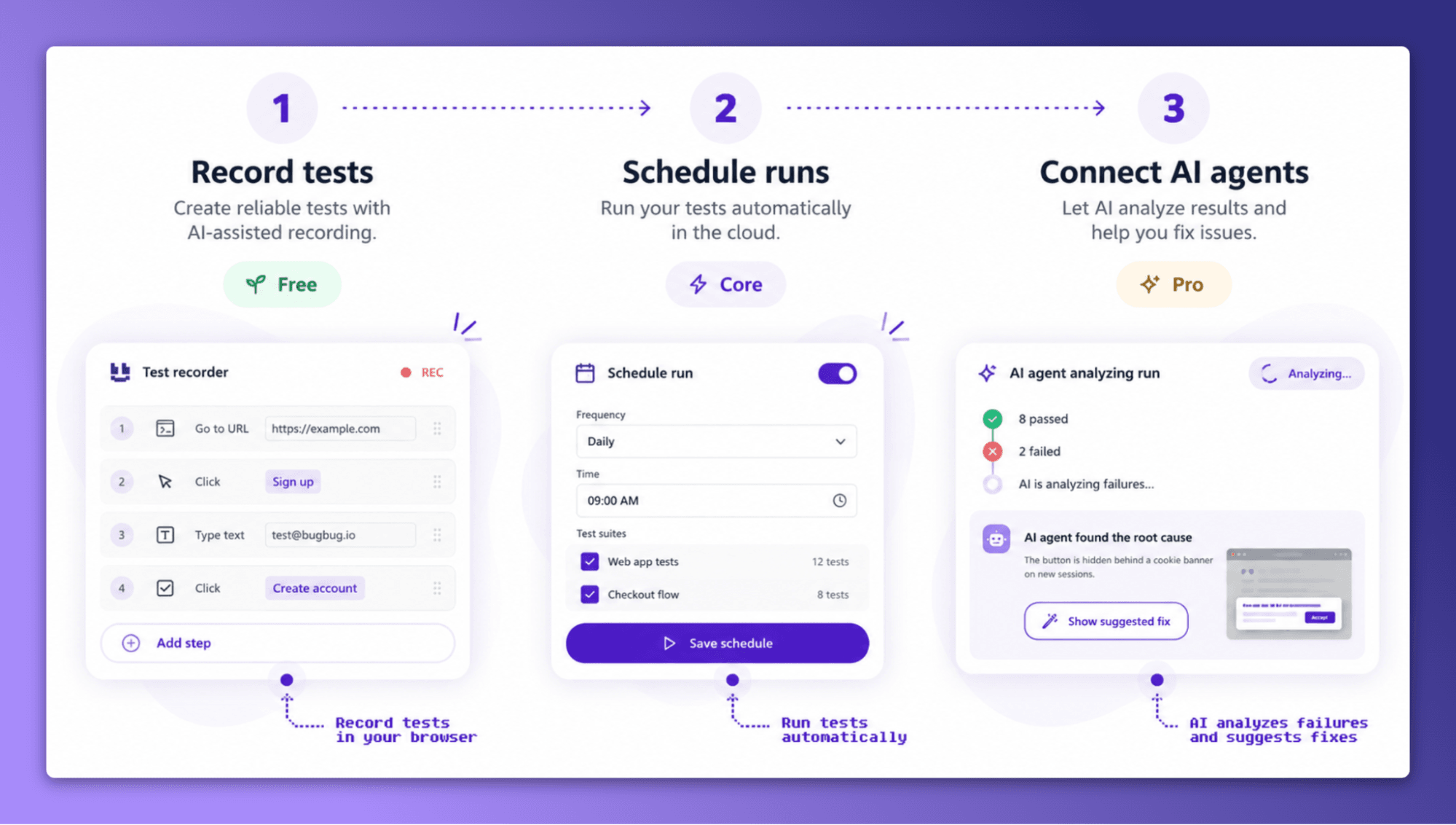
Opportunities for AI in software testing extend well beyond generating scripts. Some applications address problems at the start of development, while others become relevant after a test suite has been running for months.
Choosing where to introduce AI begins with identifying the work that creates the most friction. Slow test creation, frequent selector failures, and lengthy debugging sessions each point toward different capabilities.
Product requirements rarely describe every boundary condition. Even clear specifications can leave questions about permissions, account states, or unexpected sequences of user actions.
Generative AI can analyze written requirements and propose scenarios before test automation begins.
Suppose a subscription product follows these rules:
Basic accounts can create three projects. Pro accounts can create unlimited projects. Expired Pro subscriptions return to Basic.
Several tests follow directly from the description, including verifying project limits and account downgrades. Questions about existing projects after a downgrade need additional clarification.
| Scenario | Expected outcome |
|---|---|
| Basic account creates a third project | Project creation succeeds |
| Basic account attempts a fourth project | The plan limit is enforced |
| Pro account creates additional projects | Basic plan limits don't apply |
| Pro subscription expires | Account transitions to Basic |
| User opens an existing project after downgrade | Product policy must define access |
| Subscription is renewed | Entitlements follow the renewal policy |
Missing requirements are an important part of the output. An AI-generated test shouldn't quietly establish rules that the product team hasn't approved.
Once the unanswered questions are resolved, the scenarios can become automated checks. The process is covered in more depth in AI test case generation, including how to refine generated cases before execution.
Even minor frontend updates can break automated browser tests. Renamed elements, revised component structures, or dynamic content may invalidate existing locators, leaving QA engineers investigating failures unrelated to actual product defects.
Adaptive locator systems reduce some of this maintenance by selecting elements using information designed to remain stable across UI changes.
BugBug's AI Test Recorder includes Adaptive Locators alongside Smart Waiting and Smart Click & Scroll. These features handle common browser interaction problems during recording and execution, reducing the need for manually configured selectors and fixed delays.
Applications with frequently changing interfaces can benefit from these mechanisms, especially when regression coverage includes long user journeys.
Automatic recovery still has limits. A missing Submit button may indicate a genuine regression, and selecting a different control would conceal the original problem. Repairs need to preserve the behavior a test was created to verify.
The technical approaches and risks are explained further in self-healing test automation.
Functional tests don't catch every interface defect.
A checkout form may submit correctly while displaying overlapping fields on smaller screens. Dashboard components can extend beyond their containers, and navigation changes may hide controls that customers need.
Visual regression testing compares screenshots with approved references to identify unexpected changes. Some AI-assisted tools also help classify differences, although their methods and accuracy vary.
Reliable visual checks require stable execution conditions and maintained baselines. Animations, dynamic content, and browser rendering differences can introduce visual changes unrelated to product defects.
Design updates also need approval before they become new baselines. An intentional layout change isn't a regression, even when the screenshots differ considerably.
Used alongside functional automation, visual testing adds coverage for issues that browser assertions may not detect.
Inconsistent test data causes its own category of automation problems. Shared accounts, expired records, and incomplete setup steps can make tests fail before they reach the functionality under investigation.
Generative AI can assist with synthetic data and boundary cases. Registration testing, for example, may require international names, duplicate email addresses, unusually long inputs, and accounts with different permission levels.
Generated records need to satisfy the application's rules, and production information should be protected through appropriate data handling controls.
Failure analysis offers another application. A developer examining an unsuccessful run may have screenshots, logs, and step history spread across several sources. An AI assistant can analyze the available evidence and identify events worth investigating.
A missing dashboard element might initially look like a rendering issue. Earlier execution records could reveal that authentication failed before the application reached the dashboard.
Any explanation should remain traceable to the observed results. Without enough evidence to establish a cause, uncertainty needs to be made explicit.
Additional applications of language models are covered in Generative AI in Software Testing.
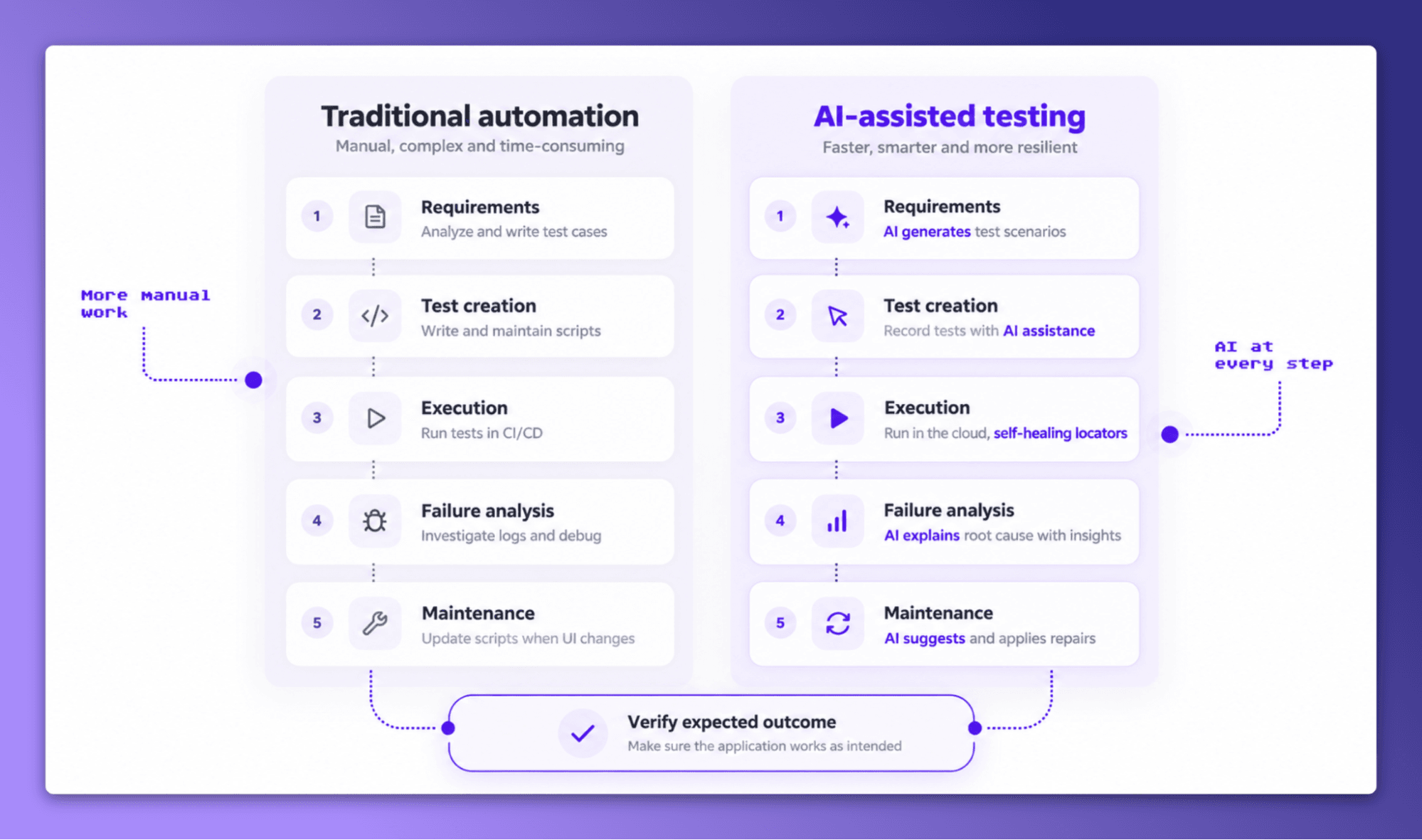
AI test automation increasingly involves tools that communicate with existing testing platforms. Connected agents can inspect projects, work with test cases, trigger execution, and examine failures through supported operations.
Browser recording remains an accessible entry point. Agent-driven workflows become relevant when teams want their AI development tools to work with existing automation.
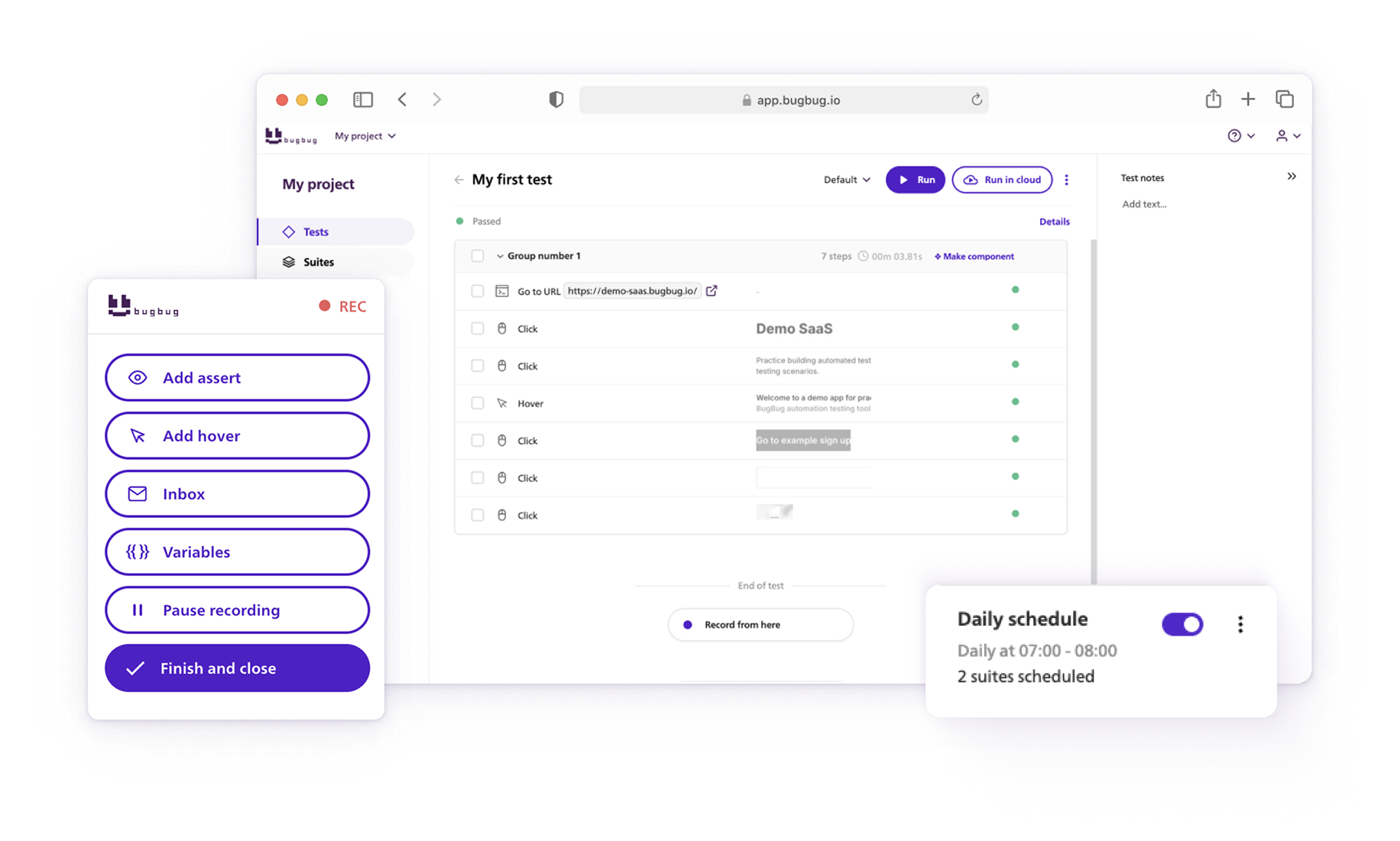
Browser recorders capture user interactions and turn them into executable test steps. A tester opens the application, completes a workflow, and saves the recorded actions with assertions that verify the expected result.
An onboarding test might create an account, confirm an email address, complete workspace setup, and verify that the correct dashboard appears.
BugBug records interactions through its Chrome extension and provides a visual editor for managing steps and assertions. Product managers can contribute tests without writing scripts, while developers retain access to the same testing project.
Recorded journeys are particularly suited to end-to-end testing, which checks whether complete customer workflows behave as expected.
Assertions deserve attention during recording. Reaching the dashboard confirms navigation succeeded, but it doesn't prove that the correct account loaded or that its permissions are valid. Those outcomes need separate checks.
Once testing tools expose operations to an AI agent, testing tasks can be handled across multiple steps.
An agent investigating a failed regression suite could retrieve recent runs, inspect the failing steps, compare evidence, and suggest corrections. With appropriate authorization, it may modify an existing test and run it again.
Such workflows give developers another way to manage automation already maintained by product or QA colleagues.
Access control becomes important when agents can modify project data. Reading test results is different from changing assertions, deleting steps, or executing tests against connected environments.
Testing teams should identify which operations an agent needs and how proposed changes will be reviewed. More detail on the underlying approach is available in agentic test automation.
Model Context Protocol, or MCP, provides a standardized interface through which AI applications can access external tools.
BugBug MCP connects compatible AI clients to testing projects and exposes supported operations for working with tests, suites, and execution results.
Developers using tools such as Cursor or Claude Code can ask their AI assistant to inspect regression coverage after a feature change. With the necessary permissions, the agent can retrieve relevant tests, examine execution results, and perform supported testing actions.
BugBug Skills complement this connection by giving agents instructions for common testing activities. Skills guide the agent's approach; MCP supplies access to the underlying project information and operations.
A team might use the connection to investigate a failed checkout test after a deployment. The agent retrieves the run, examines available screenshots and steps, and proposes a change based on its findings. Approval remains necessary when that change affects the behavior being verified.
Implementation guidance is available in How to Use MCP for Test Automation. The articles MCP vs. API and Playwright MCP vs. BugBug MCP explain the differences between integration approaches. Related browser-agent capabilities are discussed in AI browser automation.
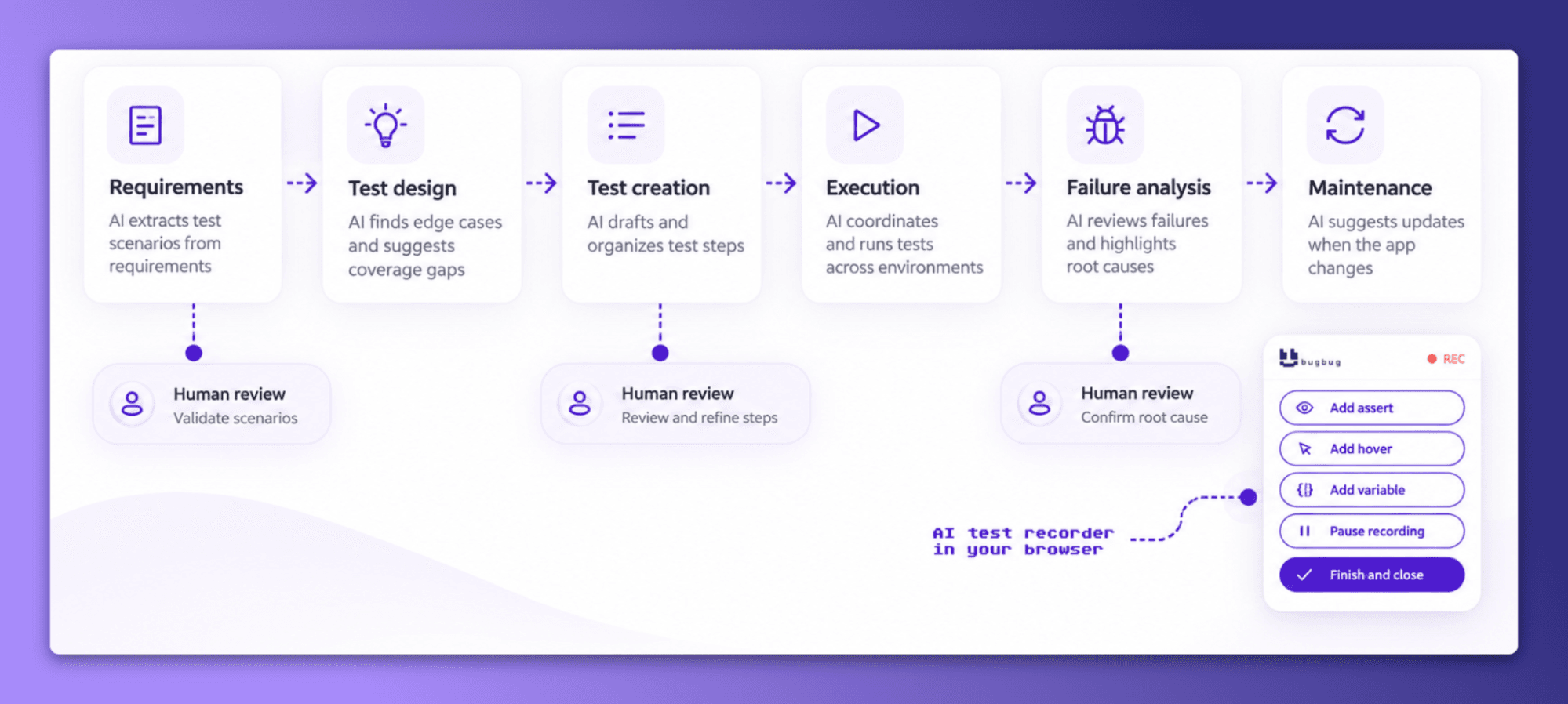
AI testing can reduce repetitive work, particularly in applications with frequent releases and growing regression suites. Its benefits are easier to measure when the team has clear expectations around test coverage, execution stability, and maintenance.
Poorly configured AI-assisted workflows can create additional problems. Automatically generated tests may add little coverage, while unreviewed repairs can make a suite appear healthy without verifying the original requirements.
| Benefit | Limitation |
|---|---|
| Faster initial test authoring | Generated tests may contain unsupported assumptions |
| Lower selector maintenance effort | Automatic repairs can identify the wrong element |
| Broader exploration of scenarios | Additional tests may not improve meaningful coverage |
| Faster analysis of failed runs | Suggested explanations may be incorrect |
| More accessible automation | Test authors still need to understand assertions |
| Agent-driven workflows | Permissions and changes require oversight |
Generative AI can produce plausible information that isn't supported by the requirements or evidence.
In testing, hallucinations may appear as invented acceptance criteria, incorrect assertions, or explanations of failures that don't match the execution record.
A checkout test could expect a confirmation email after every transaction, even when the product sends emails only under particular conditions. The generated assertion would then report failures against behavior that was never required.
Unreviewed changes can create the opposite problem. If an agent removes a failing assertion to make a test pass, the result no longer verifies the intended feature.
Reliable testing requires a record of what each assertion checks and why that behavior is expected. Execution evidence should also remain accessible when investigating failures.
These issues are covered in more depth in AI hallucinations.
Agent permissions should reflect the operations required for each task.
Investigating a failed run may require read access to execution records. Editing assertions or triggering tests involves greater authority and should follow the team's approval process.
| Do | Don't |
|---|---|
| Grant access only to required projects and actions | Give agents unrestricted permissions by default |
| Check generated assertions against requirements | Assume a passing generated test proves correctness |
| Preserve screenshots and execution evidence | Accept unsupported failure explanations |
| Use controlled test environments | Expose sensitive production credentials unnecessarily |
| Review proposed repairs | Allow an agent to weaken test coverage to achieve a pass |
These controls matter most when automated tests influence deployment decisions or interact with sensitive environments.
Software testing involves more than executing scripted checks. Someone must understand product requirements, identify business risks, investigate unexpected behavior, and determine which defects matter to users.
AI can assist with test generation and analysis, but it doesn't have independent authority to decide how a product should behave.
A browser test may detect that someone can open a restricted page. Establishing whether that access is a defect requires knowledge of the application's permission rules and the user's role.
Automation also changes how testing responsibilities are shared. Smaller teams can involve product managers in test recording while developers manage integrations and execution. QA specialists can spend more time investigating complex behavior and reviewing coverage.
The changing responsibilities are explored in How Is AI Changing QA? and Will AI Replace No-Code Testing?.
AI testing can also describe the evaluation of software that contains AI models.
A conventional application generally follows defined rules that can be checked with exact assertions. Generative systems may produce different acceptable responses to the same input, requiring additional evaluation methods.
A customer support chatbot illustrates the distinction. Its interface needs functional tests for authentication, message submission, and navigation. Generated answers need separate evaluation for accuracy, relevance, and compliance with product instructions.
| Testing with AI | Testing AI systems |
|---|---|
| AI assists with the testing process | AI-powered functionality is evaluated |
| Activities include test generation and debugging | Activities include model evaluation and response assessment |
| Often uses deterministic assertions | May require evaluation datasets and human judgment |
| Focuses on testing workflow quality | Focuses on AI application behavior |
Both approaches may be necessary in the same application. Browser tests verify that the chatbot can be used, while model evaluations assess the quality of its responses.
Methods for evaluating model behavior are discussed in AI Model Evaluation.
Tool selection should reflect the application being tested and the work the team needs to automate.
A browser-based SaaS product may benefit from visual recording and scheduled regression execution. Code-heavy projects might prioritize integration with existing frameworks. AI-powered applications introduce additional requirements for model evaluation.
Testing a real customer workflow will reveal more about a platform's strengths than a demonstration built around a simple example.
During a trial, record a workflow that matters to customers and execute it repeatedly. Introduce a controlled UI change to test maintenance behavior, then examine the failure reports and proposed repairs.
Long-term ownership matters as much as initial setup. A test suite should remain understandable to the people responsible for maintaining it.
Our AI testing tools comparison covers different platforms. More specific evaluation criteria are available in the Generative AI Testing Tools Evaluation Checklist.
Further context on selecting an AI testing framework or working with AI testing services may help teams with different technical requirements.
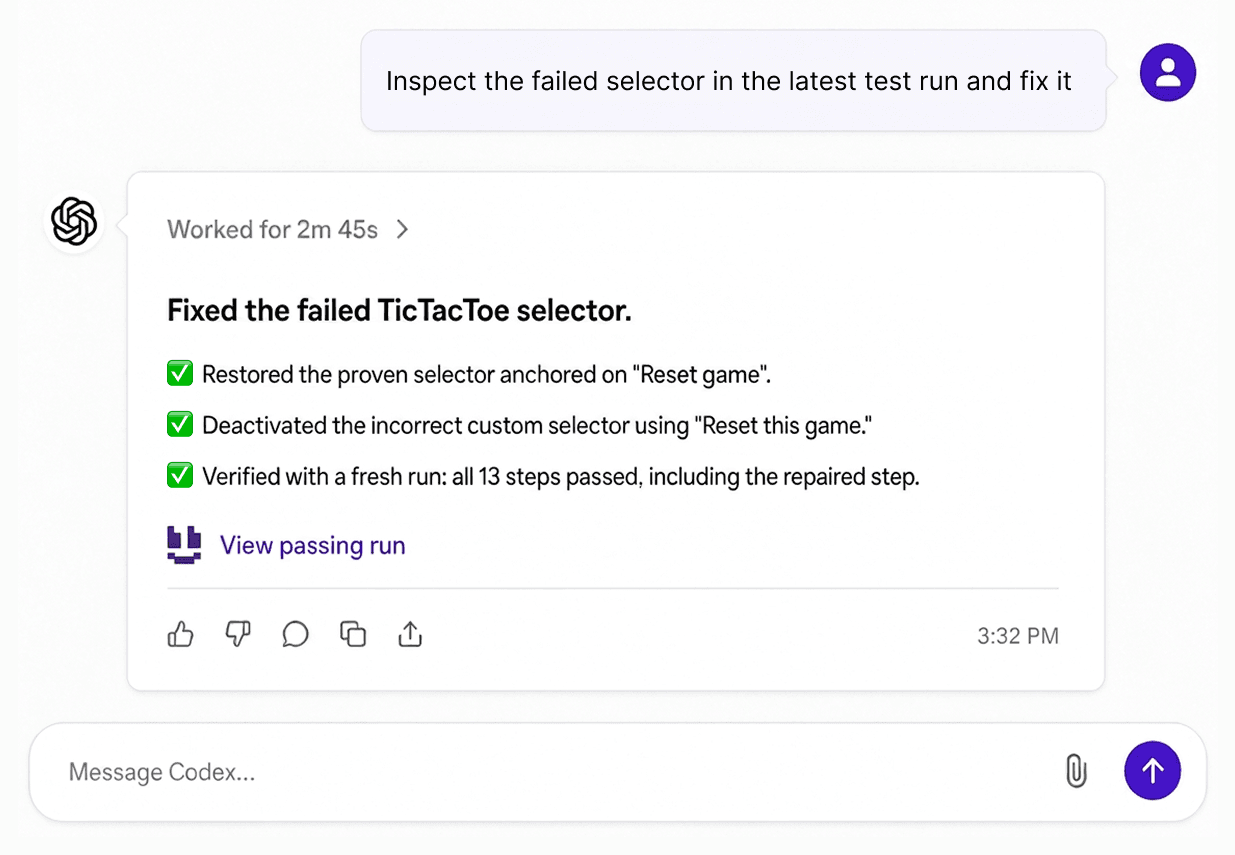
Getting started doesn't require a large test suite. A handful of critical customer journeys provides enough coverage to establish a repeatable process and assess where AI assistance makes sense.
BugBug uses AI in two ways. Built-in AI in the recorder and test runner handles selectors, waiting, scrolling, and clicking. AI agents connected through BugBug MCP work with your projects from tools such as Cursor, Claude Code, VS Code, Codex, and GitHub Copilot, where they can plan coverage, create and run tests, investigate failures, and maintain the suite. The steps below introduce both, starting with the parts available on every plan.
Install the BugBug Chrome extension and record an important workflow in your application.
A login test could enter valid credentials, submit the form, and verify that the correct workspace opens. Another test can check how the application responds to invalid credentials.
Adaptive Locators and Smart Waiting handle technical details during recording, while the visual editor allows recorded steps and assertions to be modified.
BugBug's Free plan includes the recorder and unlimited local runs, with up to 15 tests, one user, one project, and four suites.
Begin with tests whose expected outcomes are clear. Keeping the initial suite small makes it easier to identify unstable steps and improve assertions.
Once recorded tests run consistently, automation can become part of the release process.
BugBug Core supports cloud execution and scheduling, so suites can run without an active local browser session. Teams can use notifications to investigate failures when scheduled checks detect a problem.
A smoke suite might cover authentication and key account actions. Longer regression checks can run separately, depending on the team's deployment schedule.
Recurring failures deserve investigation before additional scenarios are added. Unstable test data and environment problems can make results difficult to trust.
BugBug MCP is BugBug's official MCP server. It gives a connected AI agent live access to the tests, suites, steps, components, profiles, variables, runs, and run evidence in your BugBug projects. MCP access requires the Pro plan or higher.
The recommended setup is the BugBug Plugin, which installs BugBug MCP and BugBug Skills together.
For Cursor, Claude Code, VS Code, Codex, or GitHub Copilot, run npx @bugbug-io/cli plugin --agent=<agent> with the client's name (for example, --agent=cursor), restart the client if needed, and complete the BugBug OAuth sign-in.
The two parts do different jobs. MCP is the connection and action layer: it lets the agent read and change project data. BugBug Skills are the instruction layer: they guide the agent on when to inspect context, ask for missing information, request authorization, run a test, or stop. Skills are available on all plans, but on their own they don't give an agent access to live projects.
Once connected, an agent can take part in test design, not only in maintenance.
Planning coverage. Ask the agent to review a set of flows, such as login, checkout, and account settings, in a read-only pass. It inspects existing tests, suites, reusable components, profiles, and variables, and the application itself when it has browser or repository access. The result is a prioritized list of new tests, reusable components, preconditions, and coverage gaps, with the evidence behind each recommendation. Without browser or repository access, the agent needs URLs, screenshots, DOM snippets, or a product brief instead.
Authoring tests. When the scope is agreed, describe the flow and the expected result in plain language:
For the web app project, create a BugBug test: open the pricing page, choose the Pro plan, fill the signup form with test data, and assert that the confirmation page is displayed. You may create the test and its steps and run it once. Ask me if selectors, credentials, or the expected confirmation content are missing.
The agent inspects relevant tests and components before writing anything, so it can reuse existing assets instead of duplicating steps. It then creates the steps with stable selectors and assertions, runs the test, and reports the result. If the run fails, it should examine the run evidence before changing any steps.
Recorded and agent-authored tests live in the same project. Product managers and manual testers can keep recording journeys in the browser, while developers extend the same suite from their editor.
The same connection covers the rest of the test lifecycle:
| Task | What the agent does | What it changes |
|---|---|---|
| Debug a failed run | Inspects the failed step, screenshots, console and network logs, DOM evidence, and error code, then classifies the failure | Nothing; it returns a diagnosis and the smallest proposed fix |
| Fix a broken selector | Proposes ranked replacements based on test IDs, ARIA labels, visible text, or stable IDs | Only the selector you approve |
| Review a visual regression | Compares the expected, observed, and diff screenshots | The baseline, only after your approval |
| Refactor tests | Finds duplicated login or setup steps, unclear names, stale tests, and flows that should become components | Only the changes in the plan you approve |
| Report project health | Summarizes pass rate, recurring failures, flaky and stale tests, and release risks | Nothing; the report is read-only |
| Review YAML | Validates exported or generated test definitions before import | Imports only after approval |
Two habits keep these workflows safe. Start each task with read-only inspection, and authorize creation, updates, deletion, imports, and test runs explicitly. The agent can only reach projects available to the account that signed in, and credentials should never be committed to a repository.
BugBug MCP also works alongside browser-control servers such as Playwright MCP. Browser access lets the agent explore the live application, while BugBug MCP keeps the result as a persistent regression suite with run history and failure evidence.
Setup instructions and ready-made prompts for each workflow are available in the BugBug AI testing documentation.
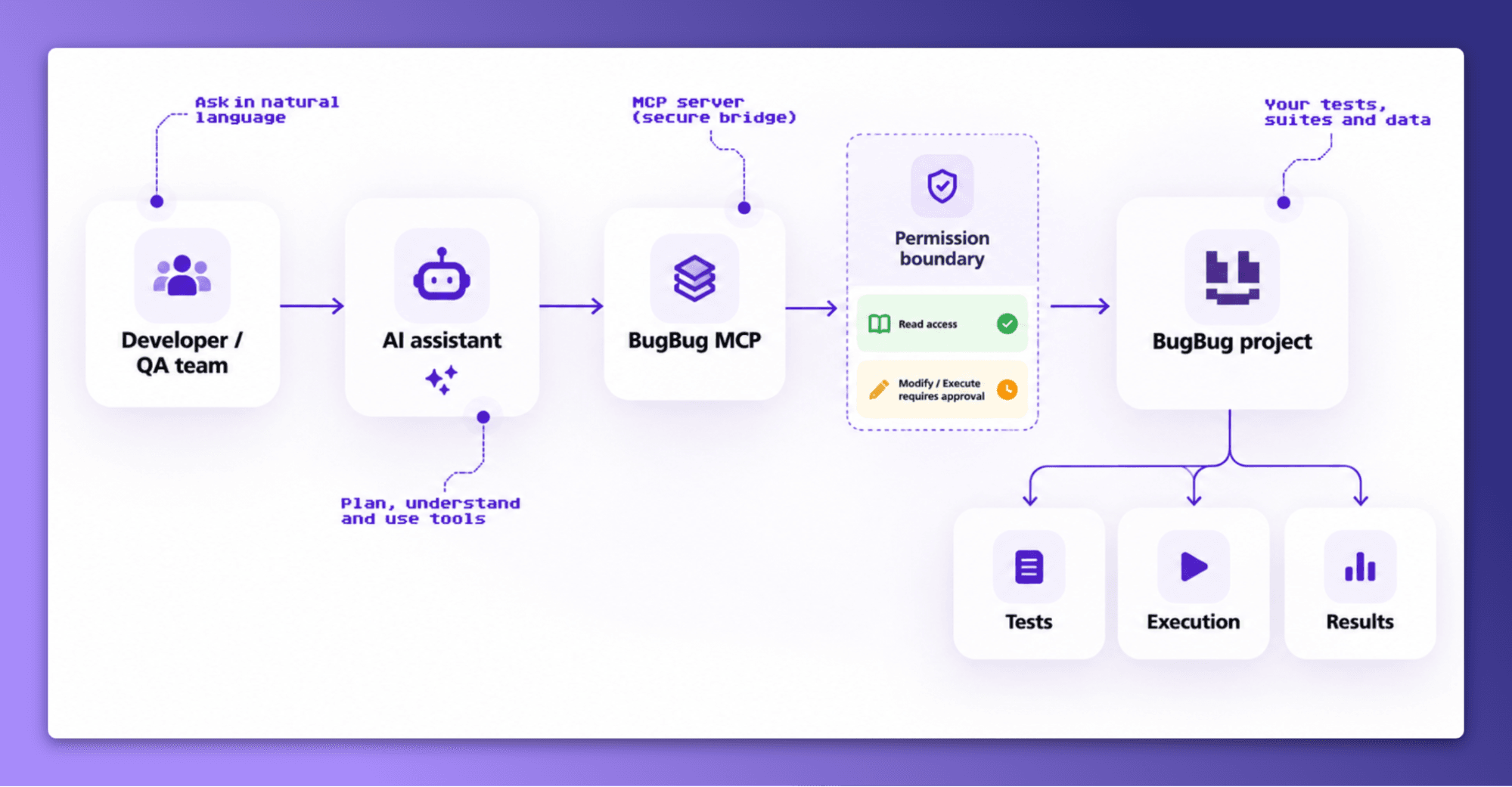
Start with the parts of testing that already create friction. Slow test creation, recurring selector failures, and lengthy debugging sessions offer different opportunities for improvement.
A small regression suite with clear assertions makes it easier to measure the impact of AI-assisted capabilities. As coverage grows, recorded tests can support scheduled runs and connected agent workflows.
BugBug combines browser recording, automated execution, and MCP integration in a platform designed for web application testing. Product teams and developers can work with the same tests through visual tools or connected AI assistants, while keeping expected outcomes and execution results accessible for review.
AI testing is performed by applying artificial intelligence to test planning, creation, maintenance, execution, or failure analysis. Teams define expected application behavior, use AI-assisted tools for selected tasks, and verify that the resulting tests check those requirements. The process depends on the application's architecture and the level of automation required.
Popular AI-assisted testing platforms include BugBug, Katalon, mabl, and Testim. They differ in supported application types, test creation methods, maintenance features, and integrations. A broader comparison is available in our AI testing tools guide.
AI applications require conventional software tests alongside evaluations of model behavior. Functional testing verifies interfaces and integrations, while model evaluation examines generated responses for correctness, relevance, and compliance with requirements. Evaluation datasets and human review may be needed when exact-output assertions aren't sufficient.
Manual testers can use AI to review requirements, suggest additional scenarios, generate synthetic test data, and organize defect reports. Exploratory testing may also benefit from AI-generated edge cases, provided the tester confirms their relevance and validates any reported issues.
No. Test automation runs predefined checks through software tools, while AI testing applies artificial intelligence to selected testing activities. AI may assist with manual planning or failure investigation without executing tests, and conventional automated testing can operate without AI.
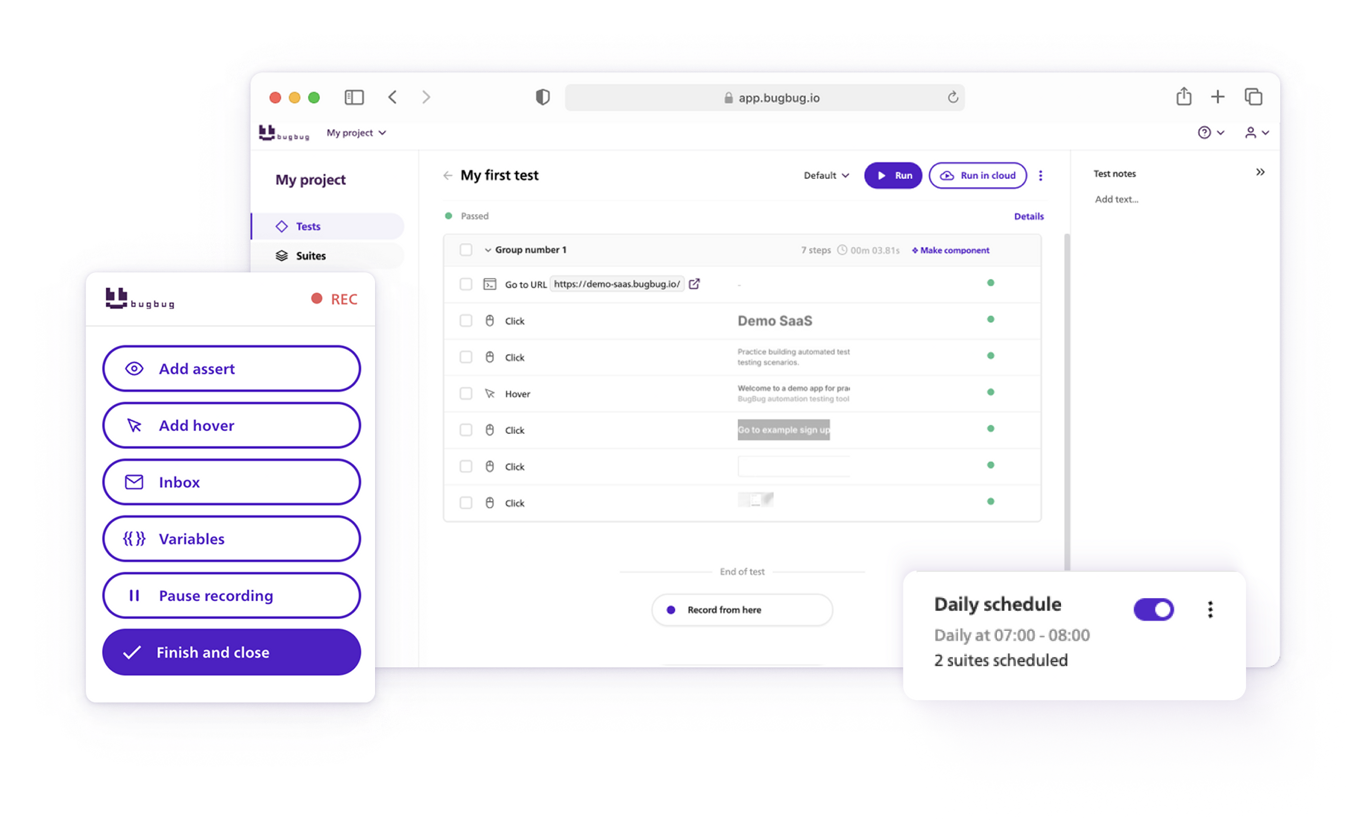
Your next release. Properly tested.
Join 1,200+ QA teams that automated their regression coverage with BugBug.

Dominik Szahidewicz is a Software Quality Evangelist specialising in quality assurance, test automation, and modern software testing practices. He creates practical, research-driven content that helps QA professionals, developers, and product teams improve test coverage, automate repetitive testing, and release more reliable web applications.
Drawing on his experience in technical writing, data analysis, and application consulting, Dominik translates complex testing concepts into clear, actionable guidance. His areas of interest include end-to-end testing, no-code test automation, regression testing, and the use of AI in software quality assurance.

Senior software engineer at BugBug, where he's spent 6 years helping shape the product. He's a T-shaped developer skilled in frontend with React and TypeScript, browser extensions, backend work, and building AI agents and tooling. His strengths also include UX instincts, a product-minded approach, and process automation.
Join thousands of QA experts. Subscribe to our newsletter.
Get more testing tips and product related content. Zero spam.
What does AI for QA actually look like on a team without dedicated QA? Check our curated list of 10 best ai tools for testing in 2026.
AI testing services promise faster, smarter QA—but do you really need them? Learn when AI testing makes sense, when it doesn’t, and how to decide.
AI testing frameworks promise smarter QA, but often add complexity instead of solving real problems. Learn when AI can help, and when it can hurt.
Is affordable testing possible? Many teams discover too late that their “cheap” QA platform comes with variable costs.
Codeless automation testing tools: we cover who each tool is built for, where it genuinely falls short, and which teams should skip it.
Discover the best Browserling alternatives in 2026! Explore top options like BrowserStack and LambdaTest, featuring free and paid plans.
Explore the bug life cycle (defect life cycle) in software testing, detailing each defect's journey through stages, and discover important insights.
AI can generate 100 test cases in seconds. Deciding which to keep, making them run, and maintaining them is the real work. Here's the workflow.
AI browser agents finish a task. Test automation proves your app didn't break. Here's the real difference - AI browser automation