How to Test a Vibe-Coded App Without Writing Test Code
Written byDominik SzahidewiczReviewed byPaweł Bylina


Updated: September 9, 2026View as Markdown
You ask Cursor or Claude to add one small feature to your vibe-coded app. It works. You ship it. Three days later a user emails you: login is broken. It has probably been broken since that prompt, because you stopped checking login four prompts ago. Testing a vibe-coded app is mostly about catching that before the user does.
To test a vibe-coded app, identify the user journeys that must keep working, define the expected result of each one as assertions, automate those browser flows with a test recorder, and rerun them after every meaningful AI-generated change. Start with authentication, payments, and the product's core action, then expand to the flows teams usually skip.
This is for small to mid-sized SaaS and web teams — including product managers and other non-technical contributors — who need a practical way to automate web test flows without writing code. We'll cover how to choose critical journeys, do a manual baseline run, record end-to-end tests, add assertions, keep tests running continuously after AI changes, and plug them into CI/CD so regressions show up early instead of in customer emails.
That's the short version. Here's how to set it up.
Nothing new, technically. Testing a vibe coding project is still functional testing, end-to-end testing, smoke testing, regression testing and security testing. There's no separate discipline called "AI app QA." What changed is the workflow and the speed of change.
When a person writes a feature, the blast radius is predictable - they touched three files and know which three. When you prompt for one, the model may also refactor a shared component, rename a state variable or simplify a validation rule you needed. You asked for a discount field. You got edits across six files you never opened.
So the question shifts. Not "did my new feature get built correctly?" but "did anything that already worked stop working?" The job is to decide which behaviors the next iteration isn't allowed to break, then check them automatically.
This isn't an "AI writes bad code" argument. AI-generated code is frequently fine. The problem is arithmetic: change velocity outruns the capacity of one person clicking through the app after each prompt.
Keep this example in mind for the rest of the article.
The prompt: "Add a discount code field to checkout."
You test it. Valid code, total drops, order goes through. Ship it. What you didn't test:
Any of those can break from a checkout refactor. None are the thing you just built, so none get clicked.
Large-scale analysis of AI-authored commits suggests AI-generated changes can still introduce bugs, code-quality issues and security problems that survive later revisions; GitClear's review of 211 million changed lines found code duplication rising and refactoring falling through 2024. Be precise about what that proves. It's a codebase-drift signal, not a measure of how often user flows break. It can't tell you whether your checkout still works. Only a test that exercises checkout can.
This lands hardest on small teams. Across BugBug's customer base, 61% have zero to three dedicated QA people and 77% run engineering teams of five to forty - the shape of most vibe-coded products too: plenty of shipping capacity, almost no checking capacity. Hence the value of learning to automate regression testing without developers instead of routing every check through the one person who can read the diff.
Don't start with a coverage percentage. Start with consequence. If this flow breaks, do you lose a user, lose money, or lose access to the product?
| Priority | Flow | What to verify |
|---|---|---|
| P0 | Signup and login | User can create an account, authenticate and reach the correct state |
| P0 | Core product action | The main reason someone uses the app still works end to end |
| P0 | Payments / checkout | Payment completes and the correct account or order state follows |
| P1 | Password reset / email confirmation | Email arrives and the link completes the intended flow |
| P1 | Permissions | Logged-out users and different account types see only what they should |
| P1 | Destructive actions | Delete, cancel and remove actions affect the correct data |
| P2 | Error states | Failed requests produce usable feedback rather than silent failures |
| P2 | Secondary flows | Settings, profile changes, filters, less-used screens |
Everything in P0 belongs in your smoke testing suite — the checks you run after every meaningful change, not just before releases. Three to five tests is a legitimate start; ten well-chosen ones catch more real regressions than sixty written to hit a number.
That ordering isn't theoretical: end-to-end regression, critical-path monitoring and smoke tests are the three primary use cases across BugBug's account base (ICP analysis, 2026). Teams converge on the same short list because that's where the consequences are.
Not technical test cases. Use plain language to describe the happy path for the core task so a non-technical person can follow it:
For each journey, also note the main failure modes and any important data boundaries, using a boundary-first testing approach rather than only naming screens or UI elements.
Write three to five. Any more and you'll never finish step one. The structured version is here: how to create a test plan.
These journeys are your contract. Everything below makes them enforceable.
This is where most first attempts fall apart. "Click Create Account" is an action — it proves a button was clickable, not that an account exists.
A test needs an outcome that covers the happy path and what happens when key inputs are missing or invalid:
Click Create Account → user reaches /dashboard → the account name is visible in the header → a confirmation email arrives.
Actions are what you do. Assertions are what must be true afterwards. Every critical journey needs at least one, and it should be something a broken build would actually fail: a URL, a piece of text, a status change, a record that now exists. Define checks around user input and server side outcomes too, not just visible UI changes.
If you can't write down the expected result, you don't have a test. You have a script that clicks.
Open a fresh browser profile and walk the flow as a brand-new user for basic manual verification. Don't debug code. Just observe what happens and what state you expect, because this first pass often catches usability issues and gaps between the product and the user's mental model before you automate the flow. You'll usually find something already broken — a confirmation email that never sends, a redirect to the wrong page. Fix that first, because automating a broken flow gives you a red test you'll learn to ignore.
You do this pass once. Everything below exists so you never repeat it by hand.
Now make the journey repeatable. Write it in Playwright or Cypress as test scripts, or record it. If you're not planning to own a framework, record it. With an AI-assisted test recorder:
No WebDriver setup, no Selenium grid, no Docker, no runner config. The recorder handles the work behind selectors and timing — adaptive locators so a renamed CSS class doesn't kill the test, smart waiting so it doesn't fail because a spinner ran 200ms long. If you do keep tests in the repo, version control matters because they should evolve with the app.
The division of labor matters: AI assists with creating and maintaining the test. You decide which behavior is worth protecting. Nothing reads your repo and works out what your product is for. Claude Code is one example of an ai tool that can help generate or refine tests, while you still choose what to protect. If it's your first time, here's how to record your first automated test.
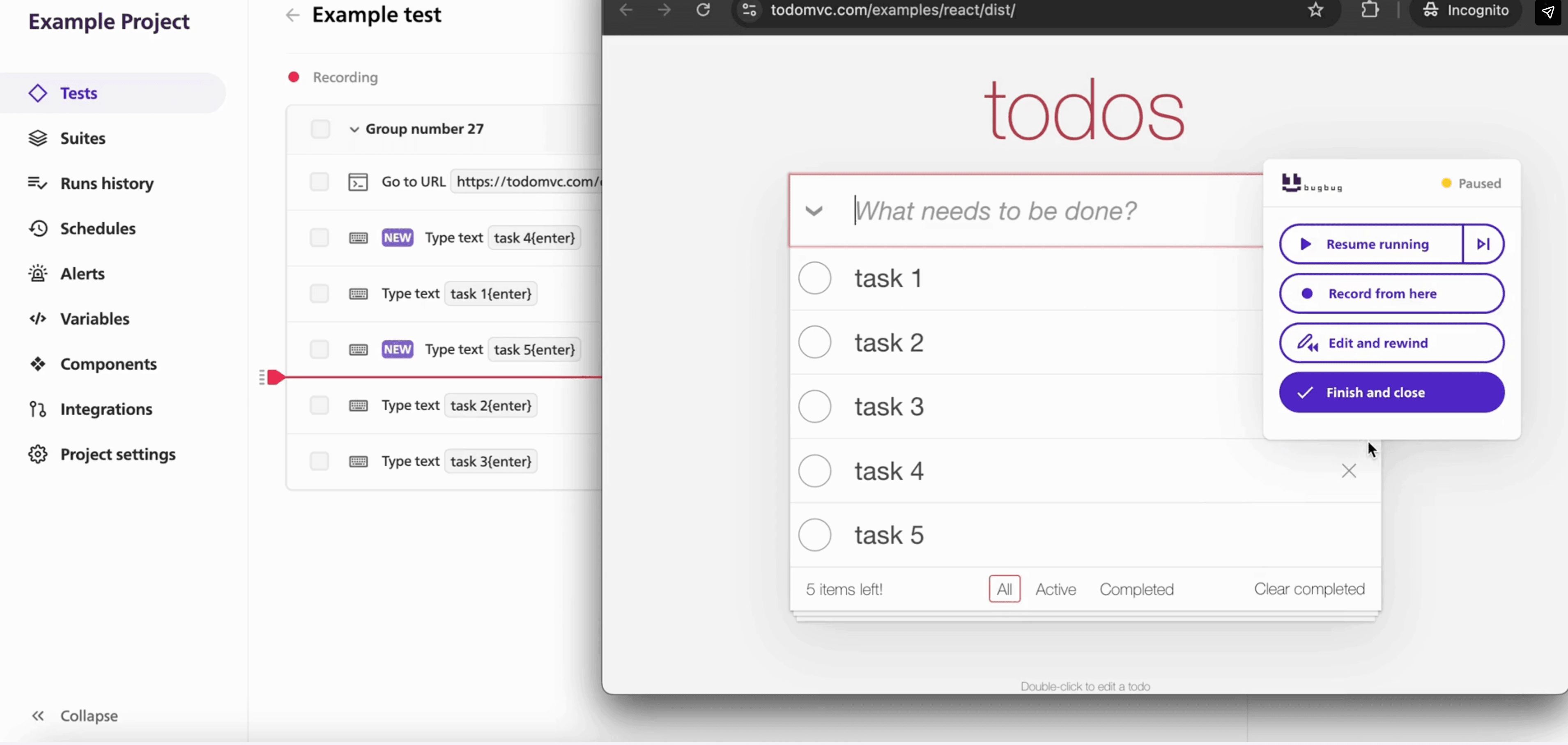
A recorded flow with no assertions only proves a browser executed some steps. It passes on a badly broken app as long as the buttons exist. Go back through and add checks:
Weak test: Click Submit.
Useful test: Click Submit → verify the dashboard is displayed → verify the account name appears → verify the plan badge shows the new tier.
The second fails when the app is broken. The first fails only when it's very broken. One assertion per meaningful state change. This is also where manual checks on a single line of logic or one branch of generated code can save you from a passing but shallow browser test.
Some flows get implemented once and never verified again, because they're tedious to check by hand.
Email flows are the biggest. Signup → confirmation email → confirmation link → login is a critical path almost nobody automates, because it means a fresh inbox every run. A built-in testing inbox handles that: the test creates a unique address, the app sends to it, and the test opens the message and clicks the link in the same run. Same for password reset.
Also worth covering: popups and second tabs (OAuth, payment providers), and test accounts in different states driven by variables rather than hardcoded credentials, so you avoid hardcoded secrets. Use environment variables and the env file for api keys, passwords, and other encryption keys, not recorded steps or source code; sensitive files should be ignored in version control and must not be publicly accessible in the deployed app. Integrations with third party services like OAuth or payment providers need extra checks because they often expose edge cases outside the main flow.
Back to the discount code.
You prompt for the field. The model makes its edits. Instead of clicking only the discount box, you run the test suite: login, checkout with and without a discount, the core action, the upgrade flow, with existing integration tests running alongside the browser checks when you have them.
All green means the change didn't break what you'd already decided was critical. If checkout-without-discount goes red, you found it in ninety seconds instead of from a support email on Saturday.
That's the loop:
Prompt → Build → Run tests → Ship
The test run is the only part that doesn't depend on you remembering what to check. That's exactly the step most vibe coders skip.
While it's a prototype with no users, running tests locally when you remember is fine. That changes when real users have accounts, money moves through the app, or you deploy on a cadence. Move the smoke suite off your laptop: schedule cloud runs against production, add a quick startup check before deploy by rerunning the suite and confirming environment-specific configuration, and run E2E tests in CI/CD so a failing checkout blocks the deploy instead of reaching users.
This step separates teams who get value from automated testing from teams who abandon it. In BugBug's analysis of its best-retained accounts, the clearest signal wasn't how many tests a team had — it was whether they'd wired the suite into the release pipeline through CI, webhooks or Slack and treated it as a gate rather than a check someone runs when they remember. Production code still needs manual checks outside browser flows, including verifying lockfiles for reproducible builds and reviewing dependency risk, since 85-95% of applications rely on open-source libraries and projects. A suite nobody looks at produces false confidence. For a public web app, deployment hardening can also include a web application firewall to reduce attack exposure once the app is live.
There's no universally correct answer, only one for your team's shape.
| Method | Best when | Main trade-off |
|---|---|---|
| Manual testing | Prototype is changing hourly and has no real users | Every regression pass has to be repeated manually |
| Playwright / Cypress | Engineers want full framework and code ownership | Setup and ongoing maintenance require engineering time |
| Low-code recorder | Small web team wants repeatable E2E coverage without owning a framework | Less suitable for developer-first teams needing full framework control |
If your engineers want tests in the repo, reviewed in pull requests, versioned with the application — go Playwright. Test-as-code gives you control no recorder matches, and those tests also benefit from standard code review alongside app changes. The cost is that someone owns that framework permanently. Worth stating plainly, since BugBug publishes this article: when BugBug asked its users in a February 2026 survey what they'd switch to if BugBug disappeared, Playwright was the most common answer by a wide margin, Cypress second.
The recorder case is different. If the person who knows the critical flows best is a founder, a PM or a support lead, they can protect the flow themselves instead of filing a ticket and waiting a sprint — roughly one in five BugBug accounts. That also makes sense when vibe coding tools or ai coding assistants help a team move faster, but important flows still need manual verification. It's the practical route to QA automation without a dedicated QA team, and why codeless testing tools exist as a category. For the discipline underneath all three, start with end-to-end testing.
One thing that isn't a trade-off: doing nothing.
Worth being blunt, because this market oversells.
Browser E2E tests don't replace:
A separate security checklist should verify security headers, publicly accessible routes, sensitive files, api keys, environment variables, hardcoded secrets, and other exposed secrets before a deployed app goes live.
Say it plainly: a passing E2E test does not prove that a vibe-coded app is secure. It proves a specific user journey still behaves as expected. Anything handling payments, personal data or authentication needs its own security review, however green your suite is. For higher-risk ai built applications, get a security team review when one is available.
Run this before you let people in, and again before each meaningful release:
☐ Signup works with a fresh account
☐ Existing users can log in
☐ The app's core action completes end to end
☐ Payment flow produces the correct account or order state
☐ Password reset or email confirmation works
☐ Critical pages reject unauthorized access appropriately
☐ Every critical automated flow contains assertions, not just clicks
☐ Smoke tests pass after the latest AI-generated change
☐ Run any existing integration tests or test suite checks before release
☐ Failed tests have an owner rather than being ignored
☐ Security-sensitive features received a separate security review
☐ Confirm no sensitive files, env file values, API keys, or other hardcoded secrets are publicly accessible
☐ If the latest AI-generated change touched them, do manual verification of the login flow, the core task, and one important failure case
If you can't tick all ten, you know what to fix next.
Vibe coding made implementation disposable. Any file can be regenerated in thirty seconds, and often is. Your users' requirements aren't disposable — login still has to work, checkout still has to work, after this prompt and the next forty.
So here's the decision. Vibe coded applications don't need a new testing philosophy. They need the old one run more often, because ai coding tools rewrite more of the app per change than a person would, and the blast radius lands somewhere you weren't looking. Pick the three to five journeys that decide whether your app works, define the expected outcome of each, record them once, and rerun them every time an ai assistant touches the codebase. That suite is a contract between the next change and the behavior nobody agreed to change. Keep its scope honest: it protects behavior, not safety. Nothing here makes your app bulletproof.
Your next eight moves:
Let AI change the implementation. Make it prove that the behavior still works.
Shipping faster with AI means running regression checks more often. With BugBug, you can record the browser flows your product depends on and rerun them after every meaningful change, without maintaining a separate testing framework. In its February 2026 user survey, the most-cited benefit was time saved (28.1%), followed by not having to write code (18.8%); it holds 4.8/5 on G2. It runs on Chromium only.
Happy (automated) testing!

Your next release. Properly tested.
Join 1,200+ QA teams that automated their regression coverage with BugBug.


Dominik Szahidewicz is a Software Quality Evangelist specialising in quality assurance, test automation, and modern software testing practices. He creates practical, research-driven content that helps QA professionals, developers, and product teams improve test coverage, automate repetitive testing, and release more reliable web applications.
Drawing on his experience in technical writing, data analysis, and application consulting, Dominik translates complex testing concepts into clear, actionable guidance. His areas of interest include end-to-end testing, no-code test automation, regression testing, and the use of AI in software quality assurance.

Paweł Bylina is a software engineer, test automation product leader, and founder and CEO of BugBug, a no-code end-to-end testing platform used by teams in more than 50 countries. He has over 15 years of experience building software and leading engineering teams as a developer, engineering manager, CTO, and SaaS founder.
Paweł created BugBug after repeatedly seeing teams struggle with test automation that was costly to implement and difficult to maintain. He now works closely with QA engineers, developers, and engineering leaders to improve how software teams create and maintain reliable automated test coverage.
His expertise includes end-to-end testing, regression testing, browser automation, no-code test automation, QA strategy, and software quality. He shares practical insights drawn from building BugBug and working with software teams worldwide.
Join thousands of QA experts. Subscribe to our newsletter.
Get more testing tips and product related content. Zero spam.
AI can generate 100 test cases in seconds. Deciding which to keep, making them run, and maintaining them is the real work. Here's the workflow.
Learn how to automate regression testing without devs or QA. Discover a risk-based strategy and practical workflows.
Discover the essential QA tester skills for 2026! Learn the technical and soft skills required to excel as a QA Tester.
Build an effective QA strategy aligned with your business goals. Explore best practices in quality assurance and test automation.
Build a CI/CD testing pipeline in 30 minutes with BugBug. Learn how to run reliable E2E smoke tests on every PR, block bad merges, and scale safely.
Read this comprehensive guide on how to choose the right CI/CD tool. Selecting the tool that aligns with your project is essential.
Discover how to calculate ROI for test automation with easy formulas and practical examples. Learn to evaluate costs and track results effectively.
Learn how to create a test plan for the testing process of your web application. Discover how to write a test plan with examples in the article.
This article delves into the significance of crafting comprehensive test cases for login pages, highlighting various scenarios.