AI Test Case Generation: How to Review & Automate
Written byDominik SzahidewiczReviewed byMariusz Wójcik


Updated: September 8, 2026View as Markdown
Give a model a user story and it will hand you 20 test cases before you've finished reading the ticket. Positive, negative, boundary, recovery. Preconditions and expected results, formatted in a neat table.
For about fifteen years, that was the expensive part of testing.
It isn't anymore.
The expensive part now sits entirely downstream: deciding which of those 20 belong in a regression suite, getting them into something that actually executes, and keeping them honest six months later when three of them fail on a Tuesday and nobody remembers what they were protecting.
Most articles about AI test case generation stop at step one, because step one is the part that demos well. This one is about next steps.
👉 Check our guide: How to use AI with BugBug?
AI test case generation turns product inputs — requirements, user stories, acceptance criteria, bug reports, support tickets — into test scenarios and test cases. A language model reads the requirement, extracts the entities and rules, and drafts tests against them.
Give it this:
A registered user should be able to reset their password using an email link.
And you'll get back checks for a successful reset, an unknown email address, an expired link, a reused link, an invalid password, mismatched confirmation, repeated reset requests, and logging in with the old password after the reset completes.
That's genuinely useful. It took ten seconds and it caught at least two things most people miss on a first pass.
Here's where it stops. The model doesn't know which of those scenarios carries real business risk for your product. It doesn't know which ones you already cover. It doesn't know that your reset flow has never broken in three years but your invite flow breaks every other release. It doesn't know who on your team will investigate the failure at 09:15 on release day.
Generating possible tests and building useful regression coverage are two different jobs. AI is now excellent at the first one and has no opinion about the second.
BugBug's AI doesn't generate complex test suites from thin air. It does something more useful: it makes recorded tests stable, keeps them maintained, and lets AI agents work inside your test suite - with your approval.
👉 Stable selectors from day one. AI learns multiple ways to find each element. When the app changes the CSS, your test doesn't break.
👉 Smart debugging. Tests fail? AI analyzes DOM snapshots and run history to pinpoint why, then suggests a fix. You review it. No silent rewrites.
👉 YAML export forever. Own your tests on every plan, including free. Export any test as readable YAML, store in Git, leave anytime.
👉 AI agents, governed. Install BugBug Plugin and Claude, Cursor, or VS Code get direct access to your suite via MCP. Agents can run tests, debug failures, and propose improvements—all within your approval workflow. BugBug Skills guide them through safe patterns.
One command gets you started: npx @bugbug-io/cli plugin --agent=claude
For practical workflows, see how to use AI with BugBug.
Start free. Delegate test work to your AI. Stay in control.
It helps to look at the whole pipeline and be honest about what got cheaper.
| Step | Who does it | Did AI make it cheaper? |
|---|---|---|
| Think of what could be tested | AI + human | Dramatically. Near zero cost. |
| Decide what's worth testing | Human with product knowledge | No. Unchanged. |
| Turn a scenario into a running test | Human or tool | Somewhat, if the tool fits your team. |
| Keep it running for two years | Whoever owns it | No. Arguably worse. |
| Know what a failure means | Human | No. |
Only one row got dramatically cheaper. And cheap generation puts more load on every row beneath it, because the constraint that used to limit suite size — how long it took a person to write tests — is gone.
The wider industry data points the same way. Faros AI's 2026 engineering report found PR volume up 98% and review time on AI-generated code up 91%. GitClear's analysis of 211 million lines found duplicated code blocks rose 8x in 2024, the first year AI-introduced cloning outpaced refactoring. Teams reporting problems with flaky tests went from 10% in 2022 to 26% in 2025.
Nothing in that picture says "we needed more test cases." It says the volume arrived and the maintenance capacity didn't.
The most useful prompt isn't "write my test cases." It's "help me find what I missed."
You already know the main workflow. For checkout: customer adds a product, enters payment details, pays, order is created. You don't need a model to tell you that.
What you want is pressure on the edges:
That's coverage discovery, and it's where the technology earns its place. You still decide which of those risks are real for your product.
Compare two prompts.
Weak:
Generate test cases for checkout.
The model invents your product, then tests the product it invented.
Better:
We have a SaaS checkout flow for logged-in customers. The user selects a monthly or annual plan, can apply one discount code, enters card details, and confirms payment. A successful payment upgrades the account immediately. Generate positive, negative, boundary, and recovery scenarios. Focus on risks that could affect revenue or prevent the customer from accessing the product.
Now it knows the constraints, the states, and which failures you consider expensive. The output changes completely.
Most teams jump straight to detailed step-by-step cases and drown in output. Start one level up:
| Scenario | Type | Why it matters |
|---|---|---|
| Successful monthly subscription | Happy path | Core revenue flow |
| Successful annual subscription | Happy path | Alternative purchase path |
| Declined payment | Negative | Common transaction failure |
| Invalid discount code | Negative | Pricing validation |
| Session expires during checkout | Recovery | User loses progress |
| Double payment submission | Edge case | Duplicate charge risk |
| Payment succeeds, UI response fails | Recovery | Inconsistent payment state |
That's a coverage map you can argue about in ten minutes. A stack of 40 fully-written cases is a document you'll skim once.
From there, sort each scenario into: automate as regression, verify manually, keep as an exploratory idea, or ignore**.**
Three things get called "test cases" and they do different jobs.
| Output | Example | Purpose |
|---|---|---|
| Test scenario | User attempts payment with an expired card | Decide what should be tested |
| Manual test case | Preconditions + 8 numbered steps + expected result | Tell a person how to test it |
| Executable test | Automated browser workflow with assertions | Test it repeatedly, forever |
AI can produce all three. Your team may only need two of them — sometimes one.
Watch what happens when you generate the middle one and your goal is automation. The model writes:
Then a tester opens an automation tool and: opens the login page, enters a registered email, enters the correct password, clicks Log in, adds an assertion on the dashboard.
The same workflow, built twice. Once as prose, once as something that runs. For straightforward browser regression, that middle artifact is a translation layer you're paying for and nobody reads again.
When the written case does earn its place: formal test documentation is required, evidence is needed for compliance or audit, an external vendor or another team will execute the tests, the workflow encodes complex business rules that need review before implementation, or the test is genuinely manual and needs human judgment. In those cases an AI-drafted document saves real hours — just review it before it goes anywhere near sensitive data.
The distinction worth making internally: documentation you need, versus documentation you produce because that's how testing has always been done.
This is the part that gets skipped in every "AI generated 200 test cases" post.
A test in your regression suite is not an asset you acquired. It's a subscription you signed. It has to stay relevant as the product changes. Someone has to investigate it when it fails. Someone has to know what it was protecting, or the fastest way to make the pipeline green is to delete it.
Run the arithmetic. A 100-test suite with a 5% non-product failure rate produces five investigations per run. At two runs a day, that's ten interruptions daily, most of which end in "the selector moved." That's not a testing strategy, it's a rota.
AI-generated tests carry a specific version of this problem. They're generated from a snapshot of the requirement, so they drift from the product faster than tests written by someone who understood why the flow exists. And self-healing makes it subtler, not simpler — an agent can repair a broken selector and hand you a passing test that no longer checks the thing you cared about.
So before any generated scenario goes into regression, one question:
What specific product risk does this test protect us from?
If you can't answer in a sentence, don't automate it yet. Generation being free is exactly why selection has to get stricter.
Instead of:
Generate 30 test cases for this feature.
Try:
Analyze the feature below and identify the smallest set of test scenarios that would provide strong regression coverage. Prioritize customer-facing failures, revenue-critical workflows, permissions, destructive actions, and states that are hard to recover from. Separate essential regression cases from exploratory edge cases. Do not generate click-by-click instructions.
Same model, different job. You've changed it from a volume machine into a prioritization tool.
👉 Learn more about AI testing from our guide on the best AI Tools for Testing
Here's the question nobody's answering well yet: if a model generated the scenario, and an agent maintains the automation, who decides whether the test still validates the right business outcome?
That's not a browser automation question. It's a question about test intent — and intent lives with whoever understands the product, not with whoever wrote the code.
The oldest failure mode in test automation is still the most common one: a suite gets built, releases break it, nobody was ever assigned to fix it, and within two quarters the automation is decoration. Ownership was never the tooling's job to supply.
AI makes that failure mode arrive faster, because now nobody even wrote the tests. It's much easier to abandon a suite you didn't author.
Which means the practical requirement before you generate anything is boring and organizational:
Answer those four and generation volume stops mattering. Leave them open and it makes things worse.
👉 Check how BugBug's skills for AI agents work
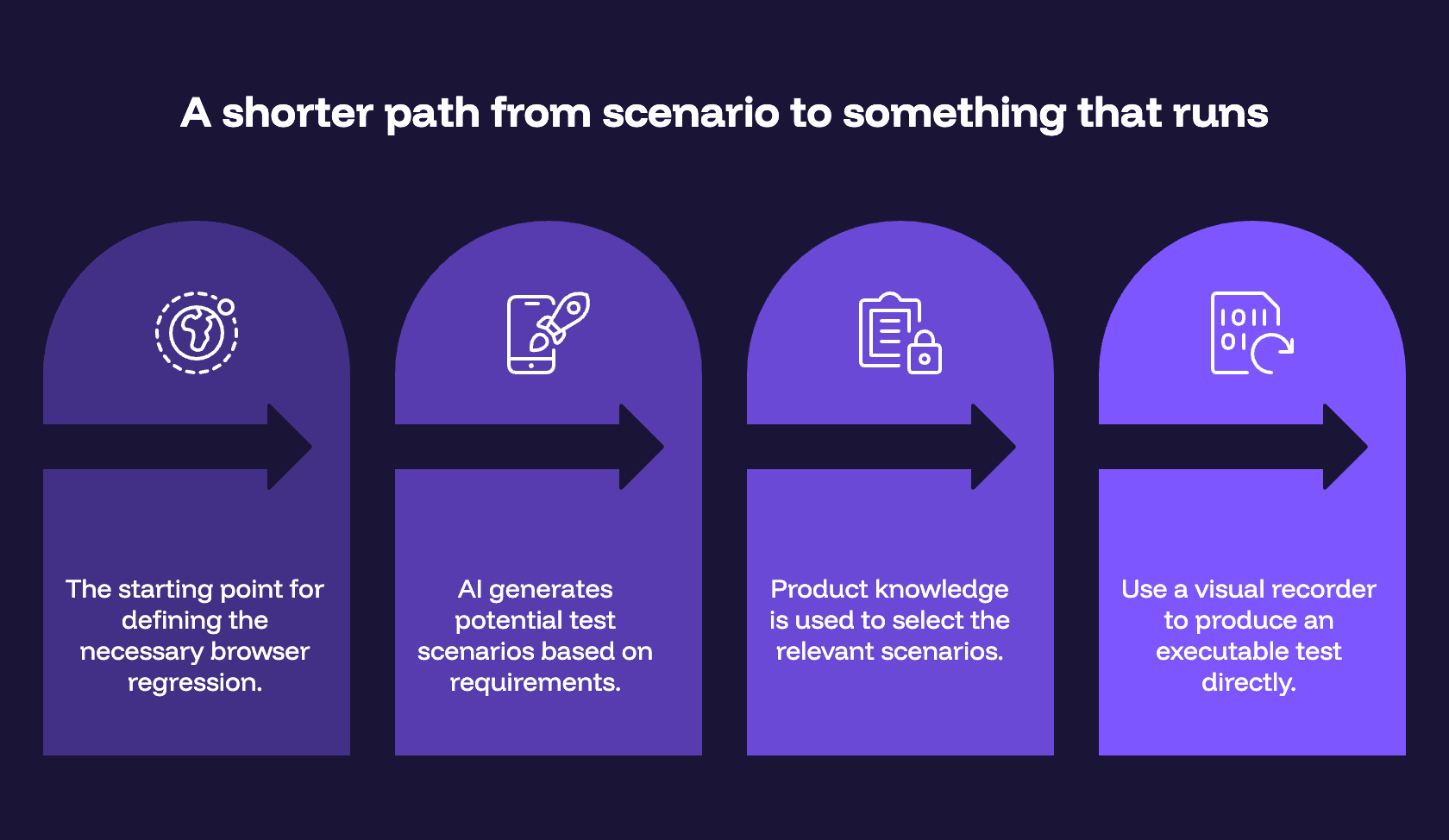
If the goal is repeatable browser regression, the pipeline can be shorter than most teams make it:
Requirement → AI proposes scenarios → human selects what matters → record the executable test
Steps one and two take minutes. Step three is where your product knowledge does the work. Step four is where most teams stall, because turning an agreed scenario into a Playwright spec means a developer, a repo, a CI config, and a maintenance owner — four things the average 30-person SaaS team can't spare.
This is where a visual recorder changes the shape of the problem. BugBug lets the person who already understands the feature click through the workflow in Chrome and produce an executable test directly — no intermediate document, no framework code, no Selenium grid, no Docker. Edit & Rewind means you can insert a step mid-test and re-run from that point instead of re-recording the whole flow, which is where most of the day-to-day maintenance cost actually sits.
Worth being clear about what BugBug isn't: it doesn't generate test cases from your requirements. That's the part AI already does well and there's no reason to rebuild it. BugBug is the layer after the decision — execution, ownership, and maintenance. It's also Chromium and Chrome only, with no Firefox, Safari, mobile, or desktop app testing. If cross-browser coverage is a hard requirement, this isn't your tool and you should look at other codeless testing options first.
For teams where it does fit, the tests don't stay locked in the visual editor. The same regression assets are reachable through API and CLI for deterministic engineering workflows — running the suite from CI after every deploy — and through MCP for approved AI agents that need to discover existing coverage, run the relevant tests, or investigate a failure. An API is right when the workflow is already known. MCP is right when an agent has to interpret an instruction and decide what to do next. (More on that distinction in MCP vs API and How to Use MCP for Test Automation.)
The useful end state isn't an agent that generates more tests. It's one regression system where humans define intent, the tests are readable by the people who own the product, and engineering and agents work against the same assets.
Yes — for a narrower job than the demos suggest.
Use it when:
Skip it when:
And in every case: decide who owns the test before you automate it. Generation is the cheap step now. Ownership, execution, and maintenance are the ones that still cost you something — and they're the ones that determine whether the suite is still running next year.
💡 If turning agreed scenarios into tests that actually execute is your bottleneck — not generating more of them — BugBug's free plan gives you 1 user and unlimited local runs. Record one critical flow and find out whether step four was ever your problem.
Happy (automated) testing!

Your next release. Properly tested.
Join 1,200+ QA teams that automated their regression coverage with BugBug.


Dominik Szahidewicz is a Software Quality Evangelist specialising in quality assurance, test automation, and modern software testing practices. He creates practical, research-driven content that helps QA professionals, developers, and product teams improve test coverage, automate repetitive testing, and release more reliable web applications.
Drawing on his experience in technical writing, data analysis, and application consulting, Dominik translates complex testing concepts into clear, actionable guidance. His areas of interest include end-to-end testing, no-code test automation, regression testing, and the use of AI in software quality assurance.

Senior software engineer at BugBug, where he's spent 6 years helping shape the product. He's a T-shaped developer skilled in frontend with React and TypeScript, browser extensions, backend work, and building AI agents and tooling. His strengths also include UX instincts, a product-minded approach, and process automation.
Join thousands of QA experts. Subscribe to our newsletter.
Get more testing tips and product related content. Zero spam.
Compare the best SaaS testing tools for startups, QA, and dev teams. See use cases, pricing, and key SaaS flows to automate.
Discover essential business tools for startups. Read the article to find the right tools for your success.
Learn how to automate regression testing without devs or QA. Discover a risk-based strategy and practical workflows.
Discover the essential QA tester skills for 2026! Learn the technical and soft skills required to excel as a QA Tester.
Learn exactly when to run regression tests—after features, fixes, updates, and on a schedule—plus tips to automate smoothly with minimal churn.
Learn how to identify and fix test failures with this complete guide on what to do when your test fails.
See how AI-assisted recording is changing UI testing in 2026: faster test creation, less maintenance, and what it means for QA-light teams.