# Top Automation Tools: 10 Best Picks for 2026
Written by Dominik Szahidewicz
Published: 2026-01-21
Updated: 2026-06-17
\[TABLE\_OF\_CONTENTS\]
Test automation has become essential for modern software teams. Whether you’re building a SaaS product, a mobile app, or a complex web platform, testing needs to be fast, reliable, and scalable.
Automated testing plays a crucial role in streamlining development processes by automating repetitive tasks, which enhances software quality, increases efficiency, and ensures broader [test coverage](https://bugbug.io/blog/software-testing/test-coverage/).
In this guide, we break down the **10 best test automation tools** in 2026—ranging from developer-focused frameworks to AI-powered and codeless platforms.
## 🎯 TL;DR - Best Automation Tools in 2026
`{"name":"dotted-frame","children":[{"name":"dotted-frame-details","children":[{"attributes":{"listType":"bulleted","listItemId":"ee0ae8196c2b7768d69c86afca108d7af","listIndent":0},"name":"paragraph","children":[{"attributes":{"bold":true},"data":"BugBug"},{"data":" – Best for startups and lean QA teams (low-code / no-code)"}]},{"attributes":{"listType":"bulleted","listItemId":"e96f8d00ad195fa3c3bf062198453e460","listIndent":0},"name":"paragraph","children":[{"attributes":{"bold":true},"data":"ACCELQ"},{"data":" – Codeless, AI-native automation across web, API, mobile, desktop, and ERP"}]},{"attributes":{"listType":"bulleted","listItemId":"e58d2e1083084fda68afce908b664d377","listIndent":0},"name":"paragraph","children":[{"attributes":{"bold":true},"data":"Testsigma"},{"data":" - AI-powered automation at scale"}]},{"attributes":{"listType":"bulleted","listItemId":"e9354de512d7087d31c5032e350d66ace","listIndent":0},"name":"paragraph","children":[{"attributes":{"bold":true},"data":"BrowserStack"},{"data":" - Cross-browser and low code automation"}]},{"attributes":{"listType":"bulleted","listItemId":"e1a195080c865200911869d53fb9d53d7","listIndent":0},"name":"paragraph","children":[{"attributes":{"bold":true},"data":"Selenium"},{"data":" – Dev-friendly, highly customizable, open-source standard"}]},{"attributes":{"listType":"bulleted","listItemId":"e8f73980f7fb537adfbc0d6445d5a1520","listIndent":0},"name":"paragraph","children":[{"attributes":{"bold":true},"data":"Playwright"},{"data":" – Modern alternative with automatic waits and robust debugging"}]},{"attributes":{"listType":"bulleted","listItemId":"e6708d8e626a22f3699fdd74a2a832321","listIndent":0},"name":"paragraph","children":[{"attributes":{"bold":true},"data":"Cypress"},{"data":" – Great for frontend JS teams, real-time testing in browser"}]},{"attributes":{"listType":"bulleted","listItemId":"ec6526b48d7996d3f0b351fe2b293f73a","listIndent":0},"name":"paragraph","children":[{"attributes":{"bold":true},"data":"Testim"},{"data":" – AI-powered and scalable, with self-healing locators"}]},{"attributes":{"listType":"bulleted","listItemId":"e9c26a55c4a20c9026ef68bf4ee141ce2","listIndent":0},"name":"paragraph","children":[{"attributes":{"bold":true},"data":"TestCafe"},{"data":" – Lightweight JS/TS framework, no browser plugins required"}]},{"attributes":{"listType":"bulleted","listItemId":"eff19c26ef112adea17592a0a8a801cc1","listIndent":0},"name":"paragraph","children":[{"attributes":{"bold":true},"data":"Rainforest QA"},{"data":" – No-code + crowdtesting for startups without QA teams"}]},{"name":"paragraph"}]}]} * **BugBug** – Best for startups and lean QA teams (low-code / no-code) * **ACCELQ** – Codeless, AI-native automation across web, API, mobile, desktop, and ERP * **Testsigma** - AI-powered automation at scale * **BrowserStack** - Cross-browser and low code automation * **Selenium** – Dev-friendly, highly customizable, open-source standard * **Playwright** – Modern alternative with automatic waits and robust debugging * **Cypress** – Great for frontend JS teams, real-time testing in browser * **Testim** – AI-powered and scalable, with self-healing locators * **TestCafe** – Lightweight JS/TS framework, no browser plugins required * **Rainforest QA** – No-code + crowdtesting for startups without QA teams `
`{"name":"yellow-tip","children":[{"name":"yellow-tip-title","children":[{"name":"paragraph","children":[{"attributes":{"bold":true},"data":"Check also:"}]}]},{"name":"yellow-tip-details","children":[{"name":"paragraph"},{"name":"paragraph","children":[{"data":"👉 "},{"attributes":{"linkHref":"https://bugbug.io/blog/software-testing/business-tools-for-startups/"},"data":"Best Business Tools for Startups"}]},{"name":"paragraph","children":[{"data":"👉 "},{"attributes":{"linkHref":"https://bugbug.io/blog/test-automation-tools/productivity-tools-for-startups/"},"data":"Best Productivity Tools for Startups"}]},{"name":"paragraph","children":[{"data":"👉 "},{"attributes":{"linkHref":"https://bugbug.io/blog/test-automation/why-startups-need-software-testing/"},"data":"Why Startups Need Software Testing?"}]},{"name":"paragraph"}]}]} **Check also:** 👉 [Best Business Tools for Startups](https://bugbug.io/blog/software-testing/business-tools-for-startups/) 👉 [Best Productivity Tools for Startups](https://bugbug.io/blog/test-automation-tools/productivity-tools-for-startups/) 👉 [Why Startups Need Software Testing?](https://bugbug.io/blog/test-automation/why-startups-need-software-testing/) `
## **What Are Test Automation Tools?**
**Test automation tools** help QA teams and developers reduce manual work by automating testing processes across different platforms and devices. Automated software testing tools, such as Cypress, provide solutions for conducting browser-based, [end-to-end testing](https://bugbug.io/blog/software-testing/what-is-end-to-end-testing/) with ease of use and integrated capabilities. Testing frameworks are a core component of many test automation tools, improving test efficiency and maintainability.
### 🔍 **What Do They Do?**
They assist in:
✅ [Functional testing](https://bugbug.io/blog/software-testing/functional-testing/) and unit testing
✅ Web automation, mobile testing, and desktop automation
✅ Simulating user interactions for real-world scenarios
✅ Reducing manual test cases and human error
✅ Generating reliable test execution results and advanced analytics
### 🧰 **Key Features to Look For**
Top automation tools in 2026 typically offer:
* Support for multiple languages (JavaScript, Python, Java, etc.)
* [Test data management](https://bugbug.io/blog/test-automation/test-data-management/) and reuse
* Ability to run parallel tests across multiple systems
* Seamless integration with CI/CD and DevOps tools
* Debugging capabilities to quickly fix [failed tests](https://bugbug.io/blog/software-testing/failed-test/)
* Compatibility with external data sources
* Automation of repetitive tasks and business processes
* Cross browser testing to ensure compatibility and consistent performance across different browsers and platforms
### 📱 **Types of Applications Covered**
Modern **software testing automation tools** can test:
* Modern web applications
* Mobile applications (iOS & Android)
* Mobile and web applications together
* Complex desktop applications
* Multi-platform software applications
### 🧑💻 **Who Uses These Tools?**
* Manual testers looking to automate repetitive tasks
* Developers who need to integrate testing into the development process
* QA teams seeking tools that scale with their testing efforts
* Businesses automating internal business processes or using robotic process automation
### 🚀 **Why They Matter**
Using the right software engineering tools for testing means:
* Saving time on tests that are typically performed manually
* Achieving broader coverage with various testing tools
* Ensuring quality across devices and browsers
* Reducing the steep learning curve with intuitive UI or no-code solutions
## **What to Consider When Choosing a Test Automation Tool**
Not all tools are created equal. The best tool depends on your team’s size, skillset, tech stack, and business goals.
Here’s what to look at before making a choice:
* **Ease of use** – Can both developers and testers use it?
* **Test maintenance** – How easy is it to update failing tests?
* **Scalability** – Does it grow with your team and app complexity?
* **Integrations** – Will it plug into your existing CI/CD pipeline?
* **Support & community** – Is help available when you need it?
## **The Top 10 Best Test Automation Tools of 2026**
Let’s break down this year’s best tools—covering both frameworks and platforms. Whether you're a lean startup or an enterprise team, there's something here for you.
## **BugBug**
**Best for:** Startups & lean QA teams
**Type:** Low-code end-to-end testing platform
**Pricing**: Free Plan; paid plans available
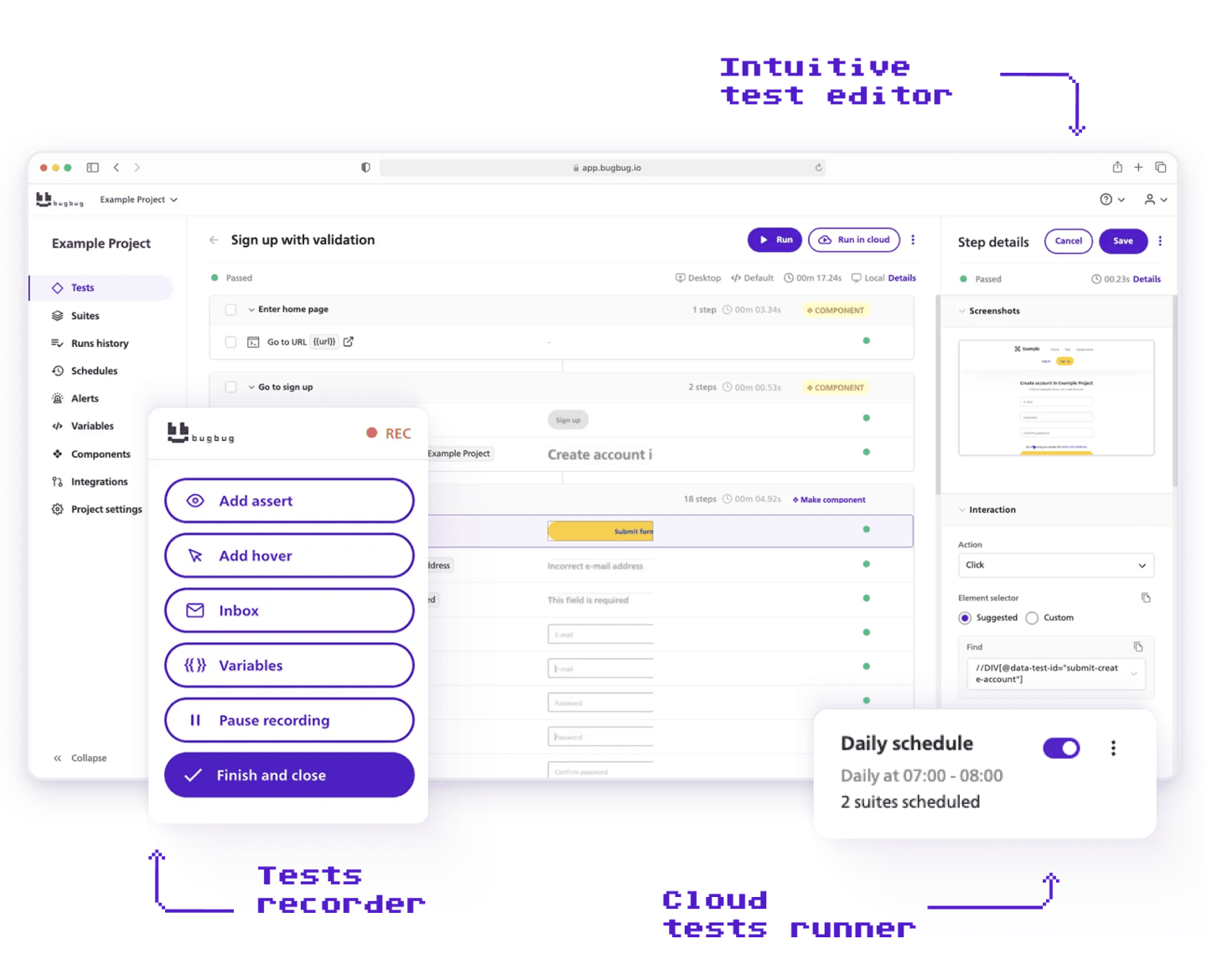
[BugBug](https://bugbug.io/) is designed for simplicity and speed. QA teams can build tests in minutes with a visual interface and no coding. Its standout "[Edit & Rewind](https://www.youtube.com/watch?v=GPZNyq0TLcY&t=128s)" feature lets you jump to any test step without re-running everything.
**Why it made the list:**
* Clean UI, fast test creation for web applications
* Parallel runs and test scheduling (cloud execution)
* [15% startup discount](https://bugbug.io/startup-discount/)
* Works directly in Chromium without external dependencies
## ACCELQ
**Best for:** Enterprise teams running multi-technology stacks (web, API, mobile, desktop, and ERP) who need one platform across every layer without writing code
**Type:** Codeless, AI-native enterprise automation platform
**Pricing:** Quote-based (enterprise plans only)
ACCELQ covers this full scope without code at any layer. A single end-to-end scenario chains web UI steps, API calls, desktop interactions, and ERP validations into one flow. Open-source frameworks cannot match this without heavy custom engineering. Autopilot adds agentic automation: describe a business process in plain language, and it learns the application and generates test cases on its own. Business analysts and product owners can build tests alongside QA engineers.
**Why it made the list:**
* Business outcomes. 72% lower maintenance effort, 7.5x faster automation development, and up to 60% shorter regression cycles (ACCELQ customer data, 2025).
* Industry recognition. Forrester Wave Leader in Autonomous Testing Platforms - only platform named Customer Favorite. G2 (4.8/5) Leader for three consecutive quarters.
* Scale and architecture. Over 1.1 million business processes automated across Fortune 500 enterprises (ACCELQ platform data).
## **Testsigma**
**Best for:** Teams seeking unified, AI-powered automation at scale
**Type:** Codeless, agentic AI automation platform
**Pricing:** Free trial available; flexible paid plans
[Testsigma](https://testsigma.com/) brings the future of test automation to QA and development teams of every size. With its unified, codeless platform powered by agentic AI, the tool takes the manual work out of end-to-end testing—covering web, mobile, APIs, Salesforce, SAP, and even desktop apps. Unlike classic frameworks, Testsigma lets users create, optimize, and execute robust tests in plain English, with no coding required.
**Why it made the list:**
* AI agents (led by Atto) plan, create, and run tests, even from Jira stories, Figma flows, or videos.
* Self-healing fixes broken scripts automatically.
* Run tests in parallel on 3,000+ real devices and browsers for web, mobile, and enterprise apps.
## **BrowserStack**
**Best for:** Cross-browser and low code automation, test management, and visual regression testing
**Type:** Cloud-based testing infrastructure
**Pricing:** Starts at $99/month. Freemium Plan available.
BrowserStack lets you run automated tests on real devices. It supports popular test automation frameworks and integrates seamlessly with CI/CD pipelines. BrowserStack’s [low code automation](https://www.browserstack.com/low-code-automation) tool also lets you build tests without the need for coding.
**Why it made the list:**
* 3,500+ device/browser combinations
* Enterprise-ready infrastructure
* Works with any framework
## **Rapise by Inflectra**
**Best for:** Enterprise teams that want AI-powered test automation
**Type:** Low-code automation platform
**Pricing:** Free trial available; custom pricing
[Rapise by Inflectra](http://www.inflectra.com/Products/Rapise) helps teams automate testing across web, desktop, mobile, and APIs from one platform. With Inflectra.ai built into the experience, it supports faster test creation, easier maintenance, and a more scalable approach to automation for teams managing complex QA needs.
**Why it made the list:**
* AI-powered test creation and maintenance
* Supports web, desktop, mobile, and API testing
* Built for scalable enterprise QA workflows
## **Selenium**
**Best for:** Developers & technical QA teams
**Type:** Open-source browser automation framework
**Pricing:** Free
Selenium is a long-time industry standard. It gives full control over test logic but requires coding skills. Works with most languages and browsers.
**Why it made the list:**
* Massive community support
* Widely compatible with CI/CD pipelines
* Foundation for many other tools
## **Playwright**
**Best for:** Fast, modern browser testing
**Type:** Open-source framework by Microsoft
**Pricing:** Free
Playwright offers a powerful alternative to Selenium. It supports multiple browsers and includes robust debugging and automation features out of the box.
**Why it made the list:**
* Automatic waits = fewer flaky tests
* Multi-tab and geolocation support
* Built-in test generator
## **Cypress**
**Best for:** Frontend JavaScript teams
**Type:** Open-source testing framework
**Pricing:** Free core; premium dashboard features
Built for JavaScript apps, Cypress gives a tight feedback loop and runs directly in the browser. It’s loved for its real-time previews and time-travel debugger.
**Why it made the list:**
* Ideal for testing React, Vue, Angular
* Great developer experience
* Live reloading and debugging
## **Testim**
**Best for:** Agile teams at scale
**Type:** AI-powered codeless testing
**Pricing:** Custom
Testim helps teams scale automation fast with smart locators that auto-heal. It combines a visual test builder with the power of JavaScript when needed.
**Why it made the list:**
* Built-in AI reduces test flakiness
* Easy for non-devs to adopt
* Enterprise features and integrations
## **Katalon Studio**
**Best for:** Teams needing codeless + scripting
**Type:** [Low-code automation](https://bugbug.io/blog/software-testing/low-code-automation/) suite
**Pricing:** Free basic plan; paid tiers available
Katalon supports testing across web, API, desktop, and mobile—all in one tool. It’s ideal if your team wants a mix of simplicity and flexibility.
**Why it made the list:**
* Drag-and-drop + custom scripting
* Built-in reporting & analytics
* Suitable for all experience levels
## **TestCafe**
**Best for:** JavaScript and TypeScript devs
**Type:** Node.js-based framework
**Pricing:** Free
TestCafe is lightweight and doesn’t depend on WebDriver. It’s fast to set up, runs stable tests, and uses modern JS syntax.
**Why it made the list:**
* Zero browser plugins needed
* Parallel execution and CI support
* Great for SPAs
## **Rainforest QA**
**Best for:** Startups without a QA team
**Type:** Codeless + crowdtesting
**Pricing:** Custom
Rainforest QA blends automation with real human testers. You build tests visually, and they run in minutes—via bots or a global crowd of testers.
**Why it made the list:**
* No-code editor
* Hybrid automation/manual approach
* Covers edge cases real users would hit
## **Robot Framework**
**Best for:** Teams favoring keyword-driven testing
**Type:** Open-source automation framework
**Pricing:** Free
Robot Framework uses readable, tabular test syntax. It’s ideal for teams who want structured, maintainable tests without diving deep into code.
**Why it made the list:**
* Python and Java integrations
* Large ecosystem of plugins
* Excellent for acceptance testing
## **BrowserStack Automate**
**Best for:** Cross-browser and mobile test coverage
**Type:** Cloud-based testing infrastructure
**Pricing:** Starts at $39/month
BrowserStack lets you run automated tests on real devices without maintaining your own test lab. It supports Selenium, Playwright, and Cypress.
**Why it made the list:**
* 3,000+ device/browser combinations
* Enterprise-ready infrastructure
* Works with any framework
`{"name":"cta-card","children":[{"name":"cta-card-title","children":[{"name":"paragraph","children":[{"attributes":{"bold":true},"data":"Choose the best free plan on the market"}]},{"name":"paragraph"}]},{"name":"cta-card-details","children":[{"name":"paragraph","children":[{"data":"Test easier than ever with BugBug test recorder. Faster than coding. Free forever."}]},{"name":"paragraph"}]},{"name":"cta-card-cta","children":[{"name":"paragraph","children":[{"attributes":{"bold":true},"data":"Get started"}]},{"name":"paragraph"}]}]} **Choose the best free plan on the market** Test easier than ever with BugBug test recorder. Faster than coding. Free forever. **Get started** `
## **Final Thoughts**
Choosing the right test automation tool depends on your team’s skills, tech stack, and goals. The best automation testing platforms help you reduce manual effort, improve coverage, and enable continuous testing across web applications, mobile and desktop testing, and even API testing.
Whether you're using a no code automation platform like BugBug or a framework that supports multiple programming languages, the key is to streamline your testing process, eliminate human error, and automate repetitive tasks typically performed manually. The right tool should support your development lifecycle, integrate with your stack, and scale as your app grows.
## **Action Points**
✅ Identify your main needs: [web testing](https://bugbug.io/blog/software-testing/web-testing-tools/), mobile app testing, API testing, or [regression testing](https://bugbug.io/blog/software-testing/everything-you-need-to-know-about-regression-testing/)
✅ Choose tools that fit your team’s skills: no-code, low-code, or code-first
✅ Look for test automation tools that integrate with your DevOps tools and CI/CD pipelines
✅ Prioritize platforms with test analytics, parallel tests, and comprehensive support
✅ Start with a free or low-cost trial—like BugBug—to evaluate features, test scripts, and usability
Happy (automated) testing!