# Easy Testing Tools for 2026
Written by Dominik Szahidewicz
Published: 2026-03-05
Updated: 2026-03-05
\[TABLE\_OF\_CONTENTS\]
Most teams don’t struggle with testing because they lack tools. They struggle because the tools are too complex.
Selenium frameworks require maintenance. Dev-heavy tools demand writing code, which is a barrier for many teams. And many “no-code” platforms still break when the UI changes.
That’s why many QA teams and startups are searching for **easy testing tools** — platforms that let you create reliable tests without maintaining a full automation framework or writing code. These tools enable teams of varying technical backgrounds to collaborate and streamline the testing process through features like visual workflows and automation.
Choosing the right test automation tool is critical to achieving a competitive advantage in software development.
In this guide, we’ll look at **the most beginner-friendly testing tools** and explain when each one makes sense.
## **🎯** Key Tools Comparison
| _Tool_ | _Best For_ | _Coding Required_ | _Supported Testing_ | _Beginner Friendly_ |
| --- | --- | --- | --- | --- |
| **BugBug** | Codeless browser automation for SaaS teams | No ([Custom JS Actions Available](https://bugbug.io/blog/software-testing/how-to-extend-low-code-testing-with-javascript/)) | Web UI, end-to-end, regression | ⭐⭐⭐⭐⭐ |
| **Mabl** | AI-powered test automation for web apps | No (optional scripting) | Web UI, end-to-end, regression | ⭐⭐⭐⭐ |
| **Rainforest QA** | No-code testing with crowdtesting support | No | Web UI, regression testing | ⭐⭐⭐⭐ |
| **testRigor** | AI-based test creation using plain English | No | Web UI, end-to-end testing | ⭐⭐⭐⭐ |
| **Ranorex** | GUI automation for enterprise apps | Optional scripting | Desktop, web, mobile | ⭐⭐⭐ |
| **Ghost Inspector** | Cloud browser automation | No | Web UI, regression | ⭐⭐⭐⭐ |
`{"name":"cta-card","children":[{"name":"cta-card-title","children":[{"name":"paragraph","children":[{"attributes":{"bold":true},"data":"Automate core user flows in 5 minutes"}]},{"name":"paragraph"}]},{"name":"cta-card-details","children":[{"name":"paragraph","children":[{"data":"Test easier than ever with BugBug test recorder. Faster than coding. Free forever."}]},{"name":"paragraph"}]},{"name":"cta-card-cta","children":[{"name":"paragraph","children":[{"attributes":{"bold":true},"data":"Start testing for free"}]},{"name":"paragraph"}]}]} **Automate core user flows in 5 minutes** Test easier than ever with BugBug test recorder. Faster than coding. Free forever. **Start testing for free** `
## Easy-to-Use Tools in Automated Testing
Software quality requires a streamlined **testing process** that covers [functional testing](https://bugbug.io/blog/software-testing/functional-testing/), **cross browser testing**, **manual testing** and [regression testing](https://bugbug.io/blog/software-testing/everything-you-need-to-know-about-regression-testing/). Testing teams struggle with complex [test automation frameworks](https://bugbug.io/blog/testing-frameworks/test-automation-frameworks/) and end up with inefficiencies. However, using a modern test automation framework can simplify automation by providing features that streamline various testing activities, including test case management, execution, and reporting. But modern **codeless automation tools** make testing easier, so both technical and non technical users can use **automated testing** for faster and more efficient testing through user friendly interfaces and graphical tools. An intuitive interface and well-designed user interface are essential for simplifying testing activities, making it easier to create, execute, and manage tests. Accessibility for non-programmers in test automation tasks is enhanced through tools like Katalon and Cypress.
`{"name":"purple-tip","children":[{"name":"purple-tip-title","children":[{"name":"paragraph","children":[{"attributes":{"bold":true},"data":"Check also: "}]},{"name":"paragraph"}]},{"name":"purple-tip-details","children":[{"name":"paragraph","children":[{"data":"👉 "},{"attributes":{"linkHref":"https://bugbug.io/blog/software-testing/web-testing-tools/"},"data":"Web Testing Tools"}]},{"name":"paragraph","children":[{"data":"👉 "},{"attributes":{"linkHref":"https://bugbug.io/blog/software-testing/codeless-automation-testing-tools/"},"data":"Codeless Automation Testing Tools"}]},{"name":"paragraph","children":[{"data":"👉 "},{"attributes":{"linkHref":"https://bugbug.io/blog/test-automation-tools/web-test-recorder/"},"data":"Web test Recorder - Which One Is The Best?"}]},{"name":"paragraph"}]}]} **Check also:** 👉 [Web Testing Tools](https://bugbug.io/blog/software-testing/web-testing-tools/) 👉 [Codeless Automation Testing Tools](https://bugbug.io/blog/software-testing/codeless-automation-testing-tools/) 👉 [Web test Recorder - Which One Is The Best?](https://bugbug.io/blog/test-automation-tools/web-test-recorder/) `
## Top Testing Tools for Beginners
Getting started with **web testing** can be overwhelming especially if you have little to no **programming knowledge**. Good news is modern test automation tools makes it easier for beginners to create reliable tests without writing lots of code. Whether you’re [testing a web application](https://bugbug.io/blog/software-testing/web-testing-tools/) or a complex web platform, choosing the right tool is key to efficiency. If you’re new to automation, check out this **Beginner’s Guide to Automation Testing** to understand the basics. For a more in-depth look at automation strategies, frameworks and best practices, check out the **Full Guide to Test Automation**.
Before selecting a tool, it’s important to follow an evaluation process—establish your criteria, assess each tool’s capabilities, and analyze potential return on investment. Consider your specific testing requirements, as different tools offer features like automated test creation, AI-based testing, and test data management to meet various needs. The right tool can streamline your development processes, improving efficiency, collaboration, and continuous integration. Remember, a well-selected test automation tool can lead to a quick return on investment.
## Easy Testing Tools for Beginners (2026)
### BugBug
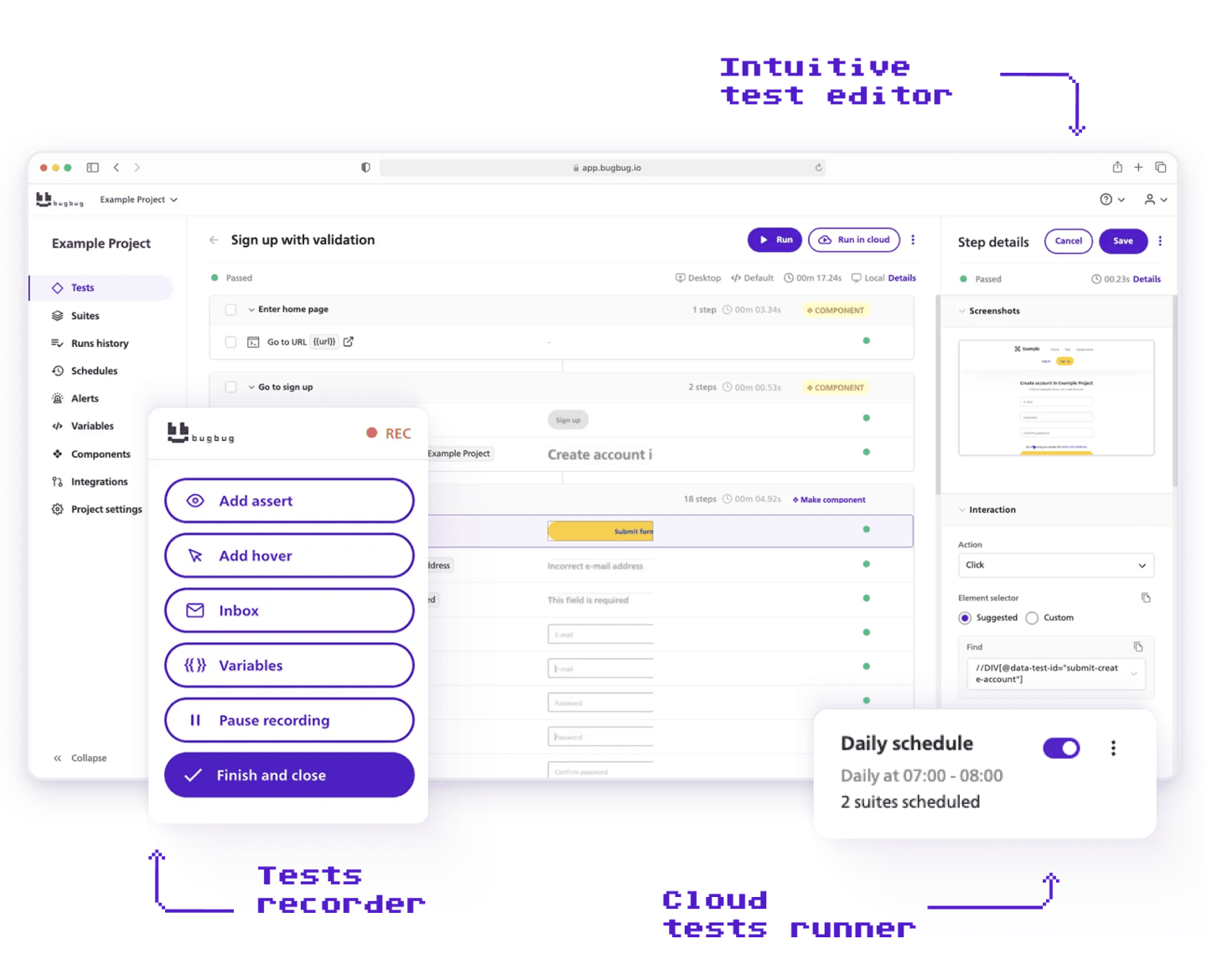
`{"name":"dotted-frame","children":[{"name":"dotted-frame-details","children":[{"name":"paragraph","children":[{"attributes":{"bold":true},"data":"Best for:"}]},{"name":"paragraph","children":[{"data":"Codeless browser automation for SaaS teams that want to automate end-to-end tests without maintaining complex frameworks."}]},{"name":"paragraph"}]}]} **Best for:** Codeless browser automation for SaaS teams that want to automate end-to-end tests without maintaining complex frameworks. `
**Pros**
* Fully **no-code test creation**
* Runs directly in the **browser with minimal setup**
* **Web based interface** makes it accessible and easy to use
* Includes a **playback tool** for recording and replaying tests
* **Edit & Rewind** feature makes debugging fast
* Built-in **test scheduling and parallel runs**
* Easy for **QA, product managers, and developers**
* **Free plan available**
**Cons**
* Supports web applications but does not support native mobile or desktop testing
Compared to BugBug, Citrus is a manual testing tool designed to streamline the testing process for web applications.
### Mabl

`{"name":"dotted-frame","children":[{"name":"dotted-frame-details","children":[{"name":"paragraph","children":[{"attributes":{"bold":true},"data":"Best for:"}]},{"name":"paragraph","children":[{"data":"AI-powered test automation for teams that want automated maintenance and visual testing."}]},{"name":"paragraph"}]}]} **Best for:** AI-powered test automation for teams that want automated maintenance and visual testing. `
**Pros**
* AI-based **self-healing tests**
* Strong **visual regression testing**
* Built-in **test analytics**
* Cloud execution with CI integrations
* Good for **continuous testing environments**
* Capable of **generating detailed reports** to track testing outcomes and improve quality assurance
**Cons**
* **Expensive for startups**
* Platform can feel **complex for beginners**
* Limited control compared to code frameworks
### Rainforest QA
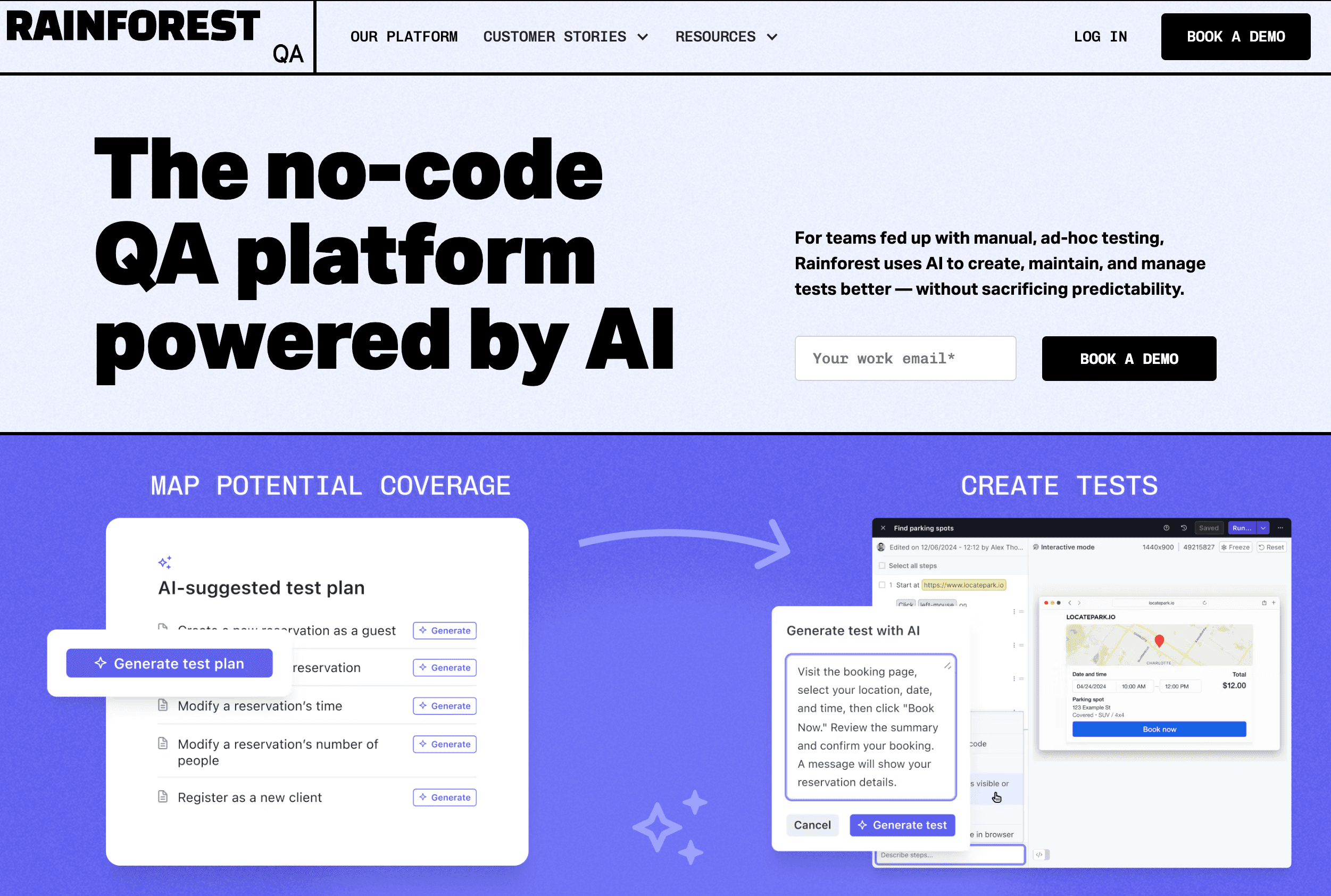
`{"name":"dotted-frame","children":[{"name":"dotted-frame-details","children":[{"name":"paragraph","children":[{"attributes":{"bold":true},"data":"Best for:"}]},{"name":"paragraph","children":[{"data":"No-code testing combined with crowdtesting for companies that want human verification of UI flows."}]},{"name":"paragraph"}]}]} **Best for:** No-code testing combined with crowdtesting for companies that want human verification of UI flows. `
**Pros**
* **No-code test creation**
* Human testers can validate test scenarios
* Cloud-based execution
* Useful for **UX validation and regression testing**
* Supports **exploratory testing** for identifying issues without predefined test cases
**Cons**
* Pricing is **high and quote-based**
* Slower feedback compared to automated frameworks
* Less suitable for **CI-driven development teams**
### testRigor
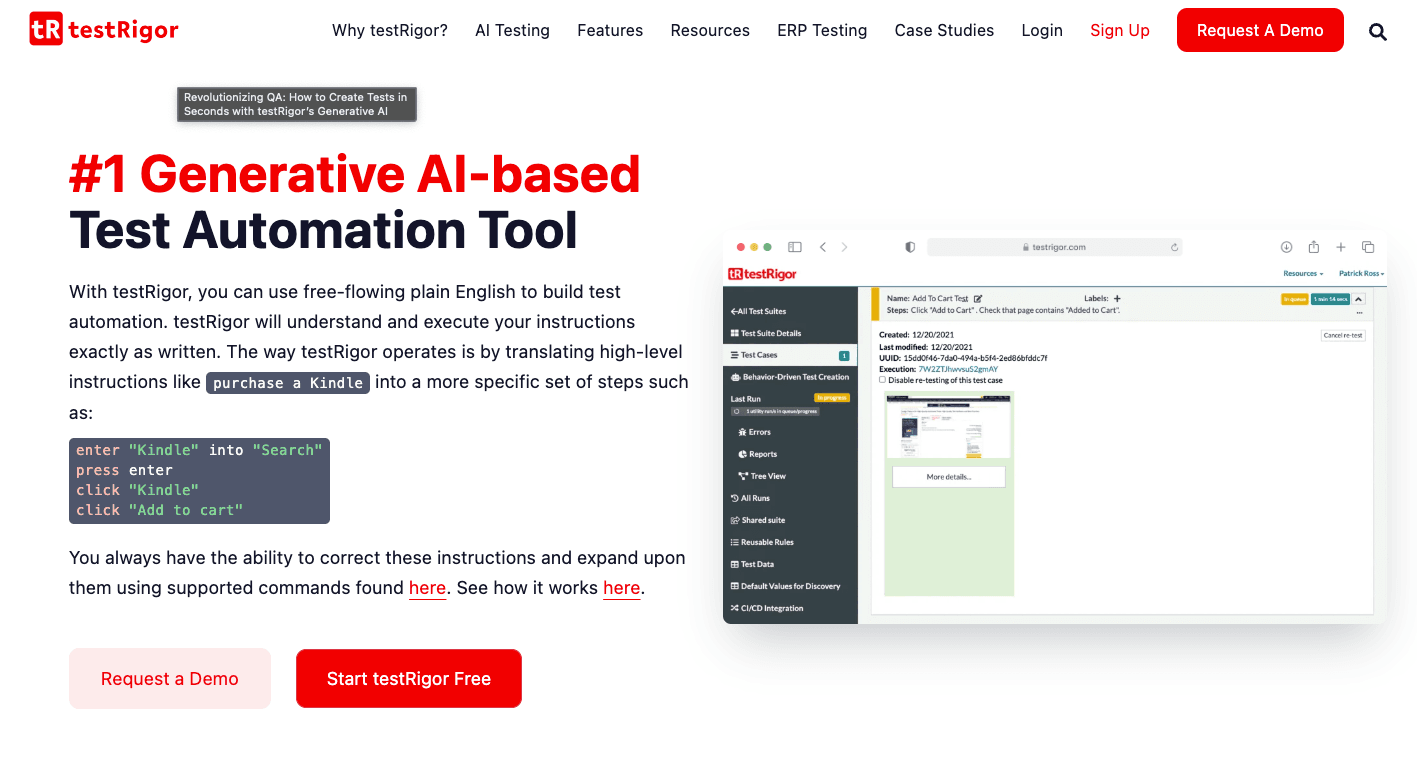
`{"name":"dotted-frame","children":[{"name":"dotted-frame-details","children":[{"name":"paragraph","children":[{"attributes":{"bold":true},"data":"Best for:"}]},{"name":"paragraph","children":[{"data":"AI-driven automation where tests are written in plain English instructions."}]},{"name":"paragraph"}]}]} **Best for:** AI-driven automation where tests are written in plain English instructions. `
**Pros**
* Tests written in **natural language**
* AI handles element detection and maintenance
* Good for **non-technical teams**
* Supports end-to-end web testing
* Compares expected and **actual outcomes** to ensure software accuracy
**Cons**
* Limited transparency in how tests work internally
* Debugging can be **less predictable**
* Less flexible than developer frameworks
### Ranorex

`{"name":"dotted-frame","children":[{"name":"dotted-frame-details","children":[{"name":"paragraph","children":[{"attributes":{"bold":true},"data":"Best for:"}]},{"name":"paragraph","children":[{"data":"Enterprise teams needing GUI automation across desktop, web, and mobile."}]},{"name":"paragraph"}]}]} **Best for:** Enterprise teams needing GUI automation across desktop, web, and mobile. `
**Pros**
* Supports **desktop, web, and mobile apps**
* Supports testing across multiple platforms, enabling efficient creation, management, and editing of automated tests
* Offers advanced features such as test case management and CI/CD integration
* Visual test creation with drag-and-drop
* Strong reporting tools
* Good enterprise support
**Cons**
* **Expensive licensing**
* Heavier setup compared to lightweight tools
* Best suited for **large organizations**
### Ghost Inspector

`{"name":"dotted-frame","children":[{"name":"dotted-frame-details","children":[{"name":"paragraph","children":[{"attributes":{"bold":true},"data":"Best for: "}]},{"name":"paragraph","children":[{"data":"Cloud-based browser automation using "},{"attributes":{"linkHref":"https://bugbug.io/blog/test-automation-tools/record-and-play-automation-tools/"},"data":"record-and-playback"},{"data":"."}]},{"name":"paragraph"}]}]} **Best for:** Cloud-based browser automation using [record-and-playback](https://bugbug.io/blog/test-automation-tools/record-and-play-automation-tools/). `
**Pros**
* Easy test creation through recording
* Cloud test execution
* Easily run automated tests through the cloud platform
* Good for **scheduled regression testing**
* Simple interface
**Cons**
* Limited customization
* Less flexible than developer frameworks
* Pricing scales with usage
## Conclusion & Next Steps
For beginners, choosing simple testing tools is the key to speeding up the software testing process and getting high quality software. A good testing tool should simplify test execution, making it easy to create and maintain tests without deep technical knowledge. The right tool can also streamline development processes and improve team efficiency. Whether you’re doing functional testing, moving from manual testing to automation testing or API testing, the right tool will help you manage test cases efficiently.
It is important to select a tool that integrates seamlessly with other software development tools and CI/CD pipelines to enhance workflow and collaboration. For example, Testomat.io integrates well into CI/CD pipelines, enhancing collaboration between teams. Features like keyword driven testing, data driven testing and test management will help teams automate workflows, regression testing and generate detailed reports for better insights. Avo Assure provides a suite of features for test case management and defect tracking.
Cost-effective testing tools that provide robust functionality at an affordable price offer great value for teams. Additionally, supporting multiple platforms ensures comprehensive test coverage across various devices, browsers, and operating systems. Built in test data handling and platform support will give you flexibility across different environments.
### Action Points to Get Started:
✅ **Define test cases** – Start by identifying key user flows that need to be tested.
✅ **Choose the right testing tool** – Select a simple tool with automation testing support.
✅ **Set up test data** – Make sure your test cases have the right data variations.
✅ **Run test automation** – Automate repetitive tasks like regression testing and API testing.
✅ **Monitor test results** – Use detailed reports to analyze test runs and improve software quality.
✅ **Maintain tests regularly** – Update automated tests to reflect new features and fixes.
Happy (automated) testing!
## FAQ – Simple Testing Tools and Getting Started with Test Automation
`{"name":"faq","children":[{"name":"faq-question","children":[{"name":"heading2","children":[{"data":"Which is the simplest testing tool?"}]},{"name":"paragraph"}]},{"name":"faq-answer","children":[{"name":"paragraph","children":[{"data":"The simplest testing tool depends on your needs. For web testing, BugBug is a beginner friendly, codeless tool that simplifies test creation without requiring programming skills. If you need a no-code solution for functional testing, tools like Rainforest QA and TestProject are also good options."}]},{"name":"paragraph"}]}]} ### Which is the simplest testing tool? The simplest testing tool depends on your needs. For web testing, BugBug is a beginner friendly, codeless tool that simplifies test creation without requiring programming skills. If you need a no-code solution for functional testing, tools like Rainforest QA and TestProject are also good options. `
`{"name":"faq","children":[{"name":"faq-question","children":[{"name":"heading2","children":[{"data":"What is the most used testing tool?"}]},{"name":"paragraph"}]},{"name":"faq-answer","children":[{"name":"paragraph","children":[{"data":"Selenium is the most widely used software testing tool, especially for test automation and functional testing. It supports multiple programming languages and works across different browsers. But for beginners, it has a steeper learning curve compared to simple testing tools like BugBug, Cypress or Playwright."}]},{"name":"paragraph"}]}]} ### What is the most used testing tool? Selenium is the most widely used software testing tool, especially for test automation and functional testing. It supports multiple programming languages and works across different browsers. But for beginners, it has a steeper learning curve compared to simple testing tools like BugBug, Cypress or Playwright. `
`{"name":"faq","children":[{"name":"faq-question","children":[{"name":"heading2","children":[{"data":"Which API testing tool is easy to learn?"}]},{"name":"paragraph"}]},{"name":"faq-answer","children":[{"name":"paragraph","children":[{"data":"Postman is one of the easiest API testing tool for beginners. It has an user friendly interface, supports automated test execution and helps testers manage test data efficiently. For advanced API automation, REST Assured and SoapUI are also good options."}]},{"name":"paragraph"}]}]} ### Which API testing tool is easy to learn? Postman is one of the easiest API testing tool for beginners. It has an user friendly interface, supports automated test execution and helps testers manage test data efficiently. For advanced API automation, REST Assured and SoapUI are also good options. `
`{"name":"faq","children":[{"name":"faq-question","children":[{"name":"heading2","children":[{"data":"Which testing is easy to learn?"}]},{"name":"paragraph"}]},{"name":"faq-answer","children":[{"name":"paragraph"},{"name":"paragraph","children":[{"data":"The easiest testing to learn is manual testing as it doesn’t require any programming knowledge. But codeless test automation tools make automation testing easier for beginners by simplifying the testing process and allowing users to create and execute test cases visually."}]}]}]} ### Which testing is easy to learn? The easiest testing to learn is manual testing as it doesn’t require any programming knowledge. But codeless test automation tools make automation testing easier for beginners by simplifying the testing process and allowing users to create and execute test cases visually. `
`{"name":"faq","children":[{"name":"faq-question","children":[{"name":"heading2","children":[{"data":"How to make testing simple?"}]},{"name":"paragraph"}]},{"name":"faq-answer","children":[{"name":"paragraph","children":[{"data":"To make software testing simple follow these steps:"}]},{"attributes":{"listType":"bulleted","listItemId":"e85d179695477ac5546cbfdb468d6896f","listIndent":0},"name":"paragraph","children":[{"data":"Use simple testing tools that require little to no coding."}]},{"attributes":{"listType":"bulleted","listItemId":"e7be1ea026a743f32f0b09388fa91c577","listIndent":0},"name":"paragraph","children":[{"data":"Start with manual testing to understand the testing process basics."}]},{"attributes":{"listType":"bulleted","listItemId":"e7a63815940faa826138abae2ee7ff0e8","listIndent":0},"name":"paragraph","children":[{"data":"Automate repetitive test cases to save time."}]},{"attributes":{"listType":"bulleted","listItemId":"e4f5c0808f443fca1e35cc9a03dec05ea","listIndent":0},"name":"paragraph","children":[{"data":"Organize and manage test cases properly with "},{"attributes":{"linkHref":"https://bugbug.io/blog/test-automation-tools/free-test-management-tool/"},"data":"test management tools"},{"data":"."}]},{"attributes":{"listType":"bulleted","listItemId":"ec967f7b117259685002fc2355300ab18","listIndent":0},"name":"paragraph","children":[{"data":"Use keyword driven testing and data driven testing to streamline test execution."}]},{"name":"paragraph"}]}]} ### How to make testing simple? To make software testing simple follow these steps: * Use simple testing tools that require little to no coding. * Start with manual testing to understand the testing process basics. * Automate repetitive test cases to save time. * Organize and manage test cases properly with [test management tools](https://bugbug.io/blog/test-automation-tools/free-test-management-tool/). * Use keyword driven testing and data driven testing to streamline test execution. `
`{"name":"faq","children":[{"name":"faq-question","children":[{"name":"heading2","children":[{"data":"Is testing easy for beginners?"}]},{"name":"paragraph"}]},{"name":"faq-answer","children":[{"name":"paragraph","children":[{"data":"Yes, especially with modern testing tools that simplify the testing process. While manual testing is easier to start with, automation testing can also be beginner friendly with the right tools, like BugBug, TestProject or Postman for API testing. The key is to choose a tool that matches your experience level and testing needs."}]},{"name":"paragraph"}]}]} ### Is testing easy for beginners? Yes, especially with modern testing tools that simplify the testing process. While manual testing is easier to start with, automation testing can also be beginner friendly with the right tools, like BugBug, TestProject or Postman for API testing. The key is to choose a tool that matches your experience level and testing needs. `
`{"name":"faq","children":[{"name":"faq-question","children":[{"name":"heading2","children":[{"data":"What is Katalon Studio used for in software testing?"}]},{"name":"paragraph"}]},{"name":"faq-answer","children":[{"name":"paragraph","children":[{"attributes":{"bold":true},"data":"Katalon Studio"},{"data":" is a popular automation testing tool used for "},{"attributes":{"bold":true},"data":"web, mobile, and API testing"},{"data":". It provides both codeless automation features and scripting capabilities, allowing teams to build automated tests while still having the flexibility to extend them with code when needed."}]},{"name":"paragraph"}]}]} ### What is Katalon Studio used for in software testing? **Katalon Studio** is a popular automation testing tool used for **web, mobile, and API testing**. It provides both codeless automation features and scripting capabilities, allowing teams to build automated tests while still having the flexibility to extend them with code when needed. `
`{"name":"faq","children":[{"name":"faq-question","children":[{"name":"heading2","children":[{"data":"What is Selenium and why is it widely used?"}]},{"name":"paragraph"}]},{"name":"faq-answer","children":[{"name":"paragraph","children":[{"attributes":{"bold":true},"data":"Selenium"},{"data":" is a well-known open-source library for "},{"attributes":{"bold":true},"data":"web-based test automation"},{"data":". It allows testers and developers to automate browser interactions using various programming languages such as Java, Python, JavaScript, and C#. Because it is flexible, widely supported, and highly customizable, Selenium remains one of the most widely used tools in modern test automation."}]},{"name":"paragraph"}]}]} ### What is Selenium and why is it widely used? **Selenium** is a well-known open-source library for **web-based test automation**. It allows testers and developers to automate browser interactions using various programming languages such as Java, Python, JavaScript, and C#. Because it is flexible, widely supported, and highly customizable, Selenium remains one of the most widely used tools in modern test automation. `
`{"name":"faq","children":[{"name":"faq-question","children":[{"name":"heading2","children":[{"data":"What is Selenium WebDriver?"}]},{"name":"paragraph"}]},{"name":"faq-answer","children":[{"name":"paragraph","children":[{"attributes":{"bold":true},"data":"Selenium WebDriver"},{"data":" is a core component of the Selenium ecosystem used for "},{"attributes":{"bold":true},"data":"browser automation"},{"data":". It enables testers to simulate real user interactions with web applications, such as clicking buttons, submitting forms, and navigating between pages. Many test automation vendors and frameworks rely on WebDriver to power their browser automation capabilities."}]},{"name":"paragraph"}]}]} ### What is Selenium WebDriver? **Selenium WebDriver** is a core component of the Selenium ecosystem used for **browser automation**. It enables testers to simulate real user interactions with web applications, such as clicking buttons, submitting forms, and navigating between pages. Many test automation vendors and frameworks rely on WebDriver to power their browser automation capabilities. `
`{"name":"faq","children":[{"name":"faq-question","children":[{"name":"heading2","children":[{"data":"What is Appium used for in testing?"}]},{"name":"paragraph"}]},{"name":"faq-answer","children":[{"name":"paragraph"},{"name":"paragraph","children":[{"attributes":{"bold":true},"data":"Appium"},{"data":" is an open-source framework used for "},{"attributes":{"bold":true},"data":"automated mobile testing"},{"data":". It allows teams to automate tests for both "},{"attributes":{"bold":true},"data":"Android and iOS applications"},{"data":", including native, hybrid, and mobile web apps. Appium supports multiple programming languages and integrates well with existing automation workflows."}]}]}]} ### What is Appium used for in testing? **Appium** is an open-source framework used for **automated mobile testing**. It allows teams to automate tests for both **Android and iOS applications**, including native, hybrid, and mobile web apps. Appium supports multiple programming languages and integrates well with existing automation workflows. `
`{"name":"faq","children":[{"name":"faq-question","children":[{"name":"heading2","children":[{"data":"What is Apache JMeter used for?"}]},{"name":"paragraph"}]},{"name":"faq-answer","children":[{"name":"paragraph","children":[{"attributes":{"bold":true},"data":"Apache JMeter"},{"data":" is an automation tool mainly used for "},{"attributes":{"bold":true},"data":"performance testing and load testing"},{"data":". It helps teams simulate large numbers of users interacting with an application to measure performance, scalability, and stability. In addition to performance testing, JMeter can also be used for certain types of functional testing."}]},{"name":"paragraph"}]}]} ### What is Apache JMeter used for? **Apache JMeter** is an automation tool mainly used for **performance testing and load testing**. It helps teams simulate large numbers of users interacting with an application to measure performance, scalability, and stability. In addition to performance testing, JMeter can also be used for certain types of functional testing. `
`{"name":"faq","children":[{"name":"faq-question","children":[{"name":"heading2","children":[{"data":"What is Robot Framework used for?"}]},{"name":"paragraph"}]},{"name":"faq-answer","children":[{"name":"paragraph","children":[{"data":"Robot Framework is an open-source automation framework built with Python that uses a keyword-driven testing approach. It is widely used for acceptance testing and robotic process automation (RPA). Robot Framework can also be extended with libraries that enable testing for both mobile and desktop applications."}]},{"name":"paragraph"}]}]} ### What is Robot Framework used for? Robot Framework is an open-source automation framework built with Python that uses a keyword-driven testing approach. It is widely used for acceptance testing and robotic process automation (RPA). Robot Framework can also be extended with libraries that enable testing for both mobile and desktop applications. `
`{"name":"faq","children":[{"name":"faq-question","children":[{"name":"heading2","children":[{"data":"What is Playwright used for?"}]},{"name":"paragraph"}]},{"name":"faq-answer","children":[{"name":"paragraph","children":[{"attributes":{"bold":true},"data":"Playwright"},{"data":" is a modern automation framework used to "},{"attributes":{"bold":true},"data":"automate web browsers"},{"data":" for end-to-end testing. It supports Chromium, Firefox, and WebKit browsers and is known for its reliability in web application testing. Playwright provides powerful features such as automatic waiting, network control, and cross-browser testing capabilities."}]},{"name":"paragraph"}]}]} ### What is Playwright used for? **Playwright** is a modern automation framework used to **automate web browsers** for end-to-end testing. It supports Chromium, Firefox, and WebKit browsers and is known for its reliability in web application testing. Playwright provides powerful features such as automatic waiting, network control, and cross-browser testing capabilities. `
`{"name":"faq","children":[{"name":"faq-question","children":[{"name":"heading2","children":[{"data":"What tools allow testing on real devices and browsers?"}]},{"name":"paragraph"}]},{"name":"faq-answer","children":[{"name":"paragraph","children":[{"data":"Tools like "},{"attributes":{"bold":true},"data":"BrowserStack"},{"data":" provide instant access to "},{"attributes":{"bold":true},"data":"real devices and browsers"},{"data":" through cloud infrastructure. This allows testing teams to run their applications across different operating systems, browsers, and device configurations without maintaining physical hardware labs."}]},{"name":"paragraph"}]}]} ### What tools allow testing on real devices and browsers? Tools like **BrowserStack** provide instant access to **real devices and browsers** through cloud infrastructure. This allows testing teams to run their applications across different operating systems, browsers, and device configurations without maintaining physical hardware labs. `
`{"name":"faq","children":[{"name":"faq-question","children":[{"name":"heading2","children":[{"data":"What is ZAP used for in software testing?"}]},{"name":"paragraph"}]},{"name":"faq-answer","children":[{"name":"paragraph","children":[{"attributes":{"bold":true},"data":"ZAP (OWASP Zed Attack Proxy)"},{"data":" is an open-source tool used for "},{"attributes":{"bold":true},"data":"security testing of web applications"},{"data":". It helps identify vulnerabilities such as cross-site scripting (XSS), SQL injection, and other common security risks, making it useful for teams implementing security checks as part of their testing process."}]},{"name":"paragraph"}]}]} ### What is ZAP used for in software testing? **ZAP (OWASP Zed Attack Proxy)** is an open-source tool used for **security testing of web applications**. It helps identify vulnerabilities such as cross-site scripting (XSS), SQL injection, and other common security risks, making it useful for teams implementing security checks as part of their testing process. `
`{"name":"faq","children":[{"name":"faq-question","children":[{"name":"heading2","children":[{"data":"What is Bugzilla used for?"}]},{"name":"paragraph"}]},{"name":"faq-answer","children":[{"name":"paragraph","children":[{"attributes":{"bold":true},"data":"Bugzilla"},{"data":" is an open-source "},{"attributes":{"bold":true},"data":"bug-tracking system"},{"data":" that helps teams manage software defects and issues. It enables teams to report bugs, assign them to developers, track progress, and maintain a structured workflow for resolving problems during the software development lifecycle."}]},{"name":"paragraph"}]}]} ### What is Bugzilla used for? **Bugzilla** is an open-source **bug-tracking system** that helps teams manage software defects and issues. It enables teams to report bugs, assign them to developers, track progress, and maintain a structured workflow for resolving problems during the software development lifecycle. `
`{"name":"faq","children":[{"name":"faq-question","children":[{"name":"heading2","children":[{"data":"What is Selenium IDE?"}]},{"name":"paragraph"}]},{"name":"faq-answer","children":[{"name":"paragraph","children":[{"attributes":{"bold":true},"data":"Selenium IDE"},{"data":" is a browser extension that enables testers to "},{"attributes":{"bold":true},"data":"record, edit, and replay test cases"},{"data":" for web applications. It provides a simple record-and-playback interface, making it useful for beginners who want to create automated tests without writing code."}]},{"name":"paragraph"}]}]} ### What is Selenium IDE? **Selenium IDE** is a browser extension that enables testers to **record, edit, and replay test cases** for web applications. It provides a simple record-and-playback interface, making it useful for beginners who want to create automated tests without writing code. `
`{"name":"faq","children":[{"name":"faq-question","children":[{"name":"heading2","children":[{"data":"What is TestLink used for?"}]},{"name":"paragraph"}]},{"name":"faq-answer","children":[{"name":"paragraph","children":[{"attributes":{"bold":true},"data":"TestLink"},{"data":" is an open-source "},{"attributes":{"bold":true},"data":"test management tool"},{"data":" designed for organizing test cases and managing their execution. It helps QA teams create test plans, track test results, and maintain structured documentation of testing activities across projects."}]},{"name":"paragraph"}]}]} ### What is TestLink used for? **TestLink** is an open-source **test management tool** designed for organizing test cases and managing their execution. It helps QA teams create test plans, track test results, and maintain structured documentation of testing activities across projects. `
`{"name":"faq","children":[{"name":"faq-question","children":[{"name":"heading2","children":[{"data":"What is SpiraTest used for?"}]},{"name":"paragraph"}]},{"name":"faq-answer","children":[{"name":"paragraph","children":[{"attributes":{"bold":true},"data":"SpiraTest"},{"data":" is a test management platform designed to "},{"attributes":{"bold":true},"data":"streamline manual testing processes"},{"data":". It helps teams organize test cases, manage requirements, track defects, and monitor testing progress within a centralized system. This makes it particularly useful for teams managing large test suites and complex testing workflows."}]},{"name":"paragraph"}]}]} ### What is SpiraTest used for? **SpiraTest** is a test management platform designed to **streamline manual testing processes**. It helps teams organize test cases, manage requirements, track defects, and monitor testing progress within a centralized system. This makes it particularly useful for teams managing large test suites and complex testing workflows. `